
How to Automate Refunds in Shopify Without Losing Margin
Automate Shopify refunds end-to-end with guardrails: exchange-first logic, order-value thresholds, fraud checks, and refund window enforcement. A how-to guide covering API-level execution across Shopify and your helpdesk without approving every request.
 Mustafa BayramogluJune 14, 202615 min read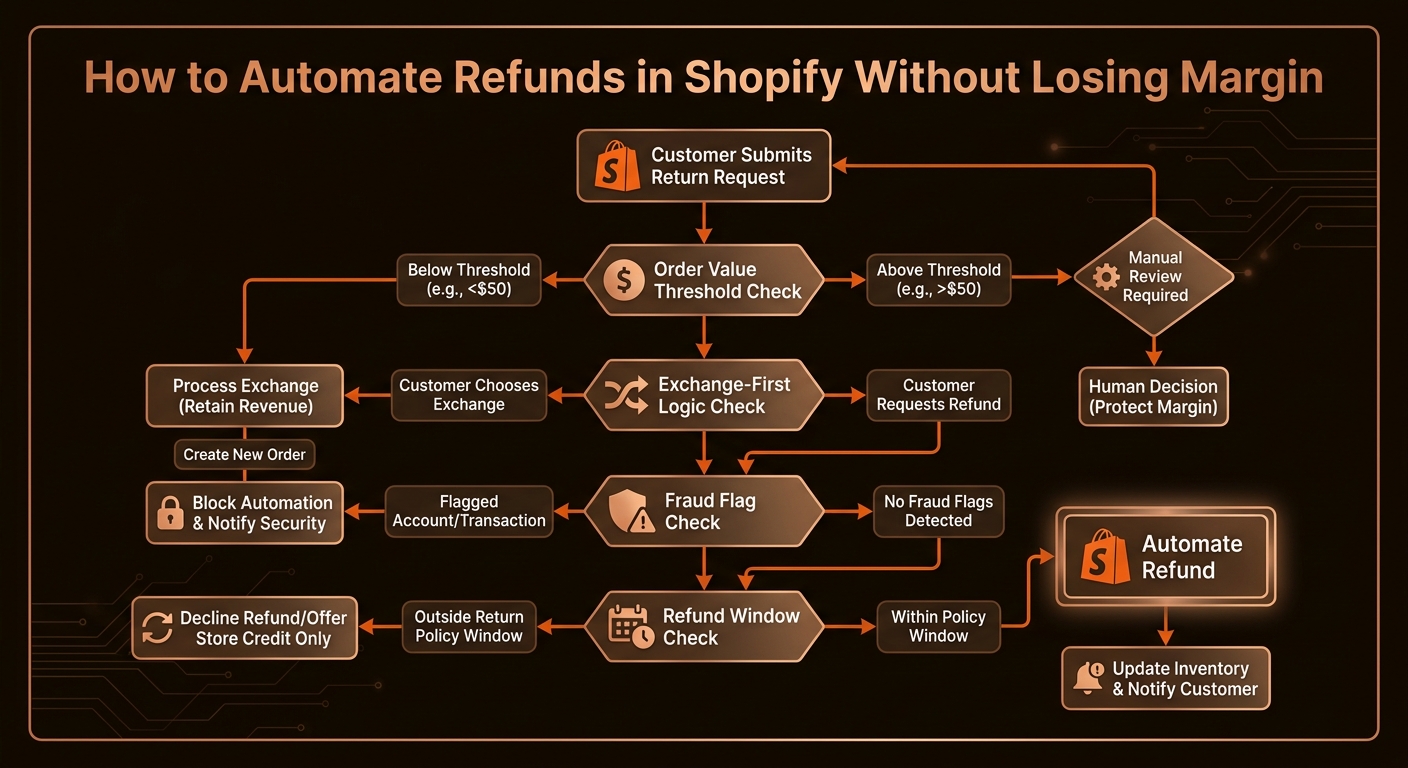
How to Automate Refunds in Shopify Without Losing Margin
Automating Shopify refunds end-to-end requires more than an API call — it requires guardrails that prevent the automation from approving every request. The correct sequence: classify the request, check policy eligibility, apply exchange-first logic, evaluate fraud and threshold guardrails, then execute the Shopify Admin API refund with the right parameters. Miss any of those steps and you speed up the process of losing margin, not protecting it.
TL;DR: Shopify Refund Automation Decision Points
| Decision Point | Condition | Outcome |
|---|---|---|
| Intent classification | Is this a refund, exchange, dispute, or something else? | Route to correct workflow |
| Policy eligibility | Within refund window? Order not final sale or digital? | Eligible or escalate to human |
| Exchange-first offer | Alternative SKU or store credit available? | Offer exchange before refund |
| Fraud / dispute guardrail | Prior chargeback or fraud flag on account? | Escalate to human |
| Order value threshold | Above configurable $ limit? | Escalate to human |
| Refund execution | All guardrails cleared, exchange declined | Execute via Shopify API |
Why Does Refund Automation Without Guardrails Erode Margin?
Refund automation accelerates every decision in the return path — including the wrong ones. A basic automation that accepts any return request, looks up the order in Shopify, and issues a refund via the Admin API will process approved and non-eligible requests at the same speed. You get faster approvals on orders that are past the refund window, on non-refundable items, on accounts with prior fraud history, and on orders where an exchange would have recovered the revenue.
The margin loss is not from automation itself; it's from automation without a decision layer. The Shopify Admin API will execute a refund on any order you tell it to execute a refund on — it enforces nothing except that the order exists and the refund amount does not exceed the order amount. Every other policy check is your responsibility to implement upstream of the API call.
A 5% approval rate on requests that should have been denied or redirected to an exchange is not a rounding error. At 500 monthly return requests with an average order value of $85 and a 40% cost of goods, 25 incorrectly approved refunds cost $2,125/month in avoidable margin loss — before accounting for return-processing labor and restocking overhead.
Guardrails close this gap. They are the conditions you define once that determine which requests reach the Shopify API and which route to human review or a different resolution path first.
Step 1: How Do You Classify a Refund Request Before Any API Call?
The first problem with naive refund automation is treating every return message as the same thing. A customer saying "I want to return this" might be describing any of five different situations — and each one has a different correct resolution path.
Standard return for refund. The customer received the item and wants money back. This is the intended refund workflow and may or may not be policy-eligible.
Exchange request phrased as a return. The customer received the wrong size, color, or variant and would accept a replacement. Routing this to the refund path is a missed exchange — you pay for the return shipping and lose the margin when an exchange would have retained the revenue.
Damage or defect claim. The item arrived damaged. This may qualify for a replacement, partial refund, or insurance claim depending on your policy, but it is not the same as a standard return and should not be auto-resolved through the same refund logic.
Dispute or unauthorized claim. The customer is claiming non-delivery or says they did not authorize the order. This is a dispute workflow that may involve carrier investigation or fraud review — not an API refund.
Non-refundable item request. Digital goods, final-sale items, custom or personalized products, and perishables often carry non-refundable tags. An intent classifier that doesn't check item tags before routing to the refund path will approve requests that policy does not permit.
Intent classification at this stage routes each request to the right workflow. It does not have to be complex — keyword detection combined with Shopify line-item tag lookups handles the majority of cases. What matters is that classification runs before any API call and that low-confidence classifications route to human review rather than defaulting to refund approval.
Step 2: What Shopify Data Does Refund Automation Need?
Once the request is classified as a standard return, the automation queries the Shopify Admin API for the data it needs to evaluate policy eligibility. Four fields are required:
Order creation date. Compare against your return window (30 days, 60 days, or custom) to determine whether the request is still eligible. An order placed 45 days ago on a 30-day policy is out of window and should route to human review, not auto-approve.
Line-item tags and product type. Check each returned item for non-refundable flags: final-sale, digital, custom, perishable, or any custom tag you apply in Shopify. If any line item is non-refundable, the order should route to human review before any refund is issued.
Order value. Apply your high-value threshold. Orders above a configurable dollar amount — many brands set this at $150–$300 — route to a human agent regardless of other eligibility factors. A customer returning a $400 order deserves a personal confirmation, not an automated email.
Customer record — fraud and dispute flags. Query the customer object for prior dispute history, fraud score (Shopify assigns a risk level), or any manual flags your team has applied. Accounts with prior chargebacks, fraud investigations, or dispute escalations should not receive automated refund approval.
All four queries run against the Shopify Admin API in parallel before any eligibility decision is made. The output is a clean eligibility status — eligible, ineligible (with reason), or escalate (with reason and pre-filled context).
Step 3: How Does Exchange-First Logic Protect Margin Before the Refund Path?
Exchange-first logic is the single highest-leverage step in the refund automation framework. The principle: for any policy-eligible return request, present an exchange or store-credit option before the refund path. If the customer accepts, the revenue stays on your books and you recover cost of goods only once rather than issuing a full refund and then selling a replacement separately.
The mechanics in Shopify:
- Check inventory availability for alternative SKUs in the same product family (correct size, adjacent color, replacement model).
- If alternatives are available, present them as the first option: "We can send you a replacement [size/color] at no cost — or if you'd prefer, we can issue a full refund. Which would you like?"
- If the customer accepts the exchange, create a new fulfillment via the Shopify Orders API and close the original return request without issuing a refund. Log the exchange in the helpdesk ticket.
- If the customer declines the exchange or no alternatives are available, proceed to the refund path.
Store credit (Shopify gift cards) is an alternative to physical exchange that works when no matching SKU is available: "We can issue store credit of $X valid for 12 months — or a full refund to your original payment method." Store credit retains the cash in your ecosystem and gives the customer flexibility.
Industry data on exchange acceptance rates varies by brand and category, but even a 20% acceptance rate on return requests that would otherwise be refunded directly reduces refund volume by a fifth. On 500 monthly returns, that's 100 transactions where you retained revenue rather than losing it to a refund.
The key implementation detail: the exchange offer must feel like a genuinely good option, not a friction barrier. Keep the language straightforward and make the refund path clearly available — a customer who feels trapped in the exchange flow will accelerate to a chargeback. The goal is to make the exchange the easier path when it's available, not to block the refund path when it's not.
Step 4: What Guardrails Protect You from Approving Every Refund?
Guardrails are the conditions that interrupt the automation before the Shopify refund API call executes. Think of them as the policy rules your most experienced returns agent applies on instinct — encoded once so the automation applies them consistently on every ticket, 24 hours a day.
Refund window enforcement. If the purchase date is outside your return window, the automation does not issue a refund. It sends a policy explanation and routes the ticket to human review with the out-of-window status noted. Humans can approve policy exceptions; the automation should not.
Order value threshold. Orders above your threshold route to human review with full order details pre-filled. The threshold should be configurable and reviewed quarterly. What counts as "high value" shifts as your average order value changes.
Fraud and dispute history. A customer with a prior chargeback, a Shopify fraud risk score of "high," or a manual dispute flag should never receive automated refund approval. Even if their current request is legitimate, the risk of a fraudulent claim is too high to resolve without human judgment.
Non-refundable item flag. If the order contains any item tagged as non-refundable and the customer is requesting a refund on that item, route to human review. The human can explain the policy and offer alternatives — the automation cannot make nuanced exceptions.
Return count flag. Customers who have submitted more than a configurable number of returns in the past 12 months — a threshold that varies by brand but might be 3–5 returns — should route to human review. Frequent returners may be exploiting a generous return policy; a human should evaluate the pattern.
Each guardrail that triggers creates a structured escalation note in the helpdesk ticket: which guardrail fired, the relevant data (order date, value, fraud score, prior return count), and a suggested next action. The human agent gets full context immediately; the customer waits only as long as the agent review takes.
Step 5: How Do You Execute the Refund and Update the Helpdesk?
For requests that clear all guardrails and decline the exchange offer, the automation executes the Shopify Admin API refund and closes the loop.
The key API parameters for a Shopify refund:
POST /admin/api/2024-01/orders/{order_id}/refunds.json
{
  "refund": {
    "notify": true,
    "note": "Automated refund — policy-eligible return, within window, exchange declined",
    "refund_line_items": [
      {
        "line_item_id": "{line_item_id}",
        "quantity": 1,
        "restock_type": "return"
      }
    ],
    "transactions": [
      {
        "parent_id": "{original_transaction_id}",
        "amount": "{refund_amount}",
        "kind": "refund",
        "gateway": "{gateway}"
      }
    ]
  }
}
The restock_type parameter controls whether Shopify returns the item to available inventory (return), removes it from inventory permanently (no_restock), or cancels the fulfillment without affecting stock. For standard returns, use return — for damaged items that cannot be resold, use no_restock.
After the API call returns a successful refund object, the automation:
- Writes the refund confirmation back to the helpdesk ticket: refund amount, transaction ID, expected processing time (typically 5–10 business days for most payment gateways).
- Sends the customer a resolution confirmation that includes the refund amount and timeline — using the customer's preferred contact channel (email, SMS, or helpdesk reply depending on your setup).
- Closes the helpdesk ticket or moves it to a "pending confirmation" status with a 48-hour snooze, after which it auto-closes if no customer reply arrives.
- Logs the resolution path (standard refund, not exchange) and guardrail outcomes in a structured field for monthly policy review.
The entire execution path from API call to customer confirmation takes under 60 seconds. For a team that previously handled returns manually, the primary time savings is not in the API execution — it's in the elimination of the lookup, copy-paste, review, and response-drafting steps that precede every manual refund.
What Percentage of Refund Requests Can This Framework Auto-Resolve?
The auto-resolve rate depends on your product mix, return rate, and policy configuration, but a well-calibrated refund automation typically resolves 55–70% of inbound return requests without human touch. The remaining 30–45% escalate to agents — but they arrive with full Shopify order data pre-filled, so handle time on escalated cases drops significantly.
The factors that push auto-resolve rate higher: a clear refund window that most customers fall within, a product catalog with few non-refundable items, a low fraud flag rate on your customer base, and a generous exchange catalog that drives exchange acceptance. The factors that push it lower: a high average order value that triggers the threshold guardrail frequently, a high-fraud-risk category, or a short refund window that creates many out-of-window escalations.
For brands handling 300+ return requests per month — a threshold where the manual review overhead becomes meaningful — this framework is a direct cost reduction. Combined with WISMO automation, which removes 25–35% of inbound ticket volume, an automated returns path can reduce total queue size by 40–50%. That reduction flows directly through the true cost per ticket math: fewer tickets handled by agents, fewer repeat contacts from unresolved returns, and a lower escalation rate to the $13.50 assisted-channel tier.
Refund Automation Implementation Checklist
| Component | Status | Notes |
|---|---|---|
| Intent classifier (refund vs. exchange vs. dispute vs. WISMO) | ☐ | Keyword rules + line-item tag lookup; low-confidence exit |
| Shopify Admin API connection — Orders endpoint | ☐ | Order date, value, line-item tags, customer record |
| Refund window check | ☐ | Configurable window; out-of-window → human review |
| Non-refundable item tag check | ☐ | Final-sale, digital, custom, perishable flags |
| Order value threshold guardrail | ☐ | Configurable $ threshold; quarterly review |
| Fraud flag guardrail | ☐ | Shopify fraud score + manual dispute flags |
| Return frequency guardrail | ☐ | Configurable 12-month return count threshold |
| Exchange-first logic | ☐ | SKU availability check + store credit option |
| Shopify Admin API — Refunds endpoint | ☐ | restock_type, transaction parameters, notify flag |
| Helpdesk ticket update | ☐ | Refund status, transaction ID, processing time |
| Customer confirmation | ☐ | Amount, timeline, contact channel |
| Escalation handoff template | ☐ | Guardrail triggered, order data pre-filled |
| Post-refund analytics | ☐ | Auto-resolve rate, exchange acceptance rate, guardrail trigger frequency |
Frequently Asked Questions
Can you fully automate refunds in Shopify?
Yes, via the Shopify Admin API's Refunds endpoint, which executes full or partial refunds programmatically against an order. The API also supports restock flags and reason codes. The risk is approving refunds that exceed your policy, so any production automation must include guardrails — order-value thresholds, refund-window checks, and fraud flags — before the API call executes.
What is exchange-first refund logic and why does it protect margin?
Exchange-first logic routes a return request to an exchange offer before it reaches the refund path. If the customer accepts an exchange, you retain the revenue and recover the cost of goods only once, rather than issuing a refund and then selling a replacement. Even a 20% exchange acceptance rate on return requests that would otherwise be refunded materially improves net revenue per return event.
What guardrails should prevent automatic refund approval on Shopify?
Four key guardrails: (1) refund-window enforcement — deny automatic approval if the return window has closed; (2) order-value threshold — escalate orders above a configurable dollar amount to human review; (3) fraud or dispute flag — never auto-approve for customers with prior chargeback or fraud history; (4) policy exception flag — if the order has a non-refundable tag (digital goods, final sale, customized items), route to a human rather than auto-approving.
How does Shopify refund automation connect to a helpdesk like Zendesk or Gorgias?
The automation reads the return request from the helpdesk ticket, pulls order data from the Shopify Admin API, evaluates guardrail conditions, and either executes the refund via the API or escalates with a pre-filled note. The helpdesk ticket is updated with the refund status, Shopify order ID, and refund amount — so the customer receives a single resolution confirmation and the agent gets a clean audit trail if human review is needed.
What is the difference between a Shopify return and a Shopify refund in automation logic?
Shopify returns (tracked via the Returns API) manage the physical return of items, restocking decisions, and RMA issuance. Shopify refunds (Refunds API) move money back to the customer. Automation can handle both independently: issue a refund without requiring the item back (returnless refund) or approve the return, wait for confirmation of receipt, and then trigger the refund. Each path requires its own decision logic and guardrails.
CorePiper's SOP-driven agents implement this full framework — intent classification, guardrails, exchange-first logic, and Shopify API execution — across your existing helpdesk (Gorgias, Zendesk, Freshdesk, or Salesforce) without replacing any tool in your stack. Configuration typically takes three to five days. Book a demo and we'll map your current return volume to an automation model that protects your margin rather than just accelerating your refund approvals.
Automate Refunds That Protect Your Margin — Not Just Speed Them Up
CorePiper configures exchange-first logic, fraud guardrails, and refund-window enforcement against your Shopify catalog and helpdesk in days — not months. You approve the rules once; the agent executes on every ticket. Book a 30-minute walkthrough to map your return volume to a protection model.