
How to Automate 'Where Is My Order?' Tickets on Shopify (Decision Logic + Guardrails)
A step-by-step decision logic and guardrails framework for automating WISMO tickets on Shopify in 2026 — covering status filtering, live data lookup, status-to-answer mapping, fraud checks, and SLA-based escalation without replacing your helpdesk.
 Mustafa BayramogluJune 11, 202613 min read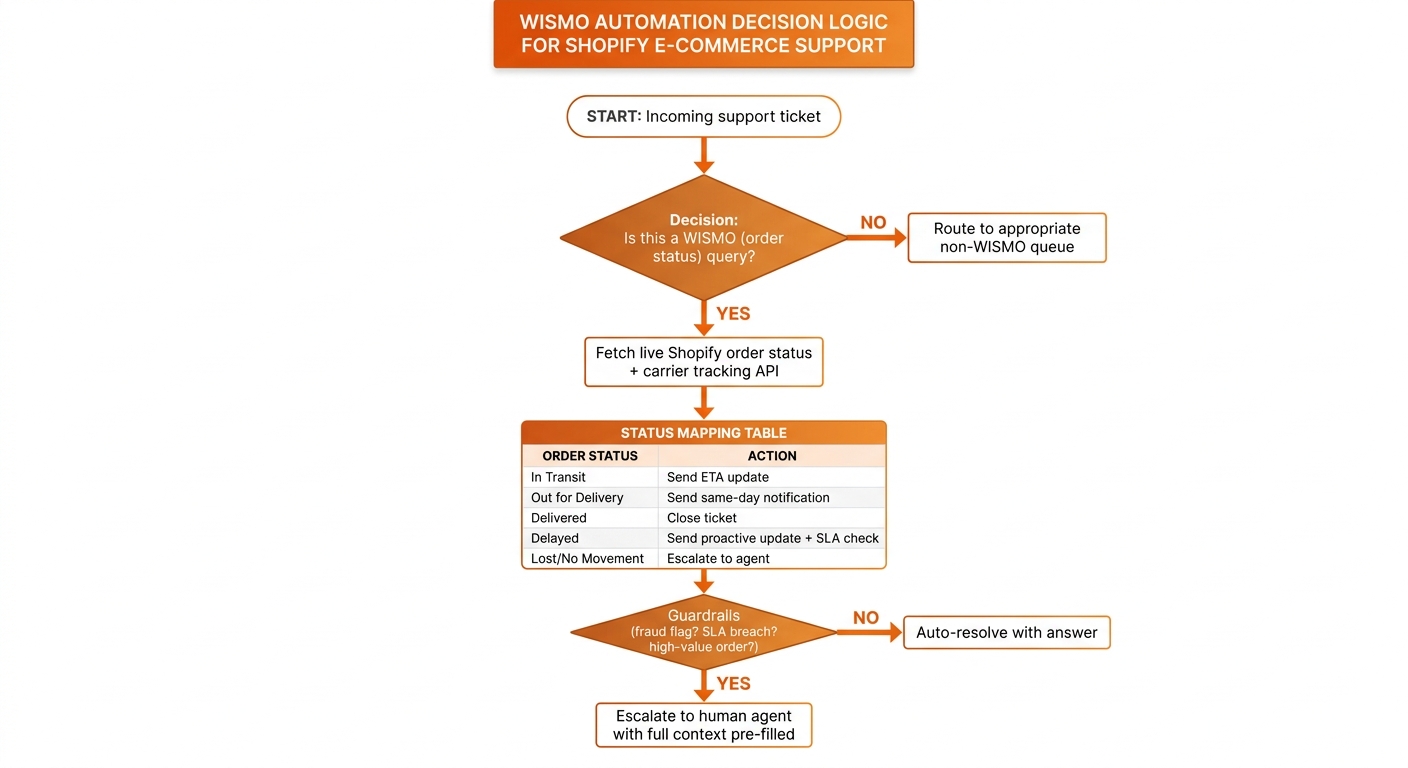
How to Automate "Where Is My Order?" Tickets on Shopify
Automating WISMO tickets on Shopify requires decision logic, not just a chatbot. The complete framework: classify the ticket as genuine WISMO or a look-alike, fetch live status from Shopify and the carrier API simultaneously, map the status code to the right customer answer, apply guardrails for high-value or high-risk orders, and either auto-resolve or escalate with full context pre-filled. Done correctly, this removes 25–35% of total ticket volume without replacing your helpdesk.
TL;DR: The Five-Step WISMO Automation Framework
| Step | What It Does | Output |
|---|---|---|
| 1. Filter | Classify ticket as WISMO vs. look-alike | Route to correct workflow |
| 2. Live status lookup | Pull Shopify fulfillment + carrier tracking | Real-time order position |
| 3. Status mapping | Match status code to customer answer and action | Draft response + resolution action |
| 4. Guardrails | Check high-value, fraud, no-movement, SLA flags | Auto-resolve or escalate decision |
| 5. Resolve or escalate | Send response or hand off with context | Closed ticket or agent-ready queue item |
Why Most Shopify WISMO "Automation" Fails the Resolution Test
Order-status questions make up 30–50% of all e-commerce support tickets — and above 50% during peak season. That concentration makes WISMO the single highest-impact lever for reducing total ticket volume, which is why it sits at the top of every reduction-by-impact ranking.
The problem: most implementations called "WISMO automation" are actually WISMO deflection. A help-center article explains how to find a tracking number. A chatbot pastes the Shopify order status link. A canned macro tells the customer to check the carrier website. These approaches produce faster replies, but they leave the underlying question unresolved.
The customer follows the tracking link, sees "In Transit," still doesn't know when their package will arrive or whether anything is wrong, and sends a second message. You have processed one WISMO ticket and created another. The queue stays the same size; the handle time just moved.
Real WISMO automation resolves the ticket. The agent reads live carrier data, interprets what the status means for this specific customer's order, sends an answer that closes the loop, and marks the ticket done — all without a human. That requires five capabilities most chatbot setups never build: intent filtering, live data access, a status-to-answer mapping, guardrails, and a clean escalation handoff. Each one is covered below.
Step 1: How Do You Filter Real WISMO Tickets from Look-Alikes?
Not every "where is my order?" message is a WISMO ticket. Several look-alike categories require completely different resolution paths — and routing them through WISMO logic generates wrong answers.
Lost-package reports. The customer says the carrier marked delivery but they didn't receive it. This is a delivery dispute, not a status check. It needs carrier investigation, potential reshipping, and may involve a freight or parcel claim. An automated WISMO response saying "your package was delivered on June 8" is the worst possible answer.
Pre-return inquiries framed as order questions. "I want to send this back, where do I send it?" The phrase "my order" appears but the resolution path is a returns workflow, not a tracking lookup.
Address-change requests framed as location questions. "I think I ordered to the wrong address — where is it going?" This is an urgent address change case. WISMO logic will pull the tracking status; the customer needs action on the order before it ships.
Follow-ups on a delay that was already communicated. The customer was told the package is delayed and is checking again. This should flow through the WISMO path, but with the context that a prior interaction exists — the response should acknowledge it.
Filtering at the intent layer before status lookup prevents these misroutes. The simplest approach is keyword-plus-structure rules: if the message contains order-status language without return/refund/damage language, route to WISMO; otherwise route to the appropriate queue. A more robust approach uses an NLP intent classifier that handles paraphrases and edge cases. Either should include a low-confidence exit that routes ambiguous messages to human review rather than forcing a classification.
Step 2: How Do You Get Live Status Data from Both Shopify and the Carrier?
Once the ticket is classified as WISMO, you need two data sources — and you genuinely need both.
Shopify Admin API (fulfillments endpoint) provides: order ID, fulfillment status, tracking number, carrier code, and fulfillment date. The endpoint is /admin/api/2024-01/orders/{order_id}/fulfillments.json. This tells you whether the order has shipped and what tracking number to look up.
Carrier tracking API provides: real-time location, scan history, and status code as the carrier sees it in this moment. FedEx, UPS, and USPS all publish tracking APIs. For multi-carrier operations, a normalization layer (EasyPost, Shippo, AfterShip API) translates carrier-specific status codes into a consistent vocabulary across all carriers.
Why both matters: Shopify's fulfillment status can lag carrier events by several hours. A package that Shopify marks as "fulfilled" may show "Label Created, Not Yet Scanned" in the carrier API — meaning the carrier hasn't physically received it yet. Or Shopify may still show "In Transit" after the carrier has marked it delivered. Cross-referencing both sources gives you the true current state, which is the only state that produces a correct customer answer.
Read both at query time. WISMO questions spike immediately after carrier status changes — a customer receives a shipping exception notification and opens a support ticket within minutes. Any data you cached an hour ago is wrong for exactly the customers who are most likely to ask.
Step 3: How Do You Map Status Codes to Customer Answers?
Carrier status codes are designed for logistics operations, not customer communication. "EXCP — Weather Delay, Code 17" is meaningless to someone who ordered a wedding gift. The status mapping step translates machine-readable codes into human language — and also determines what action the agent takes in the helpdesk.
A working status-to-action table covers the core categories:
| Status Category | Customer Message | Ticket Action |
|---|---|---|
| Pre-shipment / Label Created | "Your order is packed and heading to the carrier. You'll get an update as soon as it's scanned in — usually within 24 hours." | Snooze 48 hours |
| In Transit, On Schedule | "Your package is on its way and estimated to arrive [date]. Track it live here: [carrier link]." | Close ticket |
| Out for Delivery | "Good news — your package is out for delivery today and should arrive by end of day." | Close ticket |
| Delivered (address confirmed) | "Our records show this was delivered on [date] to [address]. If you haven't received it, reply and we'll investigate right away." | Close ticket |
| Delayed — Carrier Exception | "Your package is running a bit late — the updated estimated arrival is [date]. We're monitoring this and will update you if anything changes." | Close, snooze follow-up 72h |
| No Movement 72+ Hours Past Last Scan | Escalate to human agent with full context | Escalate |
| Carrier-Reported Lost or Investigation Opened | Escalate to human agent with full context | Escalate |
| Delivery Attempted, No Access | "The carrier tried to deliver but couldn't get access. You can reschedule delivery here: [carrier link], or reply and we'll help arrange it." | Close ticket |
This table is the SOP. Encoding it once means every WISMO ticket — whether it arrives at 2 p.m. on a Tuesday or at midnight during Black Friday — receives the same consistent, correct answer. This is the core principle behind SOP-driven AI automation: make the decision once, the agent executes it on every ticket forever.
The mapping should be configurable by your team, not hardcoded in the automation logic. You may want to add brand voice to the messages, adjust the delay threshold before escalating, or add carrier-specific wording for different shipping lanes. Build the table as editable configuration, not as code.
Step 4: What Guardrails Should Override Auto-Resolution?
Guardrails are the conditions you pre-define that say "this ticket needs a human, not an automated response." They are what separate a WISMO automation that builds trust from one that occasionally sends the wrong answer to the worst possible customer.
High-value order threshold. Orders above a configurable dollar amount — often $200–$500 for direct-to-consumer brands — get escalated regardless of status. The customer who spent $350 on an anniversary gift deserves a personal response even if their package is simply in transit.
Repeated contact on the same order. If the customer has already received an automated response about this order and is asking again, the follow-up should go to a human. Responding to a second message with another automated reply is the fastest way to turn a functional automation into a wall.
Prior fraud or dispute flag. If the customer's Shopify record carries a fraud score, a prior chargeback, or a dispute flag, route to a human. Automated resolutions — especially ones that might involve refunds or reshipping — should not execute for flagged accounts.
Carrier exception codes that indicate loss, theft, or damage. "Delivered to wrong address," "package reported stolen," "damaged at facility," "open investigation" — none of these can be auto-resolved. They require carrier communication, internal escalation, and potentially a claim.
SLA breach. If the package is four or more days past its estimated delivery date with no new carrier scan, the customer is overdue for a personal response. An automated "still in transit" reply at this stage reads as dismissive.
Guardrail thresholds should be configurable parameters, not hardcoded constants. A luxury goods brand's high-value threshold is different from a consumables brand's. Review and adjust thresholds after the first 30 days of operation — the first data you collect will tell you which guardrails are triggering too often and which are triggering too rarely.
Step 5: How Should the Escalation Handoff Work?
When a ticket hits a guardrail, the worst thing the automation can do is silently drop it into the human queue with no context. The agent opens it and sees "where is my order" — and nothing else. They spend two minutes reconstructing what the customer's situation is before they can type a word. Multiply that by fifty tickets and you've recovered all the time WISMO automation was supposed to save.
A well-designed escalation handoff pre-populates a structured note in the helpdesk ticket before it reaches the agent:
WISMO Escalation — Automation Handoff
─────────────────────────────────────
Customer: Jane D.
Order: #10482 placed May 30, 2026 ($340.00)
Carrier: FedEx | Tracking: 772...8841
Last scan: In Transit, Memphis TN hub — June 7 at 11:42 PM
Days since last scan: 4 (expected delivery was June 9)
Guardrail: No movement 96h + order above $200 threshold
Prior automation responses on this order: 1 (June 9)
The agent reads this, knows exactly what's happening, and can respond in under 60 seconds with real information — not "let me look that up." From the customer's side, the handoff is invisible: they receive a personal response from someone who already understands their situation.
For non-escalated tickets, the automation closes the loop: sends the response, updates the ticket status in the helpdesk, logs the interaction, and either closes or snoozes based on the status category. Gorgias, Zendesk, Freshdesk, and Salesforce all support status updates and ticket closure via API — the automation operates inside the tool your team already uses without requiring a separate interface.
Does This Framework Work Across Multiple Carriers?
Most Shopify stores ship with at least three carriers — often more. FedEx, UPS, USPS, DHL, and regional carriers each use different status code vocabularies, different tracking update cadences, and different API authentication.
The practical architecture: normalize at the status category level, not the carrier status code level. Build your mapping table against categories ("in transit," "delayed," "delivered") and handle carrier-specific code-to-category translation in a separate normalization layer. Adding a new carrier means adding one code-to-category mapping — it doesn't require rebuilding the decision logic.
For most mid-market Shopify brands, a carrier aggregator API (EasyPost, AfterShip, Shippo) handles this normalization and also manages API credentials per carrier, which simplifies the integration. For larger operations with direct carrier integrations, you'll build the normalization layer in-house using the carrier's published status code documentation.
What Does WISMO Automation Actually Remove from Your Queue?
When all five steps are implemented and calibrated, WISMO automation with proper guardrails typically resolves 60–75% of inbound WISMO tickets without a human touch. The remaining 25–40% escalate to agents — but they arrive with full context, so handle time drops even for the tickets humans do touch.
On a queue where WISMO is 35% of total volume (a typical Shopify mid-market brand), resolving 65% of WISMO automatically removes roughly 22–25% of total ticket volume. Combined with proactive shipping notifications (which prevent WISMO tickets from forming in the first place), the combined effect can exceed 30% total volume reduction from WISMO alone — consistent with the 25–35% figure in the ranked strategies guide.
The key to hitting those numbers is the guardrail calibration in the first two to four weeks. Early data will show you which guardrails are over-triggering (routing too many resolvable tickets to humans) and which are under-triggering (letting edge cases through to auto-resolve). Adjust iteratively. Most implementations stabilize at the right calibration within 30 days.
For a broader comparison of how WISMO automation fits into the full AI customer support stack, see our roundup of the best AI agents for customer support in 2026, which covers resolution depth across the major platforms.
WISMO Automation Implementation Checklist
| Component | Status | Notes |
|---|---|---|
| Intent classifier (WISMO vs. look-alike) | ☐ | Keyword rules or NLP; include low-confidence exit |
| Shopify Admin API connection | ☐ | Fulfillments endpoint, real-time reads |
| Carrier tracking API | ☐ | Direct or aggregator (EasyPost, AfterShip) |
| Status-to-answer mapping table | ☐ | Minimum 8 status categories; configurable messages |
| High-value order guardrail | ☐ | Configurable $ threshold |
| Repeated-contact guardrail | ☐ | Check prior automation touches on same order |
| Fraud flag guardrail | ☐ | Shopify customer/order flag lookup |
| Carrier exception guardrail | ☐ | Lost, damaged, wrong-address status codes |
| SLA breach guardrail | ☐ | Days past ETA threshold |
| Escalation handoff template | ☐ | Pre-populated structured note in helpdesk |
| Helpdesk API integration | ☐ | Gorgias, Zendesk, Freshdesk, or Salesforce |
| Post-escalation analytics | ☐ | Track auto-resolve rate, guardrail trigger rate |
CorePiper's SOP-driven agents implement this exact framework across Shopify and your existing helpdesk — Gorgias, Zendesk, Freshdesk, or Salesforce — without replacing any tool in your stack. The typical setup time is one to three days. Book a demo and we'll map your current WISMO volume to what an automated resolution path looks like for your specific carriers and order mix.
Resolve WISMO Tickets End-to-End — Not Just Answer Them
CorePiper's SOP-driven agents pull live status from Shopify and your carrier API, apply your decision rules, and either resolve the ticket or hand off to a human with full context pre-filled — inside Gorgias, Zendesk, Freshdesk, or Salesforce. Book a 30-minute walkthrough.