
Connectors vs. iPaaS vs. AI Agents: Which Integration Approach Fits Your Team?
Comparing Sinergify, Exalate, Zapier, Workato, MuleSoft, Agentforce, and cross-platform AI agents for Salesforce-Jira integration. A practical guide to choosing the right approach — and understanding why most teams start with the wrong one.
The Integration Decision Nobody Makes Carefully Enough
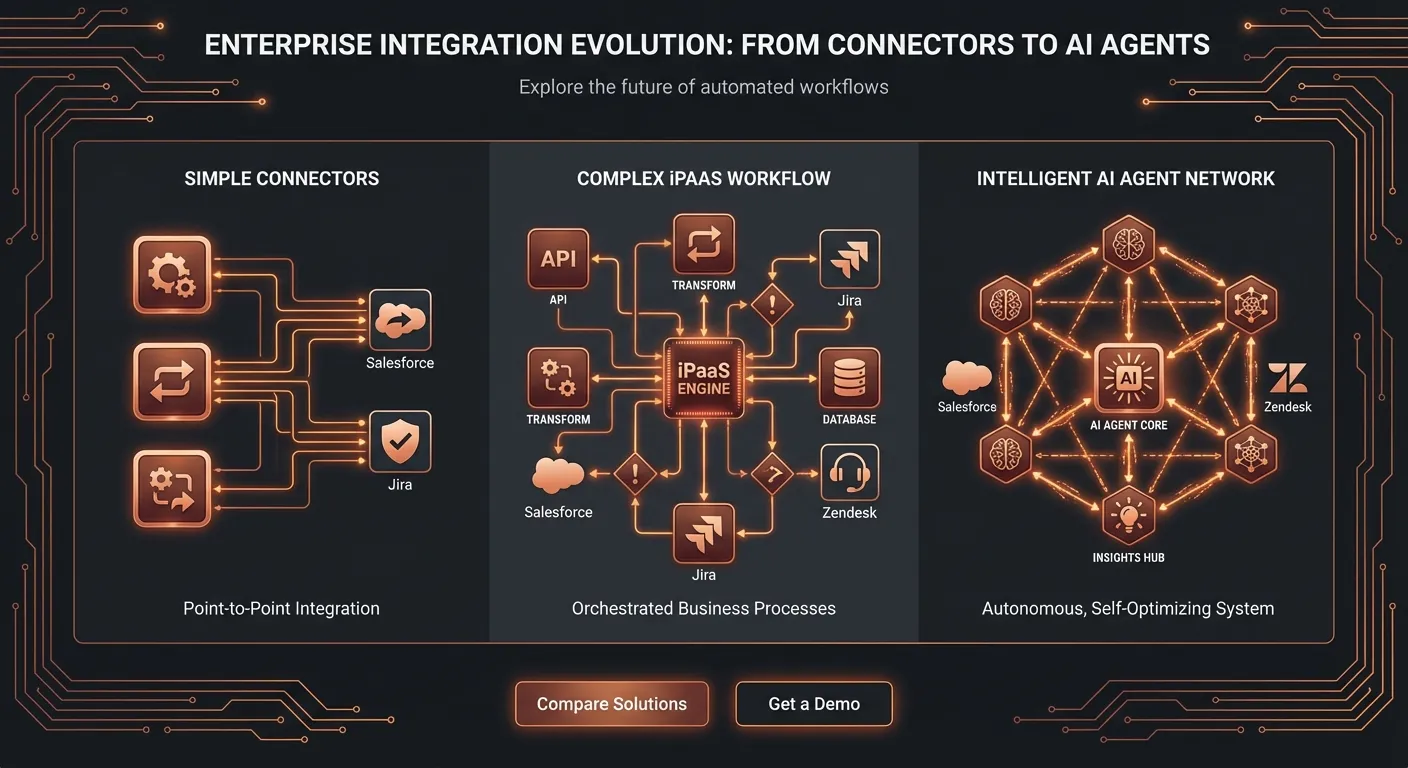
Your Salesforce team and your Jira team are talking about different things. Sales and support live in Salesforce. Engineering lives in Jira. When a customer reports a bug, raises a billing dispute, or escalates a ticket that needs a developer — someone, somewhere, has to manually bridge the gap.
The question isn't whether to integrate. It's how.
And this is where teams make expensive mistakes. They reach for the tool they know, or the one their vendor recommends, or the cheapest option that looks like it'll work — without ever asking: what does this integration actually need to do?
A field sync and an intelligent decision-making system are both called "integrations." They do fundamentally different things. Paying for the wrong one costs you either capability (too simple) or $50,000+ per year and six months of implementation work (too complex for what you actually needed).
This guide breaks down all three categories — connectors, iPaaS platforms, and AI agents — across the dimensions that actually matter to operations teams: what they can do, what they can't, who they're for, and what they'll cost you. We'll cover Sinergify, Exalate, Zapier, Workato, MuleSoft, Agentforce, and cross-platform AI agents in enough depth to help you make the right call.
The Quick Answer (Before the Deep Dive)
Before we get into specifics, here's the comparison table this post is designed to rank for. We'll unpack every cell below.
| Dimension | Connectors (Sinergify, Exalate) | iPaaS (Workato, MuleSoft, Zapier) | AI Agents (CorePiper) |
|---|---|---|---|
| Best for | Simple bidirectional sync between two systems | Complex multi-system automation with conditional logic | Cross-platform workflows requiring judgment, context, and SOPs |
| Setup time | Days to weeks | 4–24 weeks | 1–2 days |
| Handles business logic | ❌ Field mapping only | ⚠️ Static if-then rules | ✅ Dynamic, SOP-driven decisions |
| Cross-platform (3+ systems) | ❌ Usually pairwise only | ⚠️ Possible but expensive | ✅ Native |
| Learns from corrections | ❌ | ❌ | ✅ HITL feedback loop |
| Typical annual cost | $3K–$15K | $15K–$150K+ | Startup-friendly; scales with outcomes |
| Technical requirements | Low | High (iPaaS architects, MuleSoft developers) | Low |
| Vendor lock-in risk | Medium | High | Low |
The right tool depends on your team size, technical resources, workflow complexity, and how much of your support operation crosses platform boundaries. Let's walk through each category.
Category 1: Connectors
What They Are
Connectors are purpose-built integrations between two specific systems. Sinergify connects Salesforce to Jira. Exalate does the same, with a more customizable scripting approach. They're installed from the Atlassian Marketplace or Salesforce AppExchange, configured with a field mapping interface, and they keep data synchronized between the two platforms.
The core value proposition: When something changes in Salesforce, the corresponding record in Jira updates — and vice versa. Bidirectional, near-real-time, reliable.
Sinergify
Sinergify, built by Grazitti Interactive, is one of the most widely-deployed Salesforce-Jira connectors on the market. It handles standard and custom objects across Sales Cloud, Service Cloud, Marketing Cloud, and Community Cloud. On the Jira side, it supports Software, Core, Service Desk, and both Cloud and On-Premises deployments.
What Sinergify does well:
- Fast deployment — teams are usually live within a week
- Handles standard object mapping without custom development
- Works across Jira project types (Software, Service Management)
- AppExchange-certified with a clean configuration UI
Where Sinergify hits a ceiling: Sinergify is a field-sync engine. It doesn't evaluate whether a case should be escalated, or which Jira project it belongs in, or what priority it should carry based on the customer's account tier. It maps fields you configure in advance and keeps them synchronized. The business logic for what those fields mean and what should happen as a result lives with your team.
This is fine — and correct — for teams with simple, stable integration needs. If you need Salesforce cases to appear as Jira issues with consistent field values, Sinergify delivers that reliably. If you need the integration to make decisions, you've exceeded what any connector can provide.
Pricing: Quote-based (per their AppExchange listing, pricing requires contact). Third-party review sites suggest costs in the $3,000–$15,000/year range depending on user count and deployment type, though Sinergify's pricing page confirms this requires a quote.
Exalate
Exalate takes a more developer-friendly approach. Its scripting engine — now with AI-assisted configuration via "Aida" — lets teams write Groovy-based rules for complex bidirectional sync. This gives Exalate more flexibility than Sinergify's point-and-click approach, at the cost of requiring someone who can write and maintain sync scripts.
What Exalate does well:
- Highly customizable sync logic via scripting
- Scales across multiple system pairs (Jira-to-Jira, Zendesk-to-Jira, etc.)
- Per-integration pricing model means you pay for what you use
- Good for organizations with IT/developer resources who need precision control
Where Exalate hits a ceiling: Same fundamental constraint as Sinergify — it's a sync engine. The scripts encode static rules. When your team structure changes, an escalation policy gets updated, or a new edge case appears, someone needs to update the scripts manually. Exalate handles "when A changes in system 1, update B in system 2" with great flexibility. It does not handle "given the customer context, account tier, and current sprint state, decide whether to escalate and where."
Pricing: Per-integration model with a free tier; paid plans scale based on complexity and volume. Enterprise plans start around $500–$2,000/month depending on the integration combination.
When Connectors Are the Right Answer
Use a connector when:
- You need clean bidirectional sync between exactly two systems
- Your integration requirements are stable and unlikely to change frequently
- The decision-making around routing happens upstream (your team manually categorizes and assigns before the connector takes over)
- You have limited budget and your primary need is keeping data consistent
- Your team doesn't cross platform boundaries frequently in a given workflow
Category 2: iPaaS Platforms
What They Are
Integration Platform as a Service (iPaaS) sits above point-to-point connectors. Instead of syncing two systems directly, iPaaS platforms provide a general-purpose automation layer where you build workflows (called "recipes" in Workato, "flows" in MuleSoft) that can span multiple systems, apply conditional logic, and trigger actions based on events.
The three platforms most relevant to Salesforce-Jira workflows are Zapier (SMB/mid-market), Workato (enterprise), and MuleSoft Anypoint Platform (large enterprise with API management needs).
Zapier
Zapier is the iPaaS entry point for most teams. Its 8,000+ app integrations library and no-code "Zap" builder make it accessible to non-technical users. For simple Salesforce-Jira automation — "when a Salesforce case gets Priority: High, create a Jira issue" — Zapier works fine.
What Zapier does well:
- Fastest time to live for simple automations (hours, not weeks)
- Massive connector library reduces integration gaps
- Non-technical teams can build and maintain workflows without IT involvement
- Per-task pricing is transparent and predictable at small scale
Where Zapier breaks: Zapier's model is inherently trigger-and-action. Each "Zap" handles one workflow thread. Complex multi-step processes that require branching logic, contextual data from multiple sources, error handling, and rollback logic quickly become unwieldy — you end up with dozens of fragile Zaps, each one a single point of failure.
For Salesforce-Jira specifically, Zapier's limitations show up when workflows require:
- Reading data from multiple Salesforce objects before making a decision
- Dynamic routing logic that depends on current Jira sprint state
- Error handling when the Jira API returns unexpected responses
- Synchronization of state across multiple workflow branches
Pricing: Starts at $19.99/month for individuals; business plans start around $69/month. At enterprise scale with high task volumes, costs escalate significantly. The per-task pricing model creates unpredictable bills as automation usage grows.
Workato
Workato is the enterprise iPaaS most teams land on when they outgrow Zapier. Its "recipe" model supports more complex logic than Zapier — including loops, branching, API calls, and data transformation. The platform's 1,200+ pre-built connectors (including Salesforce and Jira) mean most integration patterns are available out of the box.
What Workato does well:
- Handles multi-step, multi-system workflows with real conditional logic
- Strong governance and audit logging for enterprise compliance requirements
- Workato's Autopilot feature adds some AI-assisted recipe building
- Enterprise security (RBAC, SSO, compliance tools) built in
Where Workato gets expensive: Workato uses consumption-based pricing that's opaque until you get a custom quote. Third-party sources consistently report annual costs of $15,000 to $50,000 for mid-market deployments, with complex enterprise implementations exceeding $100,000 per year. Implementation work adds further: proof-of-concept builds for SMBs run $12,000–$25,000; complex enterprise deployments run $60,000–$150,000+.
The deeper issue: Workato recipes are still static logic. You're encoding today's business rules as if-then workflows. When those rules change — and they will — someone needs to update the recipes. That someone typically needs iPaaS platform expertise, which adds ongoing operational overhead.
Pricing: Custom quote required; typically starts around $10,000/year, scales with active recipes and task volume.
MuleSoft Anypoint Platform
MuleSoft is the heavyweight of enterprise integration. Built around API-led connectivity, it's designed for organizations managing dozens of internal and external systems with strict governance, security, and compliance requirements. When a large bank or healthcare system needs to integrate 50+ applications with API versioning, data governance, and SLA enforcement, MuleSoft is built for that.
What MuleSoft does well:
- API lifecycle management (design, deploy, govern, monitor)
- Handles massive scale and complex integration topologies
- Strong data governance and compliance features (HIPAA, SOC 2, etc.)
- Deep integration with the Salesforce platform (unsurprisingly, given the acquisition)
Where MuleSoft becomes overkill: For most teams needing Salesforce-Jira integration — even sophisticated enterprise teams — MuleSoft is architectural overkill. The platform's first-year total cost of ownership often runs 2-3x the base subscription, factoring in implementation, training, and developer resources. Specialized MuleSoft developers command $150,000–$200,000 annually in salary. Implementation timelines typically span 4-6 months for complex deployments.
MuleSoft's pricing is capacity-based and unpublished — you negotiate directly with their sales team. Industry data suggests mid-market annual contracts in the $50,000–$200,000 range.
The MuleSoft tax is particularly relevant for Agentforce users: tightly coupling Salesforce automation to MuleSoft for external integrations creates vendor concentration risk. When the platform you use for CRM and integration is the same vendor, negotiating leverage evaporates.
Pricing: Custom, capacity-based pricing; base subscriptions typically $50K–$200K/year for mid-market; first-year TCO 2-3x higher.
The Core Limitation of All iPaaS Platforms
iPaaS platforms add sophisticated automation on top of the same fundamental constraint as connectors: the logic is static. When you build a Workato recipe that routes Salesforce cases to Jira based on a set of conditions, those conditions are locked in at build time. The recipe doesn't know that your team structure changed in January, that there's a sprint crunch in February, or that a specific customer is in a delicate renewal conversation. It follows the rules you wrote.
Real-world support operations don't stay still. Escalation policies change. Team structures shift. Edge cases multiply. Every time the business changes, someone has to update the automation — or the automation silently continues applying outdated logic.
When iPaaS Is the Right Answer
Use iPaaS when:
- You have complex multi-system workflows that span beyond two platforms
- Your IT/operations team has the bandwidth to build and maintain automations
- Governance, compliance, and audit logging are hard requirements
- Your budget supports $15K–$150K/year for integration infrastructure
- Workflows are relatively stable and don't require frequent logic updates
- You need automation (trigger → action) rather than decision-making (evaluate context → determine best action)
Category 3: AI Agents
What They Are and Why They're Different
AI agents represent a fundamentally different architecture from both connectors and iPaaS platforms. Where connectors sync and iPaaS automates, AI agents reason.
An AI agent doesn't follow pre-built rules. It evaluates the full context of a situation — the case content, the customer's profile and history, the team's current capacity, your documented SOPs — and makes a decision about what should happen. Then it takes action across whatever platforms are relevant, regardless of whether that's Salesforce, Jira, Zendesk, or all three simultaneously.
The distinction matters most at the edges: the 20–30% of cases that don't fit neatly into any pre-built workflow. Every iPaaS implementation has these. They're the cases that fall through the cracks of your Workato recipes, requiring a human to intervene, context-switch, and manually route. At scale, this 20–30% represents a disproportionate share of your team's time and your customers' frustration.
The Cross-Platform Advantage
Most integration tools are pairwise: they connect System A to System B. Adding a third system (Zendesk, ServiceNow, HubSpot) typically means another connector or another iPaaS recipe layer — and the complexity compounds. Teams running Salesforce + Jira + Zendesk often end up with three separate integration layers that don't communicate with each other.
As we detailed in the cross-platform case operations post, the real-world support operation rarely fits cleanly into a two-platform model. A customer reports a bug through Zendesk. The Salesforce account manager needs to know. Engineering needs a Jira ticket. The customer needs a proactive update. That's a four-platform workflow that requires either a human coordinating manually or an agent that thinks across all of them simultaneously.
Cross-platform AI agents handle this natively. They don't need a pre-built recipe for "Zendesk → Salesforce → Jira → Zendesk response." They reason about the situation and take the actions that make sense — following your SOPs, but applying judgment to context that a rigid workflow can't process.
SOP-Driven Logic vs. If-Then Rules
The critical architecture distinction: AI agents don't replace your business logic. They execute it more intelligently.
When you implement a SOP-driven AI agent, you're not asking it to invent routing decisions. You're encoding your actual escalation policies, priority frameworks, and handoff procedures as structured instructions the agent follows. The difference from iPaaS rules is that the agent interprets these instructions in context — the way a skilled senior employee would apply a policy — rather than matching literal conditions.
A Workato recipe might say: "If Salesforce case priority = Critical, create Jira issue with priority = Highest, assign to Team A."
An SOP-driven agent reads: "Critical cases should be routed to the team best positioned to resolve them, with priority reflecting both the reported severity and the customer's strategic importance. Enterprise accounts in active renewal should be treated as one level higher than the reported priority."
Same intent. Radically different behavior when a "Critical" case comes from a churning SMB customer vs. a strategic account with a $1M renewal on the line.
Human-in-the-Loop: The Mechanism Connectors and iPaaS Miss
Every integration system makes mistakes. Connectors sync incorrect data. iPaaS recipes mis-route cases when conditions are ambiguous. The question isn't whether errors will occur — it's how the system handles them.
Connectors have no error-correction mechanism at the decision level. You detect the mistake by finding the wrong outcome and tracing it back manually.
iPaaS platforms provide monitoring and error logging, but the recipe logic itself doesn't update from the error. Someone has to notice the pattern and manually update the workflow.
AI agents with human-in-the-loop feedback improve from corrections. When a routing decision is overridden by a human — because the agent routed a case to Team A and the supervisor moved it to Team B — that correction becomes a training signal. Over time, the agent's routing decisions improve in exactly the dimensions where it was making mistakes. The system gets smarter with use, rather than requiring periodic manual rebuilds.
This compounds significantly at scale. An iPaaS platform deployed for 18 months has the same logic it had on day one unless someone actively updated it. An AI agent deployed for 18 months has processed thousands of cases, absorbed hundreds of corrections, and refined its decision-making based on real outcomes.
Agentforce: The Vendor-Native AI Agent
Salesforce's Agentforce deserves specific attention here because it's the AI agent option teams consider first when they're already Salesforce customers.
Agentforce is powerful within the Salesforce data boundary. The Atlas Reasoning Engine is well-designed for CRM-centric workflows — qualification, follow-up, case summary, next-action recommendation. If your entire workflow lives inside Salesforce, Agentforce is genuinely compelling.
The limitation is structural: Agentforce acts on Salesforce data. Integrating it with external systems like Jira requires additional infrastructure. As Composio's analysis of Agentforce actions notes, connecting to external systems "requires setting up individual Auth Providers and managing granular scopes for every external tool" — and "Flow HTTP Callouts often choke on the massive, nested JSON schemas returned by modern APIs." Atlassian's own blog post on Jira Agents notes that "Salesforce's Agentforce agents act on CRM records and Data Cloud objects inside Salesforce's data boundary."
This isn't a flaw in Agentforce's design. It's a reflection of Salesforce's product strategy: their agent is optimized for their platform. But for teams running cross-platform operations where the workflow spans Salesforce, Jira, and Zendesk, Agentforce's strength (deep CRM integration) becomes a constraint.
Additionally, the MuleSoft dependency for complex Agentforce integrations means the cost structure escalates quickly. As we covered in Agentforce vs. cross-platform AI agents, the "MuleSoft tax" is a real consideration for teams trying to build cross-platform workflows on top of Agentforce.
When AI Agents Are the Right Answer
AI agents are the right answer when:
- Your workflows cross three or more platforms regularly
- Business logic is complex, contextual, or changes frequently
- Your team is currently spending significant time on manual routing and escalation decisions
- You want your integration to improve over time, not just maintain static rules
- You want to deploy quickly (days, not months) without a large implementation team
- Your SOP knowledge is currently distributed across people's heads and tribal knowledge — and you want to operationalize it
The Real Cost Comparison
Cost conversations around integration tools often stop at the license fee. That's the wrong stopping point.
Total Cost of Ownership: What You're Actually Buying
Connectors (Sinergify, Exalate):
- License: $3,000–$15,000/year
- Implementation: 1–2 weeks of IT time
- Ongoing maintenance: Low (stable configuration)
- Developer dependency: Minimal (Exalate scripting adds this)
- Total first-year cost: $5,000–$25,000
- Hidden cost: Human time still required for all business logic decisions
iPaaS — SMB (Zapier):
- License: $1,000–$5,000/year at business scale
- Implementation: Moderate (weeks of internal time)
- Ongoing maintenance: Medium (recipes break when APIs change)
- Total first-year cost: $3,000–$20,000
- Hidden cost: Scales poorly with task volume; fragile at complexity
iPaaS — Mid-market (Workato):
- License: $15,000–$50,000/year
- Implementation: $12,000–$60,000+ (PoC to full deployment)
- Ongoing maintenance: Dedicated operations resource
- Total first-year cost: $40,000–$120,000
- Hidden cost: Logic doesn't self-update; requires continuous maintenance investment
iPaaS — Enterprise (MuleSoft):
- License: $50,000–$200,000/year
- Implementation: $100,000–$500,000 (6-12 months)
- Developer resources: $150,000–$200,000/year (dedicated MuleSoft architect)
- Total first-year cost: $300,000–$900,000 for complex deployments
- Hidden cost: Every configuration change requires MuleSoft expertise
AI Agents (CorePiper):
- License: Outcome-based pricing; startup-friendly to enterprise
- Implementation: 1–2 days (SOP ingestion, platform connections, configuration)
- Ongoing maintenance: Minimal; the agent improves from use
- Total first-year cost: Fraction of iPaaS; comparable to mid-tier connectors for equivalent capability
- Hidden benefit: Reduces human time spent on routing/escalation decisions — which has its own ROI
The ROI comparison isn't just about software licensing. It's about the fully-loaded cost of manual operations that your integration layer displaces. A Workato implementation that costs $80,000/year but still requires three team members to manually review edge cases may be more expensive than a $30,000/year AI agent deployment that handles 85% of cases autonomously.
A Decision Framework: Matching Tool to Workflow
Use this framework to identify your starting point:
Start with a connector if:
- You need exactly Salesforce ↔ Jira field sync
- Your team handles all routing decisions manually
- Budget is under $10K/year for integration
- Setup time must be under two weeks
Move to iPaaS if:
- You need automation logic beyond field sync (triggers, conditional actions)
- Your workflows span more than two systems but are relatively stable
- You have IT resources to build and maintain recipes/flows
- Compliance and governance features are required
Choose AI agents if:
- Workflows cross three or more platforms in the same case lifecycle
- Your business logic changes frequently or is too complex for static rules
- You're spending significant human time on manual routing and escalation
- You want your integration capability to compound over time rather than require constant rebuilds
- You want to operationalize the SOP knowledge currently trapped in your team's heads
The "start simple, scale up" trap: Many teams start with a connector, hit its limits, upgrade to Zapier, hit those limits, then purchase Workato — spending $150K+ in total over three years and ending up with an iPaaS platform that still doesn't solve the judgment problem. If your integration needs are complex enough that you're already thinking about Workato-tier solutions, it's worth evaluating AI agents first. The implementation time is often shorter, the capability ceiling is higher, and the learning curve is shallower.
What Competitors Miss: The Three Dimensions Nobody Writes About
Most comparison content online evaluates connectors, iPaaS, and AI agents on features: connector count, supported platforms, pricing tiers. Three dimensions matter more for real operations teams:
1. The SOP Dimension
Most integration tools treat business logic as a technical configuration problem: map these fields, trigger these actions, apply these conditions. But for operations teams, business logic is often undocumented. It lives in senior reps' heads. It evolves through Slack conversations. It's the accumulation of dozens of "well, in cases like that, we usually..." judgments.
Only AI agents can ingest and operationalize this kind of implicit knowledge. Connectors need explicit field mappings. iPaaS platforms need explicit workflow logic. AI agents can process SOP documents, learn from corrections, and apply the spirit of a policy rather than just its literal conditions.
2. The Cross-Platform Dimension
Integration tools are overwhelmingly evaluated on their pairwise capabilities. "How well does Tool X handle Salesforce-Jira?" But the real operations question is: "How well does Tool X handle a workflow that spans Salesforce, Jira, and Zendesk, where the state in each platform affects decisions in the others?"
Almost no connector vendor addresses this. Most iPaaS comparisons stop at two-platform scenarios. Cross-platform AI agents are built for this from the ground up — because that's where the real operational complexity lives.
3. The Evolution Dimension
Integration tools are typically evaluated at point-in-time. How well does it work on day one? Six months later, after your team has changed, your tools have been updated, and new case types have emerged — which approach gets better with use?
Connectors and iPaaS platforms need manual updates to evolve. The better your team gets at support operations, the more your integration layer falls behind, because the people improving your processes aren't automatically updating your Workato recipes.
AI agents that learn from corrections evolve alongside your team. The same feedback loops that make your senior reps better at their jobs make the agent better at its job. That compounding matters enormously over 12–24 months of deployment.
Making the Call
The integration landscape in 2026 is richer than it's ever been — which means the decision is also more consequential. Choosing the wrong layer means either under-investing (connector when you needed intelligence) or over-investing (enterprise iPaaS when a connector would have done the job for one-tenth the cost).
The quick decision filter:
- Just need sync? → Connector. Sinergify or Exalate. Start there, verify it meets your needs.
- Need automation with conditional logic, budget available, stable requirements? → iPaaS. Workato for mid-market, MuleSoft only if you're managing API infrastructure at scale.
- Need cross-platform judgment, want to operationalize SOPs, want the system to improve over time? → AI agents. The setup time is shorter than any iPaaS platform, the ceiling is higher than any connector, and the value compounds in ways static tools can't.
For most operations teams running Salesforce + Jira + any third platform, the honest answer is that connectors will leave you with too much manual work, enterprise iPaaS will cost too much and require too much maintenance, and the gap between those options is exactly where cross-platform AI agents belong.
See It in Action
CorePiper connects Salesforce, Jira, and Zendesk with SOP-driven AI agents that make routing decisions, handle escalations, and learn from your team's corrections — without the six-month implementation timelines or the $50,000 Workato contract.
If you're evaluating your integration options, we're happy to walk through your specific workflow and show you exactly where each approach would hit its ceiling.
Book a 30-minute workflow audit →
Related reading:
- SF + Jira + Zendesk: Why Cross-Platform Is the Only Path Forward — the pillar post
- AI Case Routing Between Salesforce and Jira: Beyond Simple Data Sync — intelligent routing deep dive
- What Are SOP-Driven AI Agents? — the architecture behind context-aware automation
- Salesforce to Jira Case Escalation: A Step-by-Step Automation Guide — the how-to companion