
How to Automate Order Cancellations and Address Changes on Shopify
Learn how to automate the two most common Shopify order-edit requests — cancellations and address changes — using AI agents and the Shopify Admin API. Includes SOP logic, guardrails, and step-by-step API reference.
 Mustafa BayramogluJune 29, 202611 min read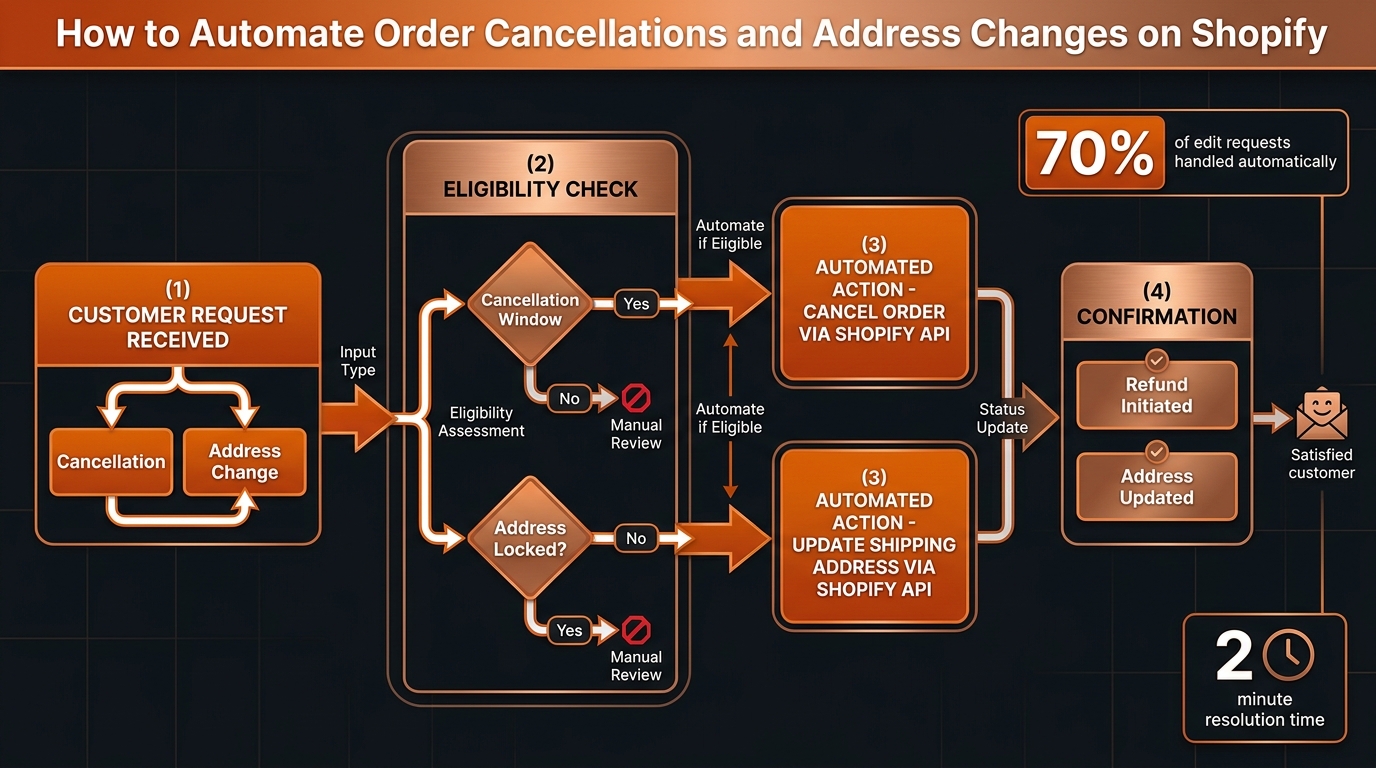
How to Automate Order Cancellations and Address Changes on Shopify
Shopify provides no native self-service path for order cancellations or address changes after checkout — so every "edit my order" request becomes a support ticket. An AI agent connected to the Shopify Admin API can handle 65–75% of these requests automatically using a defined SOP, freeing agents from processing routine edits while keeping guardrails in place for high-risk cases.
TL;DR: Automating Shopify Order Edits
| Request Type | Automatable? | Key Condition | Shopify API Action |
|---|---|---|---|
| Cancellation (before fulfillment) | Yes, 75–85% | Order not yet fulfilled | POST /orders//cancel |
| Cancellation (after fulfillment) | No — return flow | Fulfillment complete | Escalate or initiate return |
| Address change (pre-shipment) | Yes, 65–75% | No label generated yet | PUT /orders/ shipping_address |
| Address change (post-shipment) | Rarely automatable | Label already generated | Carrier intercept — escalate |
| Item swap | Partial | Depends on inventory | Cancel + reorder or escalate |
Why Does Shopify Turn Order Edits Into Support Tickets?
Once a Shopify order is placed, customers have no native way to cancel it, change the delivery address, or swap an item. Every request requires a support agent to log into Shopify, find the order, verify its status, and manually take action.
For brands processing 500–5,000 orders per month, this creates a steady volume of straightforward requests that consume agent time disproportionate to their complexity. A cancellation request that takes an agent 4–6 minutes to handle manually — find the order, check fulfillment, cancel, confirm refund, reply to customer — can be completed by an AI agent in under 30 seconds with the same outcome.
The gap between what Shopify natively supports and what customers expect is the source of this ticket class. Closing it with automation does not replace agents: it removes the 70% of edit requests that are routine and binary, so agents focus on the 30% that require actual judgment.
What Does the "Edit My Order" Ticket Class Actually Look Like?
Cancellation requests are the highest-volume order-edit ticket type. Customers cancel because they changed their mind, found a better price elsewhere, ordered the wrong item, or placed a duplicate. The key variable for automation is fulfillment status: an order that has not yet been picked and packed can be cancelled cleanly through the Shopify Admin API. An order that has already shipped requires a return and refund workflow — a different SOP entirely.
Address change requests are the second most common type. A customer misspelled their street address, realized they are moving, or wants delivery at their office. The automation window is narrow: once a shipping label has been generated, the change requires voiding and recreating the label or using a carrier redirect service, which may not be automatable for all carriers. Pre-label address changes are straightforward.
Item swaps — "I ordered size M but I want L" or "Can I change the color?" — are the most complex. They typically require cancelling the original order and placing a new one, with inventory checks, price holds, and discount re-application. Automation is possible but requires more SOP logic than the other two types; many brands start with a hybrid approach (AI initiates, human confirms the new order).
How Does the Automation SOP Work?
Step 1: Classify the request
The first decision is what the customer actually wants. "Can I cancel my order" and "I ordered to the wrong address" require different API calls. The AI agent extracts:
- Request type (cancel / address-change / item-change)
- Order identifier (order number or email)
- Additional context (the correct address, reason for cancellation)
For ambiguous messages, the agent asks one clarifying question before proceeding.
Step 2: Look up the order and check eligibility
The agent calls the Shopify Admin API to fetch the order object:
GET /admin/api/2024-01/orders/{order_id}.json
The response includes the fields needed for eligibility evaluation:
fulfillment_status: null (unfulfilled),partial, orfulfilledfinancial_status:paid,partially_paid,refunded,voidedcancelled_at: null if not yet cancelledshipping_address: current shipping address on file
For cancellations, the eligibility check is:
fulfillment_statusis null (no items shipped)cancelled_atis null (not already cancelled)- Order value is below the high-value threshold (e.g., $200)
- No active fraud flags
For address changes, the eligibility check is:
- No fulfillment record with a tracking number
fulfillment_statusis null- New address is in the same country (international changes need additional logic)
If eligibility fails, the agent escalates with the reason: "Order already fulfilled — routing to return/refund guidance" or "Label already generated — carrier intercept may be possible, routing to agent."
Step 3: Execute the action
Cancelling an order:
POST /admin/api/2024-01/orders/{order_id}/cancel.json
{
  "reason": "customer",
  "email": true,
  "refund": {
    "restock": true
  }
}
This cancels the order, restores inventory, and initiates a refund to the original payment method. Shopify sends a cancellation confirmation email automatically when "email": true.
Updating a shipping address:
PUT /admin/api/2024-01/orders/{order_id}.json
{
  "order": {
    "shipping_address": {
      "first_name": "Customer",
      "last_name": "Name",
      "address1": "123 New Street",
      "city": "New City",
      "province": "CA",
      "country": "US",
      "zip": "94105"
    }
  }
}
This updates the delivery address in Shopify before a label is generated. If the brand uses Shopify Shipping, the agent should check label status before calling this endpoint.
Step 4: Update the helpdesk and confirm with the customer
After the API action, the agent:
- Updates the helpdesk ticket with the action taken and the Shopify order ID
- Replies to the customer with a confirmation: "Your order #12345 has been cancelled. A refund of $47.95 will appear on your original payment method within 5–7 business days."
- Closes the ticket as resolved
This four-step SOP — classify, check, execute, confirm — runs in under 30 seconds. The customer receives a real-time confirmation instead of waiting for an agent to process the request manually.
What Are the Guardrails?
No automation should execute blindly. Guardrails prevent costly errors in edge cases.
Cancellation guardrails:
- Order value threshold. Orders above $200–$300 (configurable) require human review. High-value cancellations have higher risk of processing errors, and refunds may involve split payment methods, loyalty credits, or gift card complications.
- Fraud signals. If the order has a high fraud analysis score, or the account has a history of cancellations followed by re-purchase (return arbitrage), route to human review.
- Final-sale or non-returnable items. Items tagged as final-sale should not be eligible for no-questions-asked cancellation. The SOP checks product tags before executing.
- Partially fulfilled orders. If some items have shipped and others have not, cancellation applies only to the unfulfilled line items. The agent confirms the partial scope with the customer before executing.
Address change guardrails:
- International address changes. Updating a domestic address to international may trigger different shipping rates, duties, and carrier requirements. Route to human.
- P.O. Box changes. Some carriers cannot deliver to P.O. boxes and Shopify Shipping may not support label generation. Flag and escalate.
- Already in transit. If the carrier event stream shows the package is out for delivery or at the destination, an address change is not possible. Inform the customer and close.
How Does This Fit Into a Cross-Platform Support Stack?
Most Shopify brands run support in a helpdesk separate from Shopify: Gorgias, Zendesk, or Freshdesk. The order-edit automation SOP requires the AI agent to operate across both systems simultaneously:
- Read from the helpdesk: the customer's message, order number, and prior contact history
- Read and write to Shopify: order status lookup, cancel or update action
- Write back to the helpdesk: ticket update and customer reply
Single-helpdesk AI tools — including Gorgias's native AI features — can look up order data in Shopify but have limited write access for actions like cancellation. A cross-platform AI agent with authenticated access to both systems completes the full loop without handing off to a human for the Shopify action step.
This is especially important for brands using Zendesk or Freshdesk: Shopify order management actions are not native to those helpdesks. Automation requires both read and write permissions on the Shopify Admin API, scoped to write_orders and write_fulfillments.
This pattern is the same one that makes reducing overall Shopify support ticket volume compound over time — the same agent that handles WISMO can handle order edits within the same conversation, without the customer needing to contact again.
What Results Should You Expect?
For a Shopify brand handling 200–800 cancellation and address-change requests per month:
| Metric | Before Automation | After Automation |
|---|---|---|
| Agent time per request | 4–6 minutes | 0 minutes (automatable requests) |
| Customer resolution time | 30 min – 4 hours | Under 2 minutes |
| Requests handled automatically | 0% | 65–75% |
| Human agent escalation | 100% | 25–35% |
| Customer satisfaction on edits | Variable (wait-time dependent) | Consistently high (instant confirmation) |
The 65–75% automation rate reflects a standard DTC order mix. Pre-orders, high-value orders, and post-fulfillment requests fall outside the automated path and require human handling — which is the correct design. Automation handles the routine; humans handle the exceptions.
Beyond the time savings, the customer experience improvement compounds. A customer who gets a cancellation confirmed in 90 seconds — with a refund timeline stated clearly — is far less likely to escalate, chargeback, or leave a negative review than a customer waiting three hours for manual processing.
How to Build This Into Your Support Stack
1. Define the SOP in writing first. Before any API integration, write the eligibility conditions, action sequence, and escalation criteria for each request type. What is your cancellation window? What is your high-value threshold? What tags mark final-sale items? The SOP is the logic; the automation executes it.
2. Connect Shopify Admin API with appropriate scopes. The AI agent needs read_orders, write_orders, and write_draft_orders scopes at minimum. Add write_fulfillments if updating fulfillment records.
3. Connect your helpdesk. The agent reads the customer's original request from Zendesk, Freshdesk, or Gorgias and writes back the reply and ticket resolution. The same connection handles WISMO, returns, and order edits — one integration, multiple SOP coverage areas.
4. Test against your actual order distribution. Run the SOP against the last 90 days of cancellation and address-change tickets to confirm automation rates match expectations. Edge cases not anticipated in the SOP will surface in testing — adjust eligibility logic before going live.
5. Monitor escalation quality. The 25–35% of requests that escalate to human agents should arrive with full context: the order object, the customer's request, the eligibility check result, and the reason for escalation. Agents who receive a fully-informed handoff resolve escalations faster than agents who must research from scratch.
Frequently Asked Questions
Can Shopify automatically cancel orders without manual agent involvement?
Yes, with an AI agent connected to the Shopify Admin API and a defined cancellation SOP. The agent checks fulfillment status, verifies the order is within the cancellation window, applies value and fraud guardrails, and calls the cancel-and-refund endpoint — all without a human. Most standard cancellation requests qualify for automated handling.
How do I automate address changes on Shopify after an order is placed?
Address changes require checking whether the order has shipped via Shopify fulfillment status, updating the shipping address via the Admin API order update endpoint, and noting label status if one was already generated. Orders not yet fulfilled can be updated directly. Post-fulfillment address changes require carrier intervention and should escalate to a human agent.
What percentage of Shopify order-edit requests can be automated?
For most DTC Shopify brands, 65–75% of order cancellation and address change requests qualify for automated handling based on standard guardrails: order within cancellation window, not yet fulfilled, below high-value threshold, no active fraud flags. The remaining 25–35% escalate to human agents for judgment calls.
What are the guardrails for Shopify order cancellation automation?
Key guardrails include: cancellation window (before fulfillment begins); order value threshold (orders above $200–$300 may warrant human review); fraud signals (disputed payment, address mismatch, new account); item type (pre-order, digital, or final-sale items may need special handling); and fulfillment status (partially fulfilled orders require line-item-level cancellation logic).
Does CorePiper work with Shopify for order edit automation?
Yes. CorePiper connects to Shopify via the Admin API and executes order cancellations, address changes, and refund initiations as part of SOP-driven workflows. The same agent handles the customer conversation in Zendesk, Freshdesk, or Gorgias, and logs the action across all systems without custom code.
CorePiper's SOP-driven AI agents handle order cancellations and address changes end-to-end — connecting Shopify, your helpdesk, and carrier APIs without custom engineering. Book a 30-minute walkthrough to see how it works for your order volume.