
The Real Reason Your AI Chatbot Has a Low Resolution Rate
Low AI chatbot resolution rates are not caused by bad AI — they are caused by no system access and no SOPs. Here's what actually drives the gap between 30% and 80% resolution, and how to fix it.
 Mustafa BayramogluJune 20, 202614 min read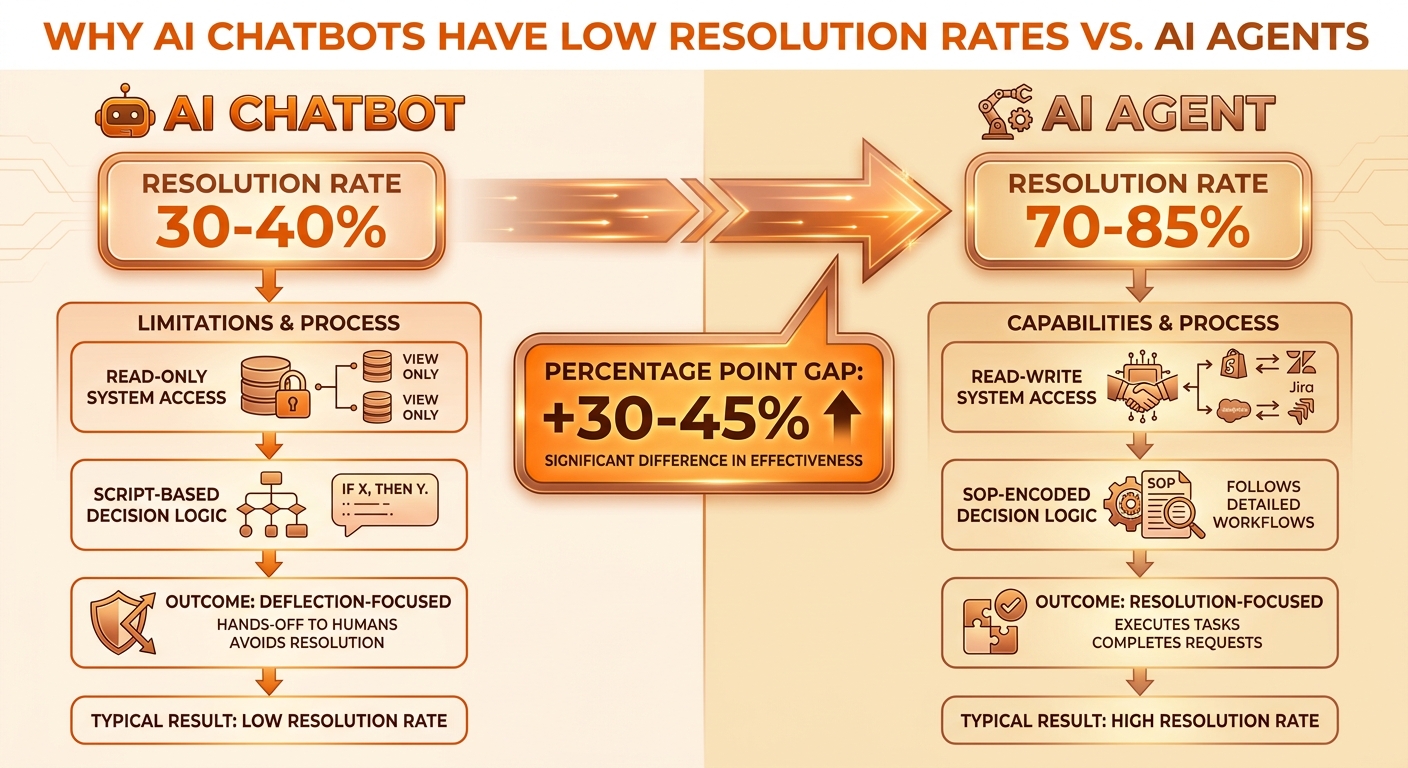
The Real Reason Your AI Chatbot Has a Low Resolution Rate
Low AI chatbot resolution rates are almost never caused by a bad AI model. They are caused by two architectural deficits: the chatbot has no write access to the systems that execute resolutions, and it runs on response scripts rather than SOP-encoded decision logic. Fixing either deficit moves resolution rate meaningfully; fixing both typically shifts e-commerce tier-1 containment from 30–40% to 65–85%.
TL;DR: Why AI Chatbot Resolution Rates Stay Low
| Root cause | What it looks like | What actually fixes it |
|---|---|---|
| No system access | Bot replies correctly but cannot issue refund, update address, or query carrier | Connect agent to Shopify, helpdesk, carrier APIs with write access |
| Read-only integrations | Bot reads order status but cannot take action on it | Upgrade from read to read-write API connections |
| Script-based decision logic | Hits FAQ ceiling, fails on edge cases | Encode SOPs as conditional agent logic |
| Single-platform scope | Resolves within helpdesk but not across Shopify + carrier + CRM | Implement cross-platform resolution layer |
| Deflection measurement | Counts customers who gave up as "resolved" | Switch from deflection rate to resolution + re-contact rate |
What "Resolve" Actually Requires
Before diagnosing low resolution rates, it helps to be precise about what resolution means. A ticket is resolved when the underlying customer job is done — not when a reply is sent, not when the customer stops messaging, not when they close the chat window.
For the five highest-volume ticket types in e-commerce, resolution looks like this:
WISMO ("Where is my order?"): Resolution = the customer knows exactly what is happening with their specific shipment, including live carrier status, and either receives confirmation that it is on track or gets a concrete next step (file a claim, rebook, receive store credit). A tracking link in a reply is not resolution — it is an action item handed back to the customer.
Refund request: Resolution = the refund is initiated in Shopify, the customer receives a confirmation with amount and timeline, and the ticket closes. A reply explaining the refund policy is not resolution.
Return initiation: Resolution = an RMA is generated, a return label is sent to the customer, and the case is logged. A reply explaining how to start a return is not resolution.
Address change: Resolution = the order address is updated in Shopify before fulfillment, and the customer receives confirmation. A reply saying "we'll try to update it" is not resolution.
Order cancellation: Resolution = the order is cancelled and refund initiated if applicable. A reply saying "please contact us to cancel" is not resolution.
Each of these requires a write action in at least one external system. This is the first reason most chatbots cannot resolve them.
Root Cause 1: No System Access (The Most Common Diagnosis)
Most helpdesk chatbots are deployed as read-only responders inside a single platform. They can read ticket context, pull from a knowledge base, and generate a reply. They cannot write to Shopify, query a carrier API, initiate a refund, or close a case in Salesforce.
This is not an oversight — it is a deliberate design choice for the deflection architecture. The chatbot's job was to keep customers out of the human queue by giving them information. Taking action was assumed to be a human's job.
The consequence: for any ticket type that requires an action (most of e-commerce's highest-volume tickets), the chatbot generates a correct reply that still leaves the customer with work to do. The customer either does the work (looks up their tracking, initiates the return manually, sends a follow-up) or gives up. Neither outcome registers as a resolution.
What connects system access to resolution rate:
When a chatbot has only read access to one platform, its resolution ceiling is bounded by tickets that can be resolved with information alone — FAQ answers, policy explanations, status lookups. In most e-commerce queues, this is roughly 25–35% of volume.
When an agent has read-write access to Shopify, a helpdesk (Zendesk, Gorgias, or Freshdesk), and a carrier API, it can resolve WISMO, refunds, returns, and cancellations autonomously. This typically covers 60–75% of e-commerce ticket volume. Add Salesforce or Jira for escalation logging and the addressable scope expands further.
The math is not complicated: more system access equals more ticket types resolvable without a human, which equals a higher resolution rate.
Root Cause 2: Scripts Instead of SOPs
Even chatbots with system access often hit a second ceiling: they run on response scripts rather than decision-grade Standard Operating Procedures.
A response script is a trigger-response pair: if the customer says X, reply with Y. Scripts handle the clean case — the customer asking exactly the question the script was written for, in the context the script assumed.
A Standard Operating Procedure is conditional logic that encodes what the right action is for each situation. An SOP for WISMO handling might read: if the order is in transit and within SLA, confirm status. If the order is delayed past SLA by 24 hours, send a proactive update and offer store credit. If the carrier shows no movement for 48+ hours, initiate a trace and escalate with full context pre-filled. If the order value is above $300, escalate regardless of status and flag for VIP handling.
Scripts fail on edge cases. SOPs handle them by design.
Most of the ticket types that remain unresolved by chatbots are not hard tickets — they are tickets where the customer's situation falls outside the script. A partial fulfillment. A customer who already emailed twice. A delayed shipment at an unfamiliar regional hub. A refund request outside the standard window with a valid reason. Scripts route these to humans. SOPs resolve most of them autonomously.
The direct connection: the gap between a 35% resolution rate and a 70% resolution rate is often the difference between scripts and SOPs, holding system access constant.
Root Cause 3: Measuring Deflection Instead of Resolution
A third, underdiagnosed cause of "low resolution rate" is that the resolution rate is actually fine — it is just not being measured. What is being measured instead is deflection rate.
Deflection rate counts contacts that did not reach a human agent. It combines four very different outcomes:
- The customer's issue was genuinely resolved (this is real deflection — you want this)
- The customer gave up and left (this is churn, not resolution)
- The customer sent a second ticket (this will show up in your queue tomorrow, angrier)
- The customer disputed a charge or posted a negative review (this is the invisible downstream cost)
All four look identical in the deflection metric. A 65% deflection rate with a 25% re-contact rate means roughly 40% of contacts were genuinely resolved — the rest left unsatisfied in one of three ways that costs you money without appearing in the deflection number.
If you are reporting a "low resolution rate" when you are actually looking at deflection minus re-contacts, the real resolution rate is lower than you think. If you are reporting deflection and calling it resolution, the real resolution rate is also lower than you think — because deflection includes a significant fraction of unresolved contacts.
The right measurement pair: containment rate (contacts resolved without human escalation, verified by an action completed) cross-referenced with re-contact rate (customers who send a second contact on the same issue within 72 hours). When containment is high and re-contact is low, you are genuinely resolving. When they diverge, you are deflecting.
For a full breakdown of the metrics that distinguish these, see Customer Service Metrics That Actually Matter in 2026.
What High Resolution Rates Actually Look Like in Practice
The teams achieving 70–85% autonomous resolution on e-commerce tier-1 queues have three things in common:
Cross-platform system access with write permissions. The agent is authenticated into Shopify (read order, issue refund, update address), the helpdesk (read ticket, update status, close ticket), and at least one carrier API (read shipment status). Some also write to Salesforce for case logging or Jira for escalation tickets. The point is that the agent can complete the full resolution loop — not just gather data but execute the action and confirm back to the customer.
SOPs that encode the full decision tree. Not just the easy cases but the escalation conditions: order value thresholds, carrier delay windows, fraud flags, SLA breach triggers. SOPs are written as conditional logic ("if... then... else..."), not as FAQ content. The agent evaluates these at runtime for each ticket, which is why it handles edge cases that scripts cannot.
Guardrails that keep humans on the genuinely hard work. High-resolution-rate teams do not try to automate 100% of tickets — they route the right tickets to humans via guardrails that define when to escalate. These are not failure modes; they are design decisions. A guardrail that escalates orders above $500 is not a resolution failure — it is the agent correctly identifying a case where human judgment is higher-value. The human queue becomes genuinely exception-only, which means humans handle fewer contacts but harder ones, and their CSAT on those contacts tends to go up.
Intercom's publicly reported data shows its Fin agent resolving 67% of contacts across over 40 million conversations — a real-world floor for a well-integrated agentic system. Internal benchmarks from resolution-first implementations in e-commerce typically fall in the 68–82% range for tier-1 tickets when all three factors above are in place.
How to Diagnose Your Chatbot's Resolution Rate Problem
The fastest diagnostic is a re-contact audit:
- Pull all contacts your chatbot "resolved" or "deflected" in the last 30 days.
- Filter for customers who submitted a second contact on the same topic within 72 hours.
- Calculate re-contact rate = second contacts ÷ chatbot-resolved contacts.
If re-contact rate is above 20%, you have a deflection problem disguised as a resolution metric. Most of what you are measuring as "resolved" was not resolved.
For each ticket type with a high re-contact rate, ask one question: what action would the chatbot have needed to take to actually close this ticket? The answer is almost always one of: issue refund, generate return label, query live carrier status, update order address, cancel order. Each of these is an API call to a system the chatbot probably cannot currently write to.
That gap — between the action required to resolve and the actions the chatbot can currently execute — is your resolution rate gap. The fix is targeted: connect the chatbot to the system, add write permissions, encode the SOP for that ticket type. Each fixed ticket type moves your resolution rate.
The SOP-to-Agent Path: From 35% to 75%
The practical path from a 30–40% deflection ceiling to a 70–85% resolution rate is not a rip-and-replace of your helpdesk or your current chatbot vendor. It is an architecture change: adding a resolution layer with system access and SOP logic that operates on top of your current stack.
This is how CorePiper approaches it. Your existing helpdesk — Gorgias, Zendesk, or Freshdesk — stays in place. CorePiper connects to it, to your Shopify store, and to your carrier API. You encode your existing resolution SOPs (the ones your human agents already follow) as agent decision logic. The agent then handles all ticket types covered by those SOPs autonomously, escalating to your human queue only when guardrails trigger.
The practical outcome: the tickets your agents currently handle by following a clear process — WISMO lookups, routine refunds, standard return initiations, address changes within the edit window — route to the agent. Your human team handles the tickets where judgment matters: complex complaints, VIP customers, fraud cases, situations not covered by existing SOPs.
Day one containment rate for a well-configured implementation is typically 50–65% on the targeted ticket types. After 30 days of refinement — adding edge-case handling, tightening guardrails, expanding to adjacent ticket types — it typically reaches 70–80%.
The key constraint is SOP documentation: the agent needs to know what the right action is in each situation. Teams that have their resolution process documented (even informally) get to high resolution rates faster than teams that are encoding SOPs for the first time. If your agents have a resolution playbook — even a Notion doc or a Zendesk macro library — that is the raw material for SOP encoding.
For the cross-platform how-to on exactly this flow — connecting Shopify, a helpdesk, and carrier APIs into a single SOP-driven resolution layer — see How to Automate "Where Is My Order?" Tickets on Shopify.
The Model Is Not the Problem
A common objection when resolution rates come up: "We need a better AI model." This is almost always the wrong diagnosis.
Most deployed chatbots and AI support tools run on capable foundation models — GPT-4-class or equivalent — that are more than sufficient to understand customer intent, query an API, evaluate an SOP condition, and execute a resolution. The models are not the bottleneck.
The bottleneck is architecture: whether the model is connected to the right systems, whether it has write permissions, whether it is operating against SOP logic or response scripts, and whether it is measuring resolution or deflection.
An excellent language model with no Shopify API access cannot refund an order. It will generate a very coherent, empathetic reply explaining that it cannot refund the order. That reply will have a high CSAT from customers who appreciate the tone — and a high re-contact rate from customers who still need their refund.
The fix is the plumbing, not the model. Connect the systems, encode the SOPs, switch from deflection metrics to resolution metrics, and the resolution rate follows — regardless of which underlying model you are running.
Frequently Asked Questions
Why does my AI chatbot have a low resolution rate?
The most common causes are lack of system access (the chatbot can only read from one platform, not write across multiple) and lack of SOP-encoded decision logic (the chatbot uses response scripts rather than conditional business rules). Together, these mean the bot can generate helpful replies but cannot take the actions needed to actually close a ticket. The fix is not a smarter model — it is connecting the right systems and encoding the right SOPs.
What is a good AI resolution rate for e-commerce customer support?
For tier-1 tickets (WISMO, refunds, returns, address changes, cancellations), a well-configured AI agent should resolve 65–85% autonomously without human intervention. Rule-based chatbots typically hit 30–40%. Per SQM Group, world-class First Contact Resolution is 80%+, achieved by roughly 5% of contact centers; AI agents with proper system access and SOP encoding can reach this benchmark for the tier-1 ticket class.
How do I increase my AI chatbot's resolution rate?
Three steps: audit which ticket types your chatbot closes versus deflects (measure re-contact rate); for each unresolved type, connect the agent to the system that executes the needed action with write access; encode your existing SOPs as agent conditional logic. Each step moves resolution rate. All three together typically achieve 65–80% for e-commerce tier-1 queues.
Is the problem with AI chatbot resolution rate the AI model itself?
Rarely. Most deployed chatbots run on sufficiently capable models. The bottleneck is architecture: the chatbot is not connected to the systems it needs to take action, and it is running on response scripts rather than SOP decision logic. A more capable model cannot refund an order it has no API access to. Fix the integration and SOP encoding first.
What is the difference between deflection rate and resolution rate for AI support?
Deflection rate measures contacts that did not reach a human agent — a cost metric that counts customers who gave up as "successful." Resolution rate measures contacts where the underlying issue was actually completed. A chatbot can achieve 70% deflection while resolving fewer than 40% of contacts. Resolution rate is the metric that correlates with CSAT and re-contact rate; deflection rate often does not.
Mustafa Bayramoglu is the founder of CorePiper (YC W19). He has spent the last several years building and deploying SOP-driven AI agents for cross-platform case operations across Shopify, Zendesk, Freshdesk, Salesforce, and Jira.
Resolution Starts With System Access and SOPs — Not Better AI
CorePiper's SOP-driven agents plug into your existing Shopify, Zendesk, Gorgias, Salesforce, and Jira stack and resolve tickets end-to-end — not just draft replies. Book a 30-minute walkthrough to see what 70–85% autonomous resolution looks like on your support queue.