
How CorePiper Resolves a Damaged-Shipment Ticket End-to-End (Across Shopify + Zendesk + Carrier)
A product walkthrough showing how CorePiper's SOP-driven AI agent handles a damaged shipment ticket from first customer message to closed case — reading Shopify, Zendesk, and the carrier portal in a single automated workflow.
 Mustafa BayramogluJune 26, 202611 min read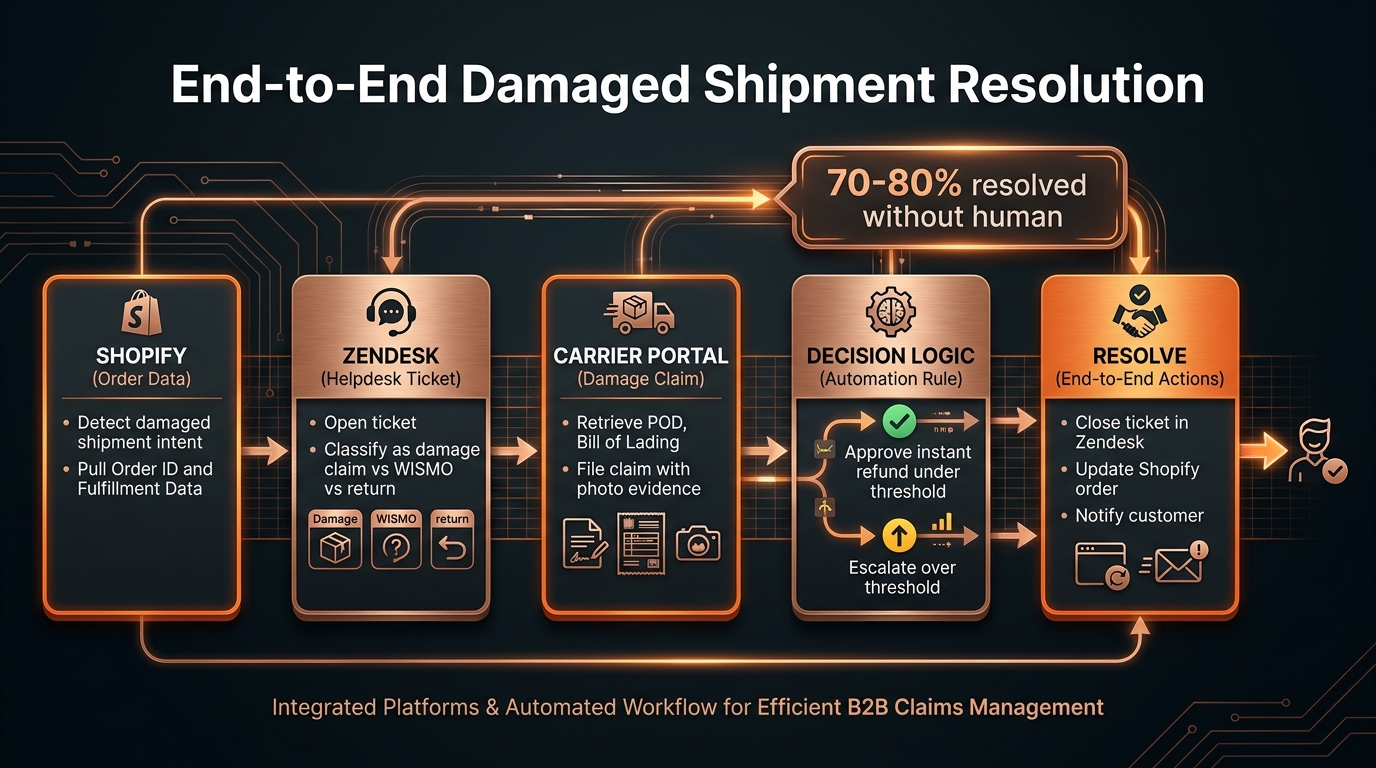
How CorePiper Resolves a Damaged-Shipment Ticket End-to-End (Across Shopify + Zendesk + Carrier)
When a customer reports a damaged shipment, CorePiper's SOP-driven AI agent reads the order from Shopify, updates the ticket in Zendesk, retrieves proof of delivery and damage records from the carrier portal, applies your refund or claim thresholds, and closes the case — all in a single automated workflow that runs without human involvement for routine cases.
TL;DR: The 5-Step End-to-End Resolution Workflow
| Step | What Happens | System Touched | Typical Time |
|---|---|---|---|
| 1. Intake | Customer messages "my package arrived damaged" — ticket opens in Zendesk | Zendesk | Instant |
| 2. Order lookup | Read Shopify: order value, carrier, tracking number, fulfillment date | Shopify Admin API | Under 1 min |
| 3. Carrier data | Pull POD, last-mile scan, damage status from carrier API | Carrier API | Under 1 min |
| 4. Decision | Below threshold → instant refund or reship; above threshold → file claim and escalate | Internal SOP logic | Under 1 min |
| 5. Resolve | Close Zendesk ticket, trigger Shopify refund, notify customer | Zendesk + Shopify | Under 1 min |
What Does "End-to-End" AI Ticket Resolution Actually Mean?
Most AI support tools that advertise "end-to-end resolution" operate inside one system. They draft a reply in your helpdesk. The problem with a damaged-shipment ticket is that it touches at least three systems by definition: the helpdesk where the customer submitted the complaint, Shopify where the order and fulfillment data lives, and the carrier portal where proof of delivery and damage documentation are stored.
A resolution without all three is incomplete. An AI that checks Shopify but cannot query the carrier portal will tell a customer their package "was delivered" when the carrier's own records show a damaged-at-delivery scan. An AI that queries the carrier but cannot write back to Shopify cannot issue the refund. An AI that can do both but only operates inside Zendesk cannot update Shopify's order record, which means your fulfillment reporting stays out of sync.
End-to-end resolution means the case is closed in every system it touched. The Zendesk ticket is closed. The Shopify order is updated — refund issued, reship initiated, or claim filed. The customer receives a final communication. For above-threshold cases, the carrier claim is filed with evidence attached before the case reaches a human agent's queue.
How Does CorePiper Read the Right Shopify Order?
When a damaged-shipment ticket arrives, CorePiper needs the Shopify order record before it can do anything else. Order value determines whether the case can be auto-resolved or must escalate. Carrier and tracking number determine which carrier API to query. Fulfillment date determines whether the case is inside the carrier's claim window.
CorePiper connects to the Shopify Admin API with read access to the Orders and Fulfillments objects. When a ticket comes in, the agent identifies the order through one of three paths:
Order ID in the ticket text. The customer includes their order number in the message. The agent parses it directly.
Customer email lookup. The agent reads the customer's email from the helpdesk ticket, queries Shopify for orders associated with that email in the past 30–60 days (configurable), and returns the most recent relevant fulfillment.
Explicit confirmation. If multiple recent orders exist, the agent asks the customer to confirm the order number before proceeding. One verification step is cheaper than resolving the wrong order.
Once the order is confirmed, CorePiper reads: order ID, total value, line items, shipping address, fulfillment status, carrier, tracking number, and fulfillment date. This data is the foundation for every step that follows, and it's available in under a minute without a human opening Shopify at all.
How Does CorePiper Access the Carrier Portal?
Carrier portals are where damaged-shipment cases get stuck. A human agent typically logs into the carrier's claims portal, uploads photos, fills out claim forms, and tracks claim status — a workflow that takes 20–40 minutes per case and requires credentials not every agent holds.
CorePiper accesses carrier tracking and claims data via API for major carriers including UPS, FedEx, USPS, and DHL. The SOP specifies which carrier API to call based on the carrier code pulled from the Shopify fulfillment record. The agent:
- Calls the carrier tracking API to retrieve the last-mile scan history, delivery confirmation status, and any exception codes that flag damage, loss, or delivery failure at the time of delivery.
- Reads the proof-of-delivery record — timestamp, signature if captured, and any carrier-noted exceptions.
- For formal claim workflows, calls the carrier claims API to initiate a claim with order value, damage description, and available documentation pre-attached.
For carriers without a public claims API, CorePiper works with documents the customer uploads to the helpdesk ticket — damage photos, packaging images, labels — and routes the case to a human agent with all documentation pre-organized and the claim template pre-filled. The difference in human effort between "start from scratch" and "verify and submit" reduces agent handle time on above-threshold cases significantly.
For teams handling LTL freight claims and carrier disputes rather than parcel claims, the same architecture applies — the SOP maps to freight carrier APIs and bill-of-lading data, and the claim-window logic accounts for carrier-specific regulations rather than parcel terms.
What Decision Logic Determines Refund vs. Formal Claim?
Not every damaged-shipment case should follow the same resolution path. A low-value order with a photo of dented packaging warrants an instant refund or replacement. A high-value B2B order with a carrier exception code at delivery warrants a formal claim with documentation — not an automatic refund your finance team can't reconcile.
CorePiper applies configurable decision logic at the resolution step:
What triggers auto-approve?
All conditions must be true:
- Order value below your configured threshold (e.g., under $200)
- Customer account not flagged for prior fraudulent damage claims
- At least one corroborating signal: a carrier exception code for damaged delivery, a customer-uploaded damage photo, or a delivery exception noted in the POD
- Case within the return or claim window (configurable per carrier SLA)
When auto-approve conditions are met, CorePiper triggers a Shopify refund via the Admin API for the damaged item value, updates the Zendesk ticket with the resolution summary, and sends the customer a confirmation with refund timeline. Ticket closes. A human never touches it.
What triggers escalation?
Any one of the following conditions routes the case to a human:
- Order value above your configured threshold
- Customer flagged in a fraud-review list
- Missing carrier evidence (no exception code, no POD, customer-reported damage with no carrier data to corroborate)
- High-value SKU requiring inventory reorder approval before a reship is confirmed
When escalation triggers, CorePiper files the carrier claim with available evidence attached, writes a structured handoff note to the agent queue — order ID, carrier claim number, damage evidence status, customer history, and suggested next action — and sends the customer a holding message with the correct SLA window. When the human agent opens the ticket, the claim is already filed and the case is ready for review, not triage.
This is the key distinction between end-to-end resolution and deflection: even cases that require human judgment reach the agent faster and with more complete context than they would through a manual workflow.
Why Can't a Single-Helpdesk AI Agent Do This?
This is the right question to ask any AI support vendor before buying.
A Zendesk AI agent lives inside Zendesk. It can read the ticket, draft a reply, and add a comment. What it cannot do natively is read your Shopify order record, trigger a Shopify refund, or call the UPS claims API. Those cross-system actions require credentials for each external system AND a SOP that sequences the calls in the correct order.
In practice, single-helpdesk AI agents — Zendesk AI, Intercom Fin, Gorgias AI — operate within their platform's own integration ecosystem. They can surface ticket history, suggest macros, and draft responses. They can often pull basic Shopify order data via native app connections. But the carrier portal connection, the Shopify refund trigger, and the claim-filing step in sequence are typically out of scope without significant custom engineering on your side.
Gorgias AI is purpose-built for Shopify and genuinely strong at reading order data from within the Gorgias interface. But its resolution scope is Gorgias — not Zendesk, not Jira, not Salesforce, and not the carrier claims API. Intercom Fin excels at ticket drafts and knowledge-base lookups across its own channels. Neither is designed for cross-system write operations that span three separate APIs in sequence.
CorePiper's architecture is built for this workflow from the ground up. A SOP defines the sequence of API calls, data reads, decision gates, and write-back actions. The SOP encodes once what a senior support agent would do manually — and the agent executes it on every ticket, at the same standard, without needing to log into three different portals.
For teams running Zendesk with freight claims workflows, this cross-platform SOP execution is the difference between automation that handles 20–30% of damage tickets and automation that handles 70–80%.
How Does CorePiper Close the Ticket in Every System?
After the decision logic runs, CorePiper executes a coordinated close across all three systems.
In Shopify: Issues the refund via Admin API for auto-approve cases, or flags the order with a claim-in-progress status for escalation cases. Line items are marked appropriately so your inventory and revenue reporting stay clean.
In Zendesk: Adds a resolution note (auto-resolved) or a structured handoff note (escalation) to the ticket. Updates the ticket status to Solved or Pending accordingly. Applies a tag — for example, damage-claim-auto-resolved or damage-claim-escalated — for reporting and audit purposes.
Customer communication: Sends the customer a final message confirming the resolution — refund timeline, reship tracking, or claim status — from within Zendesk so the full communication history stays in one thread.
For pricing models where you pay per resolved case, CorePiper counts a case as resolved when the Zendesk ticket closes AND the Shopify action is confirmed. You pay for completion, not for the attempt.
What Does the Full Timeline Look Like?
From first customer message to closed case:
- Under 5 minutes for auto-resolved cases with clean carrier data and below-threshold order values
- Under 5 minutes to human handoff for escalation cases — the agent receives a fully pre-filled case, not a blank ticket requiring investigation from scratch
- A fraction of previous handle time for the human agent to review and submit the formal claim in escalation cases, because the carrier claim is already filed and all documentation is attached before the agent opens the ticket
For teams handling 50–200 damaged-shipment tickets per week, the compounding effect is significant. Even if 40% of cases require human review, they arrive at the agent queue with claims filed, order data verified, and customer communication sent — meaning humans handle exception management instead of repetitive data gathering.
Is This Available Today?
Yes. The damaged-shipment SOP is a standard workflow in CorePiper. Setup requires connecting your Shopify store via OAuth, your Zendesk workspace via API key, and your carrier API credentials — typically completed in one day for a single carrier, three to five days for multi-carrier configurations with custom thresholds and escalation rules. No code is required on your side; the SOP is configured in CorePiper's interface, not deployed by your engineering team.
For questions about specific carriers, order volumes, or refund threshold configuration, the demo walkthrough goes through a live damaged-shipment resolution using your actual Shopify and Zendesk environment.
Mustafa Bayramoglu is the founder of CorePiper (YC W19). CorePiper builds SOP-driven AI agents for cross-platform case operations across Shopify, Zendesk, Gorgias, Salesforce, and Jira.
See End-to-End Damaged-Shipment Resolution in 30 Minutes
CorePiper's SOP-driven AI agent reads your Shopify order data, your helpdesk ticket, and your carrier portal in a single automated workflow — then resolves the case or escalates with a fully pre-filled handoff. No rip-and-replace of your current stack. Book a walkthrough to see the exact workflow.