
How to Orchestrate Salesforce, Zendesk, and Jira Together with AI
Connect Salesforce, Zendesk, and Jira through a single SOP-driven AI agent layer — no custom middleware, no brittle iPaaS flows. Here is the cross-platform orchestration approach that keeps case context intact across all three platforms.
 Mustafa BayramogluMay 2, 202613 min read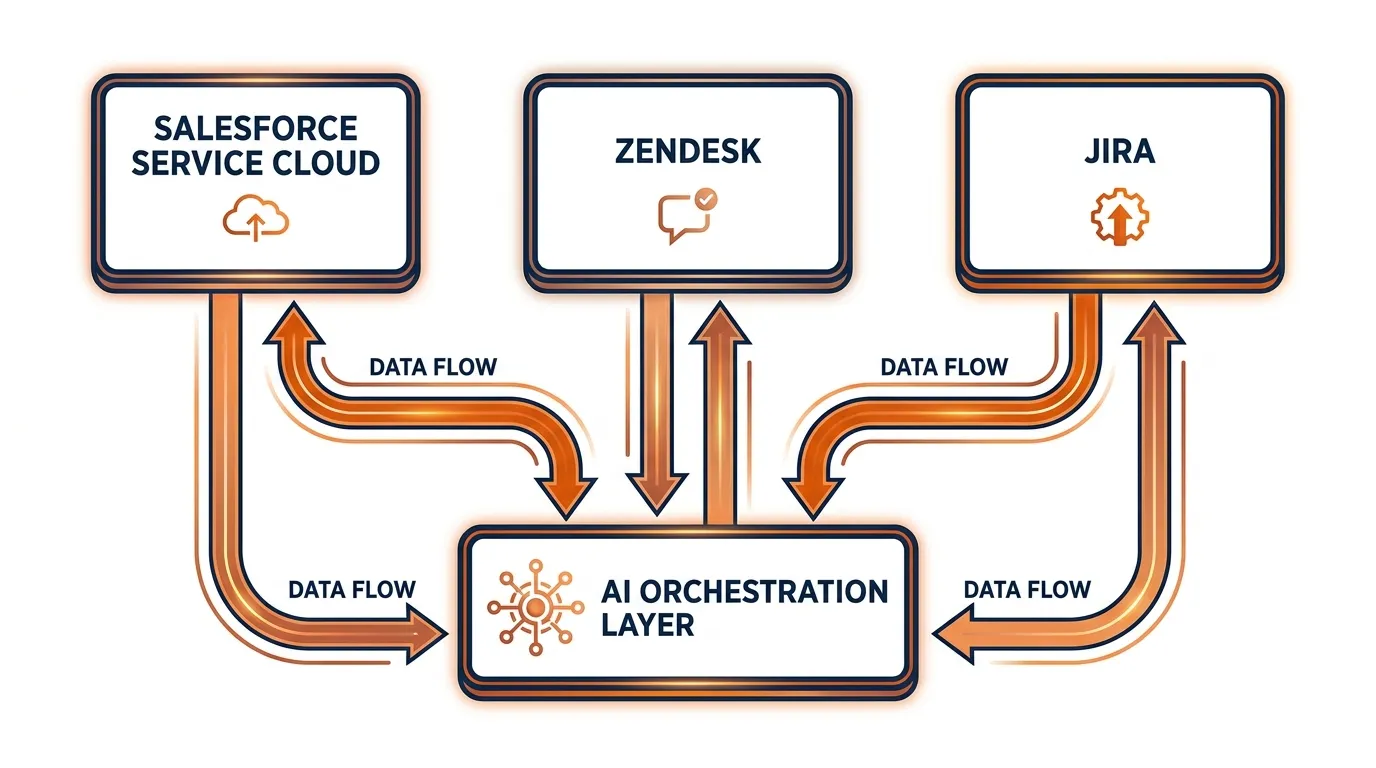
How to Orchestrate Salesforce, Zendesk, and Jira Together with AI
Orchestrating Salesforce, Zendesk, and Jira with AI means routing cases across all three platforms through a single SOP-driven agent layer — without building custom integrations or maintaining brittle iPaaS flows. The agent reads full case context from each system and executes the right actions in the right order, keeping records synchronized and workflows moving from first customer contact to final resolution.
TL;DR: Salesforce–Zendesk–Jira Orchestration at a Glance
| Dimension | Traditional (iPaaS / Custom Code) | SOP-Driven AI Orchestration |
|---|---|---|
| Setup time | 6–18 months | 3–5 business days |
| Maintenance overhead | High — breaks on API version changes | Low — agent adapts without reconfiguration |
| Context transfer | Field-mapping only | Full case context: notes, history, attachments |
| Decision logic | Trigger / rule based | SOP-driven with cross-system case awareness |
| Cross-platform visibility | Siloed per connector | Unified case state across all three platforms |
| Escalation handling | Manual routing | Automatic routing with context pre-loaded |
| Audit trail | Fragmented across three systems | Consolidated in orchestration log |
Why Do Salesforce, Zendesk, and Jira End Up in the Same Workflow?
Enterprise operations teams rarely deploy all three platforms as part of a deliberate architecture — they inherit them. Salesforce arrives with the sales team, expands into Service Cloud as the company grows, and becomes the account record of truth for revenue, contracts, and customer tier. Zendesk arrives from the support team, who needed a customer-facing ticketing interface faster than IT could complete a Salesforce Service Cloud rollout. Jira arrives from engineering or operations, who needed granular work-item tracking that neither Salesforce cases nor Zendesk tickets were designed to provide at scale.
The result is that every non-trivial case eventually touches all three. A logistics operations team might receive an inbound shipment exception via Zendesk, need to flag the Salesforce account's revenue-at-risk field, and create a Jira issue to track the carrier dispute investigation. A SaaS support team might resolve 80% of Zendesk tickets without touching Salesforce, but every escalation that requires an engineering fix or a contract renewal touch creates a Jira issue and a Salesforce case simultaneously.
This reality — three platforms, one case — is the integration problem that connectors and iPaaS tools consistently fail to solve. Not because connecting the APIs is technically difficult, but because meaningful case context does not transfer cleanly through field mappings. A Jira issue created by a Zendesk-to-Jira connector contains the ticket number and subject line. It does not contain the Salesforce account tier, the prior case history, the customer's revenue profile, or the internal notes added by the support agent who first triaged the case.
What Breaks When You Try to Integrate Salesforce, Zendesk, and Jira Manually?
The failure modes are predictable. Teams that have run this integration with native connectors or iPaaS flows for more than six months recognize the same set of recurring problems.
Context loss at every escalation. When a Zendesk ticket escalates to Jira via a webhook, the Jira issue typically arrives with four fields: ticket ID, customer email, subject, and description. Missing from that issue: the full conversation thread, the Salesforce account tier and open contract value, all agent-added internal notes, previous cases for the same account, and any attachments the customer uploaded. The receiving team asks Slack for background. Two to four days of resolution time evaporate before the investigation begins.
Bidirectional sync breaks on platform updates. Maintaining a sync between Salesforce case status and Zendesk ticket status requires a connector that listens to Salesforce platform events. That connector breaks when Salesforce updates its event payload format — which happens at least twice per year across Salesforce platform releases. After a silent failure, the Salesforce case shows "Resolved" while the Zendesk ticket still shows "Open." Customer-facing agents work from the Zendesk view; operations managers work from the Salesforce view. Neither knows the other's state is wrong.
iPaaS flows lack case-state awareness. A Zapier or Workato flow can trigger when a Zendesk ticket tag equals "escalate." It cannot execute the logic an experienced operations manager applies: if tag equals escalate AND Salesforce account tier equals Enterprise AND no open Jira issue exists for this account in the last 30 days AND the revenue-at-risk field exceeds $50,000, create a priority-one Jira issue and notify the account executive. That decision requires reading three systems simultaneously and applying conditional logic across the full case state — which is precisely what SOP-driven AI orchestration does.
Maintenance compounds over time. A full Salesforce–Zendesk–Jira integration setup typically involves 8–15 individual iPaaS flows or webhook handlers. Each annual platform release from Salesforce, Zendesk, and Jira (six to twelve events per year combined) breaks at least one flow. After 18 months, maintaining the integration set is a part-time job — one that typically falls to whoever originally built it and is never formally resourced.
How Does AI Orchestration Differ From a Salesforce–Zendesk–Jira Connector?
AI orchestration replaces the trigger-action model with an SOP model. Instead of defining what should happen when a specific field changes, you define what the agent should do at each step of a case lifecycle — and the agent reads across all three systems to execute the SOP correctly at every step.
The operational difference is most visible in three scenarios.
When context determines the action. A connector creates a Jira issue when a trigger fires. An AI agent reads the Salesforce account record, the full Zendesk ticket thread, and the current Jira issue backlog before deciding whether to create a new issue, link to an existing one, reassign the priority of an open issue, or escalate to a human reviewer. The right action depends on case context that no single-trigger connector can encode.
When multiple systems must update in sequence. Closing a freight damage claim might require: updating the Zendesk ticket to "Resolved," recording the recovery amount in the Salesforce case, creating a Jira task for finance reconciliation, and triggering a Zendesk satisfaction survey. An iPaaS flow chains these steps sequentially and stops at the first failure, leaving partial state. An AI agent executes the full SOP as an atomic unit, logs every step's outcome, and surfaces any failure with the full case context attached.
When the process evolves. When your operations team updates the escalation criteria — adding a new account tier, changing the revenue threshold for priority routing, or updating the Jira project for a new product line — you update the SOP definition. You do not rebuild 12 connector flows across three different configuration dashboards.
What Does a Working Cross-Platform AI Orchestration Actually Look Like?
Three patterns cover the majority of value in logistics and enterprise operations teams.
Escalation with full context transfer. A Zendesk ticket arrives tagged for carrier escalation on a damaged shipment. The AI agent reads the Salesforce account record (account tier, open contract value, account executive name), the full Zendesk thread (customer messages, agent notes, damage photos), and any existing Jira issues for the same account. It creates a Jira issue pre-populated with account context, claim value, carrier name, damage photo links, and the complete Zendesk thread — then updates the Zendesk ticket to "Escalated" and posts a public comment with the expected resolution timeline. The receiving Jira assignee has everything needed to begin the carrier dispute immediately. No Slack thread required.
Bidirectional status sync with business-logic gating. When a Jira issue transitions from "In Progress" to "Resolved," the agent does not simply push a status update to Zendesk. It applies the closing SOP: reads the Jira resolution notes, updates the Zendesk ticket with a public-facing summary of the resolution, updates the Salesforce case with the resolution date and recovery amount, and queues the satisfaction survey only if the customer-facing interaction in Zendesk had no open complaint thread. All of this executes within 90 seconds of the Jira status change. No agent manually updates three systems. For more on how this works at the claims layer, see the OS&D claims automation workflow.
Account-level case aggregation for enterprise accounts. A Salesforce Enterprise account accumulates three open Zendesk tickets and two open Jira issues simultaneously. A connector has no view of this accumulation — each platform sees only its own items. The AI orchestration layer monitors cross-platform case load per account and fires an alert SOP when the threshold is crossed: it flags the account executive in Salesforce, creates a consolidated case summary linking all five items, sets a shared resolution deadline in both Jira and Zendesk, and schedules a weekly sync comment on every open item until the case load drops below threshold.
This account-level view is the output that neither Salesforce, Zendesk, nor Jira generates natively — it exists only in the cross-platform orchestration layer. For the full technical architecture behind it, see AI case routing across Salesforce and Jira.
How Do You Configure AI Agents to Work Across All Three Platforms?
The technical steps — API credentials, webhook configuration, SOP mapping — are documented in the step-by-step guide above. The strategic decisions that determine whether the orchestration succeeds happen before any technical configuration begins.
Scope the case types before connecting anything. The most common integration mistake is connecting Salesforce, Zendesk, and Jira first and defining the logic second. This produces a set of flows that technically syncs data but enforces no meaningful process. Before writing a single API call, identify the three to five cross-platform case types that consume the most manual coordination time. Write the full SOP for each — entry trigger, reads, decisions, writes, error handling — and validate it with the people who currently do the work by hand. The SOP is the AI agent's instruction set; its quality determines the orchestration's quality.
Declare the system-of-record hierarchy and enforce it. When three platforms hold overlapping data, they will drift out of sync. The Salesforce case status will say "Open." The Zendesk ticket will say "Pending." The Jira issue will say "Resolved." The AI agent needs a declared authority hierarchy to resolve conflicts. In most deployments: Jira issue status is the resolution authority for whether technical work is complete; Zendesk ticket status is the authority for whether the customer has confirmed resolution; Salesforce case status is the business record updated last, after both Jira and Zendesk confirm closure. Encoding this hierarchy in the SOP prevents the agent from closing a Salesforce case prematurely because a Jira issue resolved while the Zendesk thread still had an open customer complaint.
Build audit logging into the orchestration from the start. Cross-platform orchestration failures are silent by default. The agent attempts a Salesforce record update, receives a permission error, logs the failure internally, and continues the case workflow. The Salesforce case stays stale. A week later, the account executive asks why a closed case still appears open. Without audit logging on every write operation — timestamped, with the full API response — diagnosing this failure requires reconstructing the event sequence from three separate platform audit trails. Configure structured logging before go-live; retrofitting it after a production failure is significantly more expensive.
For enterprise operations teams evaluating this approach in the context of Salesforce Agentforce escalation and Jira case routing, the key architectural question is whether the orchestration needs to handle cases that Salesforce did not originate. If a meaningful share of your cases start in Zendesk and only touch Salesforce for account record purposes — which is the standard pattern in logistics, claims, and multi-platform operations teams — a Salesforce-native orchestration layer cannot be the system of truth for the full case lifecycle.
What Results Should You Expect From Salesforce–Zendesk–Jira AI Orchestration?
Teams implementing SOP-driven cross-platform orchestration report four consistent outcome clusters.
Shorter case cycle times. Eliminating manual context transfer between platforms removes two to four hours per escalated case. For a team that escalates 50 cases per week, that is 100–200 hours of recaptured capacity per week — hours previously spent copying case context between systems, reconciling status discrepancies, and assembling background for the next team in the workflow. The time savings compound on cases that require multiple platform round-trips before resolution.
Higher first-attempt resolution on escalations. When Jira issues arrive pre-populated with full Salesforce account context and Zendesk conversation history, the engineering or operations team resolves the root issue in the first investigation cycle rather than opening a back-and-forth thread to gather missing information. Escalation resolution rates typically improve 25–40% within the first 90 days of orchestration go-live.
Accurate cross-platform case status visible to all teams. The most immediately visible outcome is that Salesforce, Zendesk, and Jira reflect consistent case states. Operations managers stop maintaining manual tracking spreadsheets to reconcile what each platform claims about the same case. VPs of Operations stop asking support managers to pull status from three different dashboards before a weekly review meeting. The orchestration log becomes the single authoritative view of every case's current state and history.
Audit-ready case trails for enterprise compliance. Every cross-platform action is logged against the SOP step that triggered it — timestamped, with the platform, the object updated, and the outcome recorded. When a case is audited — for a carrier dispute, a regulatory inquiry, or an enterprise contract review — the complete action trail across all three systems is retrievable from the orchestration log rather than assembled from three separate platform export requests. For logistics and claims teams running automated freight claims workflows, this audit trail satisfies most carrier investigation requests without additional documentation work.
Buyers evaluating cross-platform AI agents should focus on whether the tooling is designed around case workflows spanning multiple systems or around ticket-level resolution inside a single helpdesk. The latter category — which covers most purpose-built support AI tools — is not architecturally designed to maintain case context across Salesforce, Zendesk, and Jira simultaneously. See the Ada AI alternative comparison and Decagon alternative comparison for a feature breakdown of how cross-platform SOP orchestration differs from single-platform AI agents.
Related Reading
- AI case routing across Salesforce and Jira — routing logic, escalation triggers, and queue management
- Salesforce and Jira case escalation automation guide — step-by-step escalation SOP patterns
- How to automate OS&D claims processing end-to-end — cross-platform orchestration applied to logistics claims (calendar Week 2, row 5)
- Logistics claims automation solution — CorePiper's approach to multi-platform logistics case management
About the author: Mustafa Bayramoglu is the founder of CorePiper. He previously co-founded a YC W19 logistics company and has spent the last decade building automation for freight operations, claims workflows, and B2B case management across Salesforce, Zendesk, and Jira.