
How to Automate Customer Support Across Shopify, Zendesk, and Salesforce at Once
Step-by-step guide to running one AI agent across Shopify, Zendesk, and Salesforce — resolving tickets end-to-end without separate vendor add-ons for each platform.
 Mustafa BayramogluJuly 14, 202611 min read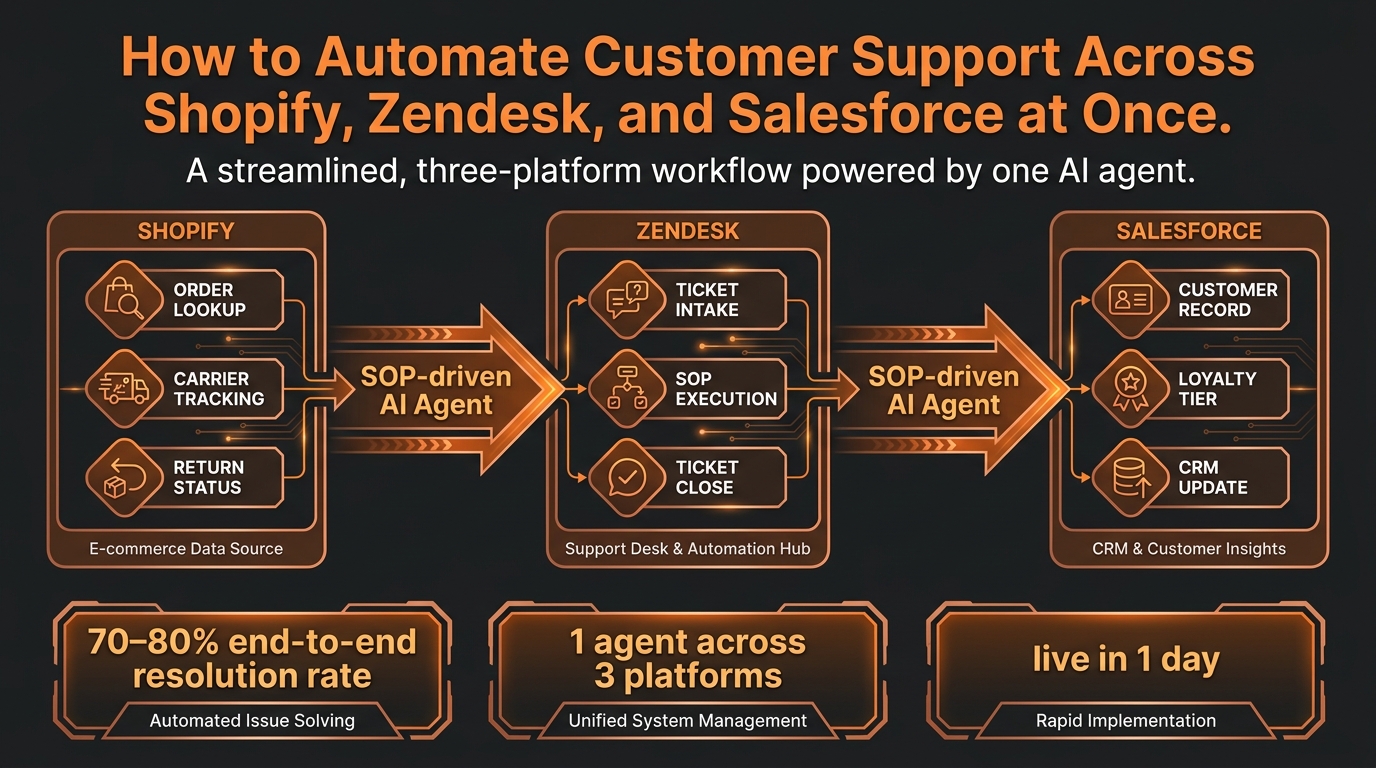
How to Automate Customer Support Across Shopify, Zendesk, and Salesforce at Once
Automating customer support across Shopify, Zendesk, and Salesforce requires a single SOP-driven AI agent with write-access API connections to all three platforms — not separate AI add-ons from each vendor. One agent pulls order data from Shopify, manages ticket workflow in Zendesk, checks the customer record in Salesforce, and closes the loop end-to-end. Teams using this architecture achieve 70–80% end-to-end resolution on e-commerce support tickets.
TL;DR: Cross-Platform Support Automation vs. Separate Vendor Add-Ons
| Approach | System access | Resolution capability | Typical resolution rate | Cost model |
|---|---|---|---|---|
| Separate AI add-ons (Zendesk AI + Gorgias AI + Einstein) | Each tool sees its own data only | Deflect or escalate cross-system tickets | 30–50% (single-platform ceiling) | Per-seat or per-conversation per vendor |
| Cross-platform SOP-driven agent | Reads and writes across Shopify, Zendesk, Salesforce | Executes end-to-end on cross-system tickets | 70–80% | Per resolved case |
| Human-only support | Full system access | Resolves all ticket types | 100% (but at $13.50/contact per Gartner) | Per seat + overhead |
Why do separate AI add-ons fail at cross-platform tickets?
Most e-commerce support stacks include a helpdesk (Zendesk, Gorgias, Freshdesk), a commerce platform (Shopify), and a CRM (Salesforce). Each vendor now sells an AI add-on for their own product: Zendesk AI, Gorgias AI Automate, Salesforce Einstein Service.
The problem is architectural. Each tool only sees its own platform's data:
- Zendesk AI reads ticket history and past conversations but cannot look up live Shopify order status or check a Salesforce loyalty tier.
- Gorgias AI Automate can pull Shopify order data (it's Shopify-native) but cannot update a Salesforce record or handle a ticket that lives in Zendesk or Freshdesk.
- Salesforce Einstein handles CRM-routed cases but has no native connection to Shopify order data or third-party carrier APIs.
The result: any ticket that requires context or action from more than one system hits a ceiling. A WISMO ticket where the customer's order status is in Shopify, the ticket is in Zendesk, and the customer's VIP tier is in Salesforce cannot be resolved end-to-end by any of these tools acting alone. The ticket escalates to a human — the most expensive resolution path.
This is the root cause of low AI resolution rates: not the AI's language capability, but its system access. A model that can only read its own platform's data will always hit an escalation ceiling on cross-system tickets.
What does a cross-platform support workflow actually look like?
A resolved cross-platform ticket moves through five stages. Here is what each stage does and which system it touches:
Stage 1 — Intake (Zendesk) The ticket arrives in Zendesk via email, chat, or web form. The AI agent reads the ticket content, classifies the intent (WISMO, refund request, address change, VIP complaint, carrier dispute), and determines which systems it needs to query.
Stage 2 — Data retrieval (Shopify + Salesforce) Simultaneously, the agent:
- Pulls the Shopify order record: order ID, item, SKU, fulfillment status, tracking number, carrier, last carrier scan, delivery estimate.
- Reads the Salesforce customer record: loyalty tier, lifetime value, prior contacts, open cases, any VIP flags.
This dual lookup — completed in under two seconds — gives the agent context no single-platform tool has. A customer asking "where is my order?" who is a Gold loyalty member with $4,200 LTV receives a different response than an anonymous first-time buyer.
Stage 3 — SOP execution The agent matches the classified intent and the retrieved data against the applicable SOP. Common SOP logic:
- If order is delayed more than 72 hours and customer tier is Gold or above, issue proactive resolution (store credit + apology + escalation to carrier), not just a status update.
- If order is within the 30-day return window, item is not final-sale, and order value is below $500, issue Shopify refund or return label without requiring manager approval.
- If carrier shows delivery confirmed but customer claims non-receipt, pull the proof-of-delivery record and escalate to carrier dispute if POD is unavailable.
Stage 4 — Action execution (Shopify + Zendesk + Salesforce) The agent executes approved actions across all three platforms:
- Issues the Shopify refund via Admin API (
POST /orders/{id}/refunds) or generates the return label. - Closes the Zendesk ticket with a resolution note and sends the customer confirmation.
- Updates the Salesforce case record with resolution outcome, adds a contact note, and triggers a loyalty point adjustment if warranted.
Stage 5 — Audit and close Every action is logged: what data was retrieved, what SOP was applied, what actions were executed, and the resolution timestamp. This audit trail serves compliance, quality review, and SOP refinement.
The entire sequence runs in under 30 seconds for routine cases. The human support team sees a closed ticket with a full audit trail — not an escalation request.
How do you configure one AI agent to work across Shopify, Zendesk, and Salesforce?
Setup follows four steps. The primary work is policy documentation, not custom engineering.
Step 1 — Connect the APIs A cross-platform agent needs write-access connections to all three platforms:
- Shopify Admin API: order reads, refund processing, return label generation, address updates. Standard OAuth integration; no custom code required with a purpose-built agent platform.
- Zendesk API: ticket read and write, status update, internal note creation, tag application. Zendesk's REST API is well-documented and stable.
- Salesforce REST API: customer record reads, case logging, contact note creation, loyalty field reads. Requires Salesforce API access (available on Professional tier and above).
With a pre-built cross-platform agent framework, these API connections are configured via credential entry rather than custom development. Setup time for integrations: two to four hours per platform.
Step 2 — Document your SOPs This is the primary labor investment and the primary quality driver. For each ticket type you want to automate, document:
- Trigger: what intent classification and data conditions activate this SOP.
- Decision logic: threshold values, eligibility checks, and conditional branches (e.g., refund auto-approve below $300, manager-flag above $300).
- Actions: exactly what API calls to execute, in what order, with what parameters.
- Escalation criteria: conditions that require human review rather than autonomous resolution.
Teams with existing written support policies typically convert them to SOP format in four to eight hours per major ticket type. Teams without written policies need to document their current human agent practice first — this is the most common implementation bottleneck.
Step 3 — Configure routing and escalation Set up Zendesk routing rules to route tickets matching your SOP coverage to the AI agent queue. Configure escalation thresholds clearly: what goes straight to human, what the agent can resolve autonomously, and what the agent resolves with a human in the loop for approval.
A common starting configuration:
- AI autonomous: WISMO, standard refunds below threshold, address changes, return initiations.
- AI-assisted (human approves): High-value refunds, suspected fraud, VIP first contacts, carrier dispute initiations.
- Human-only: Legal escalations, account security, multi-contact disputes, media/social complaints.
Step 4 — Run a supervised pilot Before enabling autonomous resolution, run the agent in shadow mode for one to two days: it executes the resolution logic internally but surfaces the proposed action to a human for approval before execution. Review the proposals, confirm the SOP logic is correct, and flip to autonomous mode when the false-positive rate is below your threshold (typically below 5%).
SOP-driven agents configured through this process typically achieve 70–80% containment in the first week and improve from there as SOP coverage expands to additional ticket types.
What ticket types resolve best with cross-platform automation?
Not all tickets benefit equally from cross-platform automation. Here is the resolution rate breakdown by type:
| Ticket type | Platforms involved | Automation rate | Why it's cross-platform |
|---|---|---|---|
| WISMO (order status) | Shopify + Zendesk | 80–90% | Carrier data is in Shopify; ticket is in Zendesk |
| Standard refund/return | Shopify + Zendesk | 70–80% | Execution requires Shopify API; ticket management in Zendesk |
| VIP order priority or exception | Shopify + Zendesk + Salesforce | 65–75% | Loyalty tier and LTV in Salesforce determine handling policy |
| Address change (pre-shipment) | Shopify + Zendesk | 60–70% | Shopify Admin API write access required; Zendesk ticket management |
| Carrier dispute initiation | Shopify + Zendesk | 45–60% | POD retrieval, claim filing requires carrier API + Shopify order data |
| Complex multi-contact disputes | All three | Human-handled | Requires relationship context and judgment beyond SOP scope |
The pattern: tickets that require data from more than one platform and a defined, repeatable action are the highest-value automation targets. Tickets that require judgment about ambiguous facts or relationship management belong with humans.
Salesforce adds the most value on VIP handling. When the agent knows a customer's lifetime value before deciding how to handle their complaint, the resolution reflects that context — which is why customers with high LTV receive proactive resolution rather than a standard response. The Salesforce Service Cloud AI agent integration makes this loyalty-tier logic configurable without custom code.
What should you measure to confirm the system is working?
Five metrics confirm the cross-platform automation is performing correctly:
1. Cross-platform resolution rate The percentage of tickets touching more than one system that the AI agent resolves end-to-end without human intervention. Target: 70–80% at 30 days post-launch. Below 50% indicates either insufficient SOP coverage or a system access gap.
2. Escalation quality rate The percentage of human-escalated tickets that required human judgment, versus tickets escalated because the agent hit a system access or SOP coverage gap. Target: escalations should be genuine edge cases, not system failures. Review the escalation reason log weekly for the first month.
3. Zendesk handle time on AI-resolved tickets Cross-platform tickets resolved by the AI agent should show near-zero human handle time in Zendesk. If agents are manually reviewing and adjusting AI-resolved tickets, the SOP logic needs refinement.
4. Repeat-contact rate by resolution type Tickets closed by the AI agent should have a lower repeat-contact rate than human-resolved tickets of the same type. AI-resolved tickets execute the action at close, while human-resolved tickets sometimes log resolution without completing the underlying action. If repeat contacts on AI-resolved tickets are above 10%, the execution logic has a gap.
5. Salesforce case log completeness Every ticket touched by Salesforce data should generate a complete case log in Salesforce. Gaps in the case log indicate API connection failures or incomplete SOP execution steps. Review Salesforce case logs weekly for the first two weeks post-launch.
The one-agent approach versus per-vendor add-ons
The economics differ beyond the resolution rate. Separate AI add-ons from Zendesk, Shopify, and Salesforce mean three vendor contracts, three billing cycles, three support relationships, and three sets of configuration to maintain when your policies change.
More importantly, separate tools cannot share context. A policy change — raising the auto-approve refund threshold from $300 to $500, for example — requires updating the SOP in three separate tools, none of which can see what the others are doing.
A single cross-platform agent has one policy layer. When the threshold changes, it changes once. Every platform the agent touches reflects the updated policy immediately.
End-to-end resolution — pulling data, executing action, confirming, and closing the loop — is only possible when one agent has read and write access to every system in the resolution sequence. A tool that can read Zendesk but not write to Shopify will always hand off the execution step to a human. The handoff is where latency, error rate, and cost concentrate.
Mustafa Bayramoglu is the founder of CorePiper (YC W19). He previously built and scaled operations across enterprise SaaS and logistics, and writes about SOP-driven AI automation for customer operations teams.