
How AI Agents Use Your SOPs to Resolve Tickets (Workflows → Agents → Actions)
SOP-driven AI agents don't answer questions — they execute your procedures end-to-end. Here's how the Workflows → Agents → Actions pipeline works for e-commerce support, and why most brands go live within a day.
 Mustafa BayramogluJuly 11, 202615 min read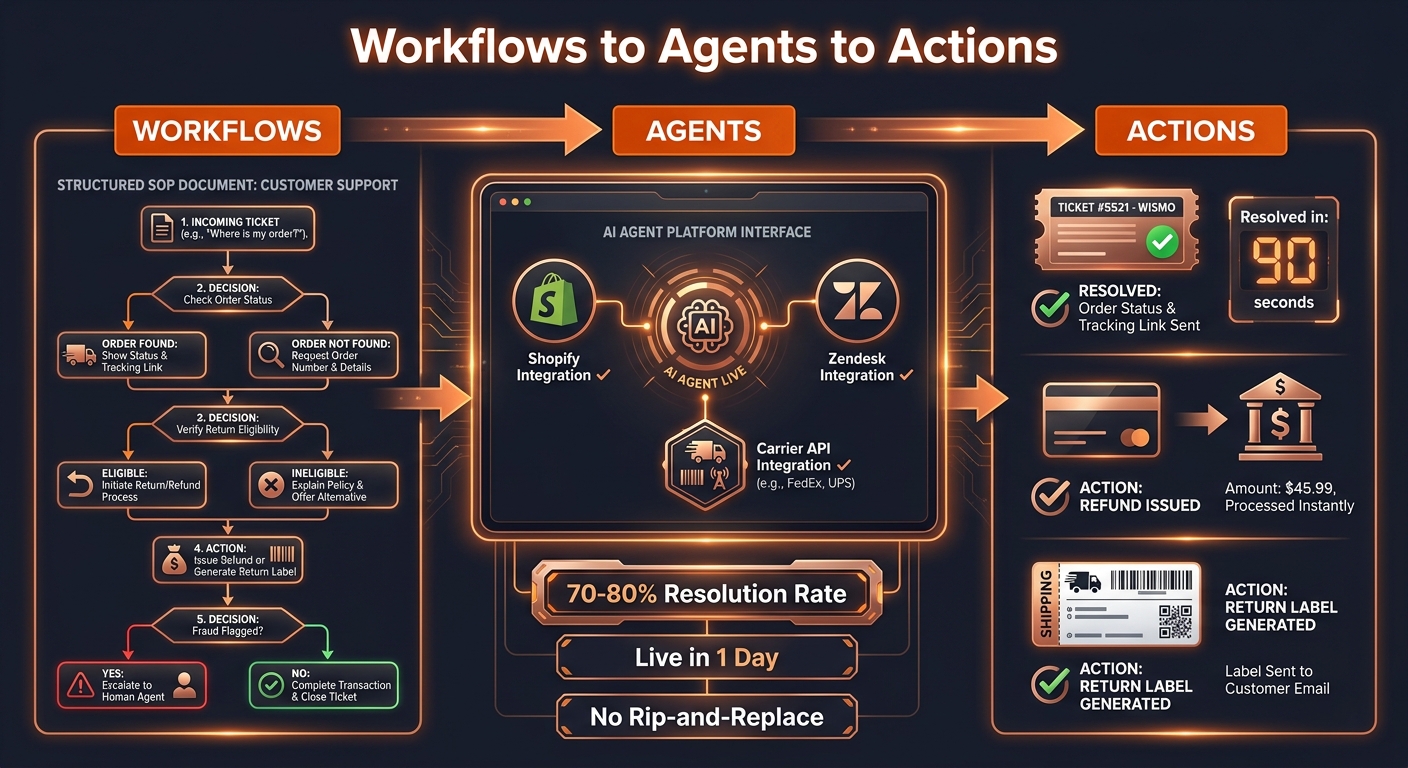
How AI Agents Use Your SOPs to Resolve Tickets (Workflows → Agents → Actions)
SOP-driven AI agents work in three steps: document your customer service procedures as structured workflows, connect them to the systems each step needs — Shopify, your helpdesk, carrier APIs — and deploy an agent that executes those procedures end-to-end. Most brands go live within a day. No rip-and-replace, no institutional knowledge lost.
TL;DR: Three Automation Approaches Compared
| Approach | How knowledge is encoded | Resolution depth | Time to live | Breaks when |
|---|---|---|---|---|
| Rule-based chatbot | Flow-builder decision trees | Deflection only | Days | Any new edge case arrives |
| RAG / document-matching AI | Knowledge base articles | Answers, rarely actions | Days–weeks | Procedures change |
| SOP-driven AI agent | Structured procedure documents | End-to-end resolution | ~1 day | Never — SOPs update the agent |
What Is a SOP-Driven AI Agent, and How Is It Different From an AI Chatbot?
Most AI "agents" deployed in e-commerce support are not agents in any meaningful sense — they are fast chatbots. They search your knowledge base, find the most relevant article, and generate a response that approximates what a human agent would say. They do not take actions. They do not issue refunds. They do not update Shopify orders. They deflect.
A SOP-driven AI agent is different at the architectural level. Instead of searching your knowledge base for what to say, it reads your Standard Operating Procedure for what to do — and then does it.
This distinction matters because most tickets your customers submit are not questions. They are service requests. A customer asking "where is my order?" does not want an explanation of how to track a package. They want their order status in under 60 seconds — and if there is a problem, they want it resolved. A replacement shipped. A refund issued. A carrier claim filed. Not a reply explaining that you will look into it.
SOP-driven AI agents execute the service. Standard chatbots draft the response.
The resolution rates reflect this difference. Well-configured SOP-driven agents resolve 70–80% of tier-1 e-commerce tickets end-to-end. Rule-based chatbots and document-matching AI reach 30–40% on optimistic benchmarks — and much of what they count as "resolved" are tickets the customer gave up on, not tickets where the issue was fixed. As we examined in detail in why AI chatbots have low resolution rates, the limiting factor is not the AI's intelligence. It is the AI's authority to act in the systems that contain the order, the payment, and the shipment.
Why Do Most AI Agents Deflect Tickets Instead of Resolving Them?
The failure pattern is consistent across tools. Brands implement a chatbot or a basic AI feature on their helpdesk, the vendor reports an impressive deflection rate, and then the support leader notices re-contact rates climbing and CSAT flat. The promised efficiency does not materialize.
There are three causes, and they stack.
No system access. A chatbot that cannot write to Shopify cannot issue a refund. A chatbot that cannot call a carrier API cannot return a real-time tracking status — only what it knows from training data or knowledge articles. That is a policy explanation, not a resolution. The agent needs read and write access to the systems where work actually happens: Shopify for orders and refunds, carrier APIs for tracking and claims, the helpdesk for ticket updates and closes.
Pattern matching instead of procedure following. RAG-based AI finds the most similar past tickets and generates a response resembling how those tickets were handled. This works when tickets are simple and procedures are stable. It fails when your return window changed three months ago, because the AI learned your old policy. It fails when a customer's situation does not match any past case closely. It fails silently — the AI generates a confident but wrong response — because it has no explicit procedure to check against.
Single-platform ceiling. Most helpdesk-native AI features see only what is in the helpdesk. They cannot check Shopify for order details, carrier APIs for shipment status, or your CRM for customer history across channels. Resolving a WISMO ticket that has become a lost-shipment claim requires touching three systems. A single-platform AI escalates that ticket to a human not because the issue is complex but because the tool's reach is limited.
How Does the Workflows → Agents → Actions Pipeline Work?
The three-stage name is deliberate. Each stage answers a different question.
Stage 1: Workflows
A workflow is the SOP itself — written not as prose documentation but as a structured decision tree that an AI agent can execute.
An effective e-commerce support SOP for AI has four components:
Trigger condition. What starts this workflow? A ticket classified as WISMO. A refund request submitted within 30 days of purchase. A return request for an order with "delivered" status. The trigger is the entry point that tells the agent which SOP to load.
Sequential steps with decision logic. Each step specifies what system to query, what data to retrieve, and what branch to take based on that data. "Check Shopify for order status. If fulfilled and a tracking number exists, query the carrier API for the last scan. If the last scan is more than 72 hours old with no delivery confirmation, flag as delayed and proceed to the compensation step."
Action specifications. What does the agent do at each decision branch? Issue a store credit. Open a carrier claim with pre-filled order data. Send a confirmation email. Escalate to a human queue with a handoff note. Each action is a concrete API call or helpdesk operation, not a vague instruction.
Escalation criteria. Explicit thresholds where the SOP stops and a human takes over: order value above $500, more than two prior contacts on the same order, a fraud flag on the account, a carrier exception code outside standard policy. Escalation is built in as a designed step, not a fallback for when the AI cannot figure out what to do.
The SOP does not need to be perfect at launch. It needs to cover the decision logic you already have — the procedures your best agents follow naturally, documented once in structured form.
Stage 2: Agents
Once the SOP is structured, the platform builds the agent. This means two things: tool connections and execution authority.
Tool connections map each step in your SOP to the API call that step requires. A WISMO SOP step that reads "check Shopify for order status" becomes a GET /orders/{id} API call to your Shopify store. A step that reads "issue refund if within policy" becomes a POST /orders/{id}/refunds call. A step that reads "close the ticket" becomes an API call to your helpdesk — Zendesk, Gorgias, Freshdesk, or whichever system holds the queue.
Execution authority scopes what the agent can do. The agent is not a general AI making open-ended decisions. It is an executor following the SOP you defined, with system access limited to exactly what the SOP requires. The agent cannot issue a refund for an order that did not pass the eligibility check. It cannot close a ticket that triggered escalation criteria. Authority is defined in the SOP; the agent enforces it.
The agent build is fast — typically hours. The connections are pre-built integrations, not custom engineering work. When you encode a new SOP, the platform creates the corresponding agent with the tools that SOP specifies. Your team does not write code.
Stage 3: Actions
Actions are what the agent executes when a live ticket arrives. The full sequence — from ticket intake to resolved close — happens in seconds or minutes.
For a WISMO ticket, the action sequence looks like this:
- Ticket arrives in your helpdesk. The agent reads and classifies it as WISMO.
- Agent queries Shopify for the order linked to the customer's email.
- Agent calls the carrier API for the latest tracking event on the shipment.
- If the shipment is on track: agent replies with the current status and estimated delivery date, updates the ticket as solved, and closes it. Resolution time: under 90 seconds.
- If the shipment is delayed by more than 72 hours: agent checks whether the order qualifies for your delay compensation policy, issues the appropriate store credit via Shopify, notifies the customer with the resolution, and closes the ticket.
- If the shipment shows an exception code or lost-package pattern: agent escalates to the human queue with a pre-filled note — order number, tracking history, exception code, and the SOP step where escalation was triggered.
The human never touches steps 1 through 5 in the first two scenarios. They only handle step 6. That shift in what reaches your team is how WISMO automation cuts ticket volume 60–80% without changing what your customers experience.
What Does This Look Like for the Five Most Common E-commerce Ticket Types?
Every e-commerce support queue concentrates around the same five categories. SOP-driven agents handle all five.
WISMO (Where Is My Order?) — 30–50% of all tickets. SOP: classify as WISMO, query Shopify for order, query carrier API for tracking, respond with status or trigger compensation if delayed. Resolution rate: 80–90% automated. This is the single highest-leverage ticket type to automate first, because of its volume and the predictability of the decision logic.
Refund requests — the highest-cost ticket type when handled manually, because they require both a judgment call and a system action. SOP: verify the order is within return window, check order value against auto-approve threshold, verify no prior fraud flag, execute refund via Shopify Admin API with restock parameters, confirm to customer. Resolution rate: 70–80% automated. The remaining 20–30% require human judgment on high-value items, gift orders, or cases with fraud indicators.
Return initiations — closely related to refunds but require return merchandise authorization (RMA) generation and potentially a return label. SOP: verify eligibility (return window, item condition policy, prior returns history on the account), generate return label, update order status in Shopify, confirm return instructions to customer. Resolution rate: 65–75% automated.
Address changes — time-sensitive because they must happen before the order reaches the fulfillment cutoff. SOP: verify order status is "unfulfilled," verify the address change meets carrier requirements, update shipping address via Shopify Admin API, confirm to customer. Resolution rate: 60–70% automated. The rate drops when orders have already reached fulfillment or when address changes involve international shipping or P.O. Box restrictions.
Carrier disputes and damage claims — the most complex ticket type, and the one where SOP-driven architecture most visibly outperforms chatbots. SOP: verify carrier tracking evidence, compare to your claim-filing threshold, file a carrier claim with pre-populated order data, issue interim store credit if your policy permits, monitor the claim and update the customer. Resolution rate: 45–60% automated. The remaining cases escalate with structured handoff data that reduces human handling time substantially compared to cold-queue escalation.
Does SOP-Driven Automation Require Replacing Your Helpdesk or Shopify Stack?
No. The rip-and-replace concern is understandable — it is how many AI vendors position themselves. They ask you to migrate your ticket history, your team's workflows, and your reporting to a new system that is the AI platform itself.
SOP-driven agents are a resolution layer, not a replacement. They sit on top of whatever helpdesk your team already uses. Tickets arrive in Gorgias, Zendesk, or Freshdesk exactly as they do today. The agent reads them from your existing queue, executes the SOP across the necessary systems, and writes the resolution back to the same queue your team sees. Nothing changes in how your agents work — except that the tickets they touch are the ones that actually need them.
Your Shopify store stays intact. Your carrier integrations stay intact. The helpdesk stays intact. The SOP-driven agent connects to all of them; it replaces none of them.
What changes over time is the composition of what reaches your human team. Before SOP-driven automation, every ticket touches a human agent. After, the team handles 20–30% of tickets — the escalations, the complex cases, the edge cases that genuinely require judgment — while the agent resolves the tier-1 volume autonomously. This shift is the economic argument behind the DTC support economics discussion: growth in ticket volume no longer requires proportional growth in headcount, because the marginal ticket handled by AI costs per-resolution rather than per-agent.
What Happens to Institutional Knowledge When an AI Agent Handles Tickets?
This concern surfaces in almost every implementation conversation, and it is the right concern to raise. When your best support agent handles a WISMO ticket, she is not just following a script. She is applying three years of experience with your carrier's known patterns, your VIP customer segment's different expectations, and the edge cases that are not written down anywhere. What happens to all of that when an AI agent takes over?
The answer depends entirely on which type of AI you deploy.
For document-matching AI, the concern is correct. The AI learns from historical ticket resolutions — which means it learns from every bad decision your agents made alongside the good ones. It averages across three years of procedure changes. It does not know your return window extended from 30 days to 45 days in February. It does not know that your highest-LTV customers receive concessions not in your policy documentation. It replicates the past rather than executing the present.
SOP-driven AI inverts this relationship. Instead of learning from historical behavior, it learns from your current documented procedures. Your best agent's knowledge is the input to the SOP, not the training data for a statistical model. When your return window changes, you update the SOP — and the agent immediately reflects the change for every ticket from that moment forward, with no retraining lag and no period of operating on stale data.
Institutional knowledge is not lost when you move to SOP-driven agents. It is formalized. The procedures that lived in your senior agents' heads are written down, reviewed, and structured into documented SOPs. This makes your support operation less dependent on specific individuals and more robust to turnover — one of the largest hidden costs in e-commerce support, as the $5,000–$20,000 per-agent replacement cost makes clear. The SOP becomes the institutional knowledge repository. When a senior agent leaves, the procedures they carried stay in the system.
This is one reason agentic AI for customer support performs differently from general LLM-based chatbots at the team level: the value compounds through the SOP library, not through any individual model's training run.
How Do You Start Building SOP-Driven Agents for Your Support Team?
The path is shorter than most teams expect, but the sequence matters.
Step 1: Audit your ticket mix. Pull the last 30 days of tickets from your helpdesk and categorize by type. Five to eight ticket types account for 70–80% of your volume. Those are your first SOP targets — not your most complex tickets, your most frequent ones.
Step 2: Write the top five SOPs in structured form. For each ticket type, document the trigger condition, the decision steps, the actions, and the escalation criteria. One to two days with your head of support or a senior agent as the knowledge source. You do not need special software — a structured document or spreadsheet works at this stage. The goal is decision logic in writing, not a perfect document.
Step 3: Map the systems each SOP needs. For each step that reads data or takes an action, identify the API. WISMO SOPs typically need Shopify and a carrier API. Refund SOPs need Shopify Admin API write access. Return SOPs need Shopify and potentially a returns platform. Address change SOPs need Shopify Admin API. Map the connections before implementation begins.
Step 4: Connect the systems and deploy the agent. The platform builds the agent from your SOPs and establishes the integrations. Most connections use pre-built connectors. Most brands complete this in a few hours once the SOPs are documented.
Step 5: Pilot with human oversight for one to two weeks. Run the agent on live tickets with a human review step before each action executes. This surfaces SOP logic gaps before you remove the review layer. Track resolution rate, escalation rate, and re-contact rate on agent-handled tickets. The pilot data tells you where the SOP needs refinement and where it is ready for autonomous execution.
Step 6: Remove oversight on proven ticket types and expand. Once a ticket type holds above 90% accuracy across two weeks of pilot operation, remove the human review step and let the agent resolve autonomously. Move to the next ticket type in your SOP backlog. Most e-commerce brands cover their top three ticket types in the first week, reach 65–70% automation coverage within the first month, and cross 75–80% within 60 to 90 days as the SOP library expands to cover more edge cases and ticket subtypes.
The measure that tells you the system is working: the re-contact rate on agent-resolved tickets. If customers who received an AI resolution are not re-contacting at a higher rate than customers who received a human resolution, the agent is resolving — not just closing. That is the difference between an automation that reduces ticket count and one that actually serves your customers.
Mustafa Bayramoglu is the founder of CorePiper (YC W19). CorePiper builds SOP-driven AI agents for cross-platform case operations across Shopify, Zendesk, Gorgias, Freshdesk, Salesforce, and Jira.