
What "End-to-End Resolution" Really Means (and How to Tell If Your AI Does It)
End-to-end AI resolution means the agent reads live data, takes action via API, confirms with the customer, and logs an audit trail — without a human in the loop. Here is the six-question checklist to find out if yours actually does it.
 Mustafa BayramogluJuly 9, 202611 min read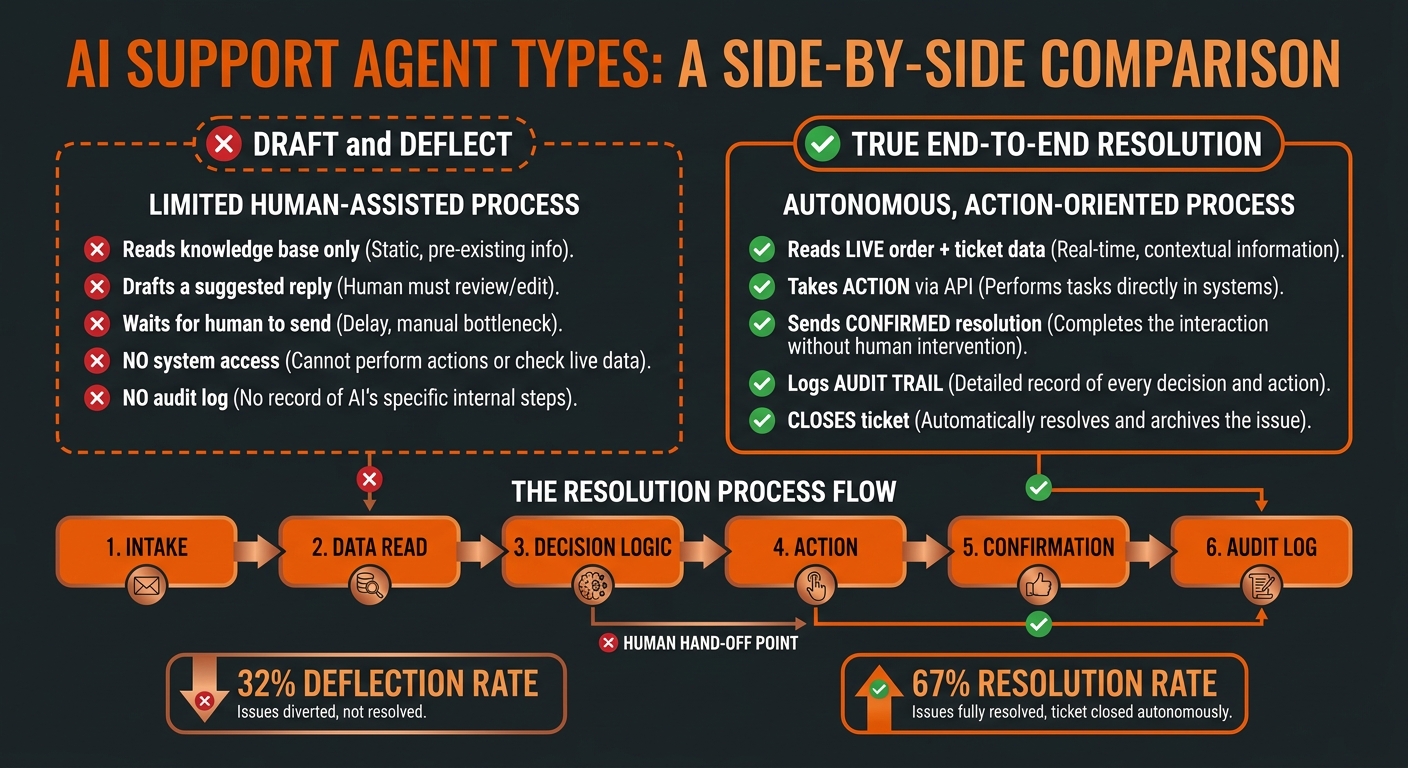
What "End-to-End Resolution" Really Means (and How to Tell If Your AI Does It)
"End-to-end resolution" means the AI reads live data, takes a real action via API, confirms with the customer, and logs an audit trail — all without a human relay. Most tools marketed as AI agents draft a response or deflect to a help article. That is not resolution. This six-question checklist tells you which kind you have.
TL;DR: Draft/Deflect vs. True End-to-End Resolution
| Capability | Draft & Deflect | True Resolution |
|---|---|---|
| Reads live system data (orders, accounts) | No — knowledge base only | Yes — live API reads |
| Takes action (refund, update, file claim) | No | Yes — write access via API |
| Confirms outcome to customer | No — suggests, human sends | Yes — executes and confirms |
| Closes the ticket | No — escalates | Yes — closes on resolution |
| Logs audit trail | No | Yes — every action logged |
| Re-contact rate | High (20–40%) | Low (5–15%) |
| Resolution rate benchmark | 30–40% | 65–85% |
Why Does the "End-to-End" Claim Get Misused?
The term "agentic AI" has become a category label applied to almost any tool that moves beyond a static FAQ bot. The result is a wide range of products — from draft-assist tools that suggest a reply to genuinely autonomous agents that execute actions — all described with the same vocabulary.
The confusion is costly. Buyers who implement a draft-assist tool expecting autonomous resolution see no headcount savings. The resolution rate stays low. Re-contact rates stay high. The evaluation criteria that should separate these products are often not surfaced in vendor demos, which typically show the AI composing a polished reply — without showing what happens when the underlying action needs to actually fire.
The distinction that matters is not intelligence or language quality. It is system access plus action authority. An agent that can write a beautiful reply explaining why a refund is warranted, but cannot execute the refund, is not resolving anything. A human still has to complete the work.
What Does a True End-to-End Resolution Actually Look Like?
Take a WISMO ticket — "Where is my order?" — arriving in a helpdesk for a brand that uses Shopify and Zendesk.
A draft-assist agent reads the ticket, identifies it as a tracking inquiry, searches the knowledge base for the tracking lookup process, and drafts a reply that says "You can check your tracking status at [link]" or "Please allow 2–3 business days." A human agent reviews the draft, modifies it if needed, and sends it. The ticket is not resolved — it is responded to. If the customer replies again ("the link doesn't work" or "my package says delivered but I don't have it"), the cycle repeats.
A true end-to-end agent reads the ticket, queries the Shopify Admin API for the order record, retrieves the tracking number, calls the carrier API for the latest status scan, evaluates whether the package is in transit, delayed, or in an exception state, and then executes one of several resolution paths:
- In transit and on schedule: confirms delivery ETA with the customer and closes the ticket.
- Delayed past SLA: applies a proactive concession (store credit or shipping upgrade) within configured authority thresholds, confirms with the customer, and closes.
- Carrier exception (damaged, lost, returned to sender): files the carrier claim, notifies the customer of the timeline, and creates a follow-up task for claim resolution.
The customer gets a confirmed outcome — not a pointer to a link. The ticket closes. No human handled the response.
This is the difference a WISMO automation audit surfaces: the brands achieving 60–80% WISMO ticket reduction are running the second pattern, not the first.
The Six-Question Checklist: Does Your AI Actually Resolve End to End?
1. Does the agent read live data at ticket time — or only its training data and knowledge base?
An agent that answers from a knowledge base is pattern-matching against static text. It cannot tell you whether a specific order is delayed, whether a refund has already been processed, or whether a customer's account has a fraud flag. True resolution requires a live API read at the moment the ticket arrives — not a cached or pre-trained answer.
Test: Submit a ticket about an order that has a real-time status change (just shipped, just delayed, delivery exception). Check whether the agent's response reflects the current status or gives a generic answer.
2. Can the agent take action — or only suggest one?
The most common gap in AI support tools is write access. Most tools can read data. Fewer can write back to it. An agent that can retrieve an order record but cannot issue a refund, create a return label, or update the shipping address has hit an action ceiling. Every ticket requiring an action has to be escalated to a human.
Test: Check the vendor's integration documentation for write-access API connections. Specifically look for: POST /orders/{id}/refunds, PUT /orders/{id}, POST /orders/{id}/cancel in Shopify; equivalent write endpoints in your CRM and helpdesk. If the documentation only lists read endpoints, the agent cannot take action.
3. Does the agent confirm outcomes directly to the customer — or pass to a human to send?
Draft-and-review workflows still require a human in the loop to confirm the resolution. The confirmation is not a trivial step — it is the moment the customer is informed that their issue is resolved. Agents that draft but do not send create a bottleneck: a human must review every drafted response before it goes out, which limits throughput and negates the staffing benefit of automation.
Test: Ask the vendor specifically: does the agent send customer-facing messages autonomously, or does every outbound message require human approval before sending? Ask to see a demo where the agent sends a resolution confirmation without a human review step.
4. Does the agent close tickets — or escalate everything and wait?
An agent that escalates every ticket after composing a response is a routing tool, not a resolution engine. Closing a ticket autonomously requires the agent to have confidence in the outcome — which in turn requires that the action was actually executed (not just suggested) and confirmed (not just drafted). Watch for platforms that show high "containment rates" but low resolution rates: containment means the customer didn't ask again, not that the issue was solved.
Test: Ask for the vendor's resolution rate data — specifically the share of tickets the AI closes without human involvement, not the share it responds to. This should be reportable as a percentage. Resolution rates below 50% on standard e-commerce ticket types (WISMO, refunds, returns) indicate significant human reliance.
5. Does the agent log every action it takes — or is it a black box?
Audit trails matter in two directions: for your operations team (who needs to see what the agent did and why, especially on refunds and claims), and for your customers (whose records need to be accurate if they call back). An agent that executes actions without logging them creates reconciliation problems — you cannot tell whether a refund was issued, when it was issued, or what triggered it.
Test: After a resolved ticket, check the audit log or activity trail. You should be able to see: what data was read (order ID, customer record, carrier status), what decision was made (approved vs. escalated), what action was taken (refund amount, label generated, claim filed), and what was communicated to the customer. If this trail doesn't exist, the platform is not audit-safe for financial actions.
6. Does it work across all your systems — or only inside one platform?
Single-platform AI tools — Gorgias AI, Zendesk AI, Intercom Fin — can resolve tickets that live entirely within their own platform. The moment a resolution requires data from a system they don't own (Shopify order data for Zendesk AI, Salesforce account history for Gorgias AI, a carrier API for any of them), the resolution breaks down. The agent either skips the data it cannot access or escalates to a human who can.
For e-commerce brands using Shopify plus any major helpdesk, the resolution ceiling of single-platform AI is hit on any ticket where the agent needs to: write back to Shopify, look up account history in Salesforce, query a carrier API, or sync a resolution outcome across systems. These are not edge cases — they describe the majority of refund, WISMO, and claims tickets. Cross-platform resolution requires an agent layer that sits above the individual platforms and has read and write access to all of them.
Test: Run a ticket scenario that requires data from two systems — for example, a Shopify refund on a ticket submitted through Zendesk. Check whether the agent reads the Shopify order, executes the refund in Shopify, and updates the Zendesk ticket — or whether it handles only one side and escalates the other.
What Resolution Rate Should You Expect?
For well-defined ticket types with clear SOPs and system access, benchmarks for true agentic resolution run 65–85%:
- WISMO (Where Is My Order?): 80–90% when the agent has live carrier API access and delivery confirmation logic.
- Standard refunds (in-window, below threshold, no fraud flags): 70–80% when the agent has Shopify write access and configured guardrails.
- Return requests (automated RMA): 65–75% after the initial auto-approval path is tuned.
- Address changes and order edits: 60–70% depending on fulfillment window guardrails.
These rates drop sharply when the agent lacks system access or when SOPs are not encoded into executable logic. An agent answering from a knowledge base typically lands at 30–40% — the range associated with rule-based chatbots — because it is effectively doing the same thing: deflecting to documentation rather than taking action.
The target for an e-commerce brand in the first 90 days of deployment is 65–70% autonomous resolution across tier-1 ticket types, rising to 75–80% after the first SOP refinement cycle. If your current tool is below 50% and the vendor attributes this to "edge cases" without a clear plan to close the gap, the underlying issue is more likely missing system access or undeveloped SOPs — not an inherently hard ticket mix.
How SOP-Driven Architecture Closes the Gap
The structural difference between draft-assist tools and true resolution agents is not model capability — it is the presence of encoded, executable SOPs that tell the agent exactly what to do in each scenario.
A knowledge-base agent reads documentation and infers a response. An SOP-driven agent runs conditional logic: if the order is within the return window and below the fraud threshold and the customer's return frequency is under the configured limit, execute the refund via the Shopify Admin API and close the ticket. Every branch is defined. Every action is specified. Every guardrail is set by your operations team, not inferred from training data.
SOP-driven agents have three operational advantages over knowledge-base agents:
Consistency. The SOP runs the same logic on the 50,000th ticket as on the first. Knowledge-base agents drift as document libraries grow and conflict with each other.
Auditability. Every decision traces to a specific SOP branch, which traces to a specific business rule your team defined. When something goes wrong — a refund that should not have fired, a ticket that escalated when it should not have — you can find the rule and correct it.
Continuous improvement. When your team changes a business rule (raises the auto-approve threshold, adds a new fraud signal), the change propagates to every future ticket immediately. SOP-driven AI agents encode your operational logic once and run it at scale, rather than requiring retraining or knowledge-base updates to shift agent behavior.
The Checklist Summary
Six questions that tell you whether you have a true end-to-end resolution agent:
- Does it read live data from your actual systems at ticket time?
- Does it have write-access API connections to execute actions?
- Does it send resolution confirmations to customers without human review?
- Does it close tickets autonomously, not just respond and escalate?
- Does it log every action in an audit trail?
- Does it work across all your platforms — helpdesk, Shopify, CRM, carrier?
If the answer to any of these is no, the agent is a draft-assist or deflection tool, not an end-to-end resolution engine. The implications for headcount, re-contact rates, and resolution rate are significant — and they become visible the moment you measure resolution rate separately from deflection rate.
Mustafa Bayramoglu is a YC W19 alum and founder with experience in enterprise operations automation. CorePiper is an SOP-driven AI agent platform for cross-platform case operations across Shopify, Zendesk, Freshdesk, Salesforce, and Jira.
See What End-to-End Resolution Looks Like in Practice
CorePiper's SOP-driven agents read live data across Shopify, Zendesk, Freshdesk, Salesforce, and Jira — then take action, confirm, and log an audit trail without a human relay. Book a 30-minute walkthrough to see a real workflow from intake to closed ticket.