
BFCM Customer Service Playbook: Handling 3–6× Ticket Volume Without Burning Out Your Team
BFCM brings 4–6× ticket volume and under-15-minute response expectations. Here's how elastic AI capacity absorbs the surge while your team handles the exceptions that actually need them.
 Mustafa BayramogluJuly 10, 202614 min read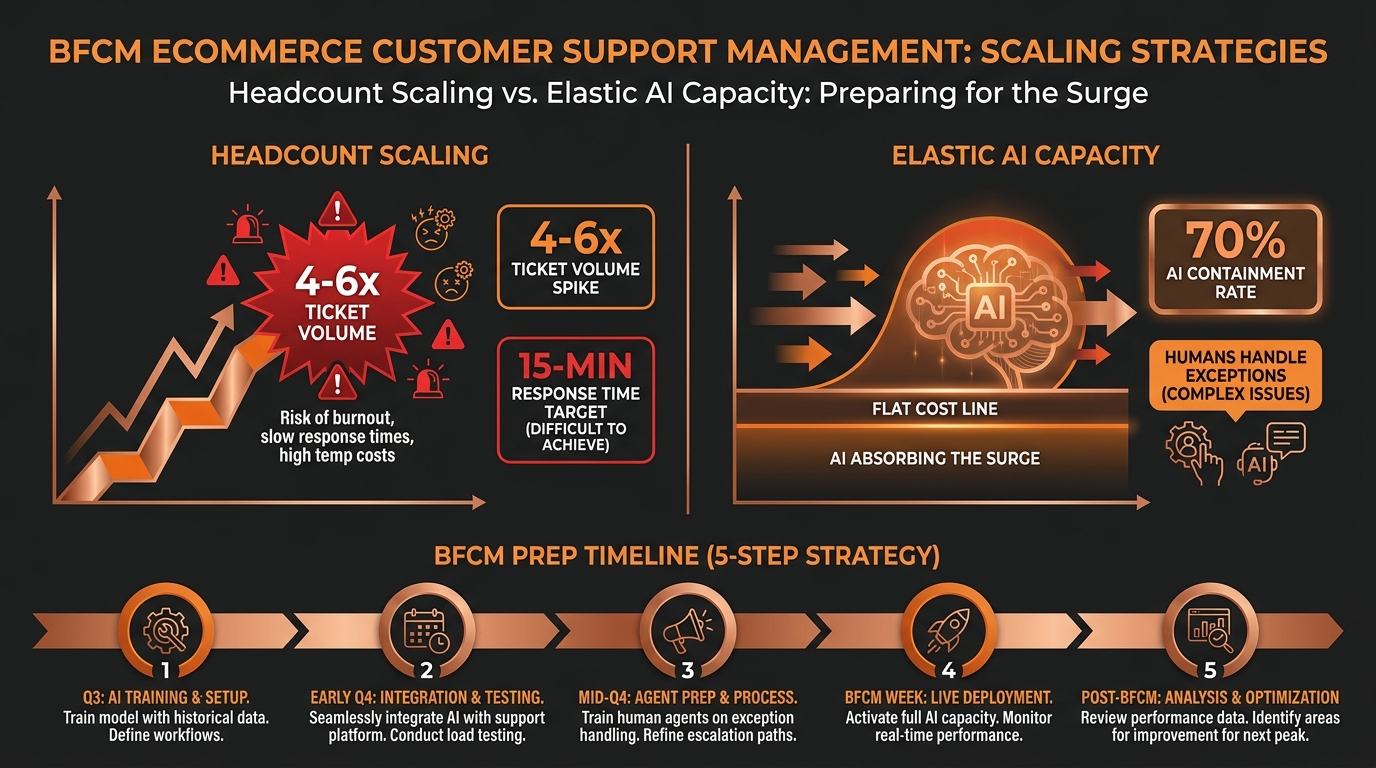
BFCM Customer Service Playbook: Handling 3–6× Ticket Volume Without Burning Out Your Team
BFCM sends 3–6× your normal ticket volume over 96 hours while buyers expect responses in under 15 minutes. The only way to meet both constraints is elastic AI capacity that absorbs the predictable tier-1 surge — WISMO, refunds, order changes, return initiations — while your team handles the exceptions that actually need human judgment.
TL;DR: Headcount Scaling vs. Elastic AI Capacity at Peak
| Factor | Headcount scaling | Elastic AI capacity |
|---|---|---|
| Cost model | Linear — more agents, more cost | Per-resolution — costs what it resolves |
| Response time at 4–6× volume | Degrades without proportional hiring | Holds — AI processes in seconds |
| Ticket types covered | All (with enough people) | Well-defined SOPs only |
| Prep time required | 6–8 weeks hiring + onboarding | 2–3 weeks SOP configuration |
| Post-BFCM residual cost | Retained headcount or layoffs | Zero — you only pay for resolutions |
| Agent burnout risk | High — surge sustained 96+ hours | Low — humans handle exceptions only |
| Coverage at 3AM Cyber Monday | Requires night shift | Native — AI does not sleep |
Why Is BFCM Customer Service Categorically Harder Than Normal Peak?
BFCM is not just a volume problem — it is a compressed-time problem layered on top of a volume problem.
During a standard busy season, ticket volume rises over days and weeks, giving you time to staff up, adjust workflows, and catch bottlenecks before they compound. During BFCM, the volume arrives in hours. Thanksgiving evening through Cyber Monday night is a 96–120-hour window, and most brands see their highest single-day ticket volume in the company's history somewhere in that window.
The buyer's patience is also at its lowest. BFCM buyers are transactional and time-pressured. They are making multiple purchases across multiple brands in a short window. When they contact support — whether about a tracking question, a coupon that did not apply, or an order they want to cancel — they are not in a mood to wait. Research consistently shows that e-commerce support contacts made during high-purchase-intent windows carry significantly lower patience than off-peak contacts, with expectations of responses in 15 minutes or less for messaging channels.
The ticket mix shifts. During BFCM, a higher proportion of tickets fall into categories that are individually simple but high in volume: WISMO queries (where is my order?), discount code errors, address correction requests placed before fulfillment closes, and order cancellation or modification requests made within seconds of purchase. These are all tickets where the answer or action is clear — the constraint is not human judgment but human throughput.
This is precisely where AI capacity replaces headcount rather than supplements it.
What Does 3–6× Ticket Volume Actually Look Like?
The range matters for planning. A 3× volume day is manageable for a well-staffed team with strong process. A 6× volume day is not — not because the team lacks skill but because the math does not work.
If your team handles 300 tickets per day with four agents, a 6× day means 1,800 tickets. Handling that volume at your standard response time requires 24 agents — six times your current capacity. Hiring 20 temporary agents four weeks before BFCM, training them to your product and policy, and integrating them into your workflow is a months-long project that costs far more than the BFCM revenue justifies. And after Cyber Monday, you have 24 agents for a queue that dropped back to 300 tickets.
The headcount model is a structural mismatch for BFCM, not a planning failure.
Where the volume actually comes from. The spike is not distributed evenly across ticket types. WISMO queries account for 30–50% of standard e-commerce support tickets — and that share rises during BFCM as buyers check obsessively on orders they placed in the middle of the night under time pressure. Return-related contacts from BFCM orders start arriving before peak is even over, as buyers' remorse and gift-sizing issues emerge. Discount disputes, double-charge questions, and address correction requests spike in the first 12–24 hours after purchase.
Understanding the composition of your last BFCM ticket queue is the most valuable input for your preparation this year. If WISMO was 45% of your peak tickets, and you have automated WISMO resolution, your AI is already handling the largest share of the surge. If you have not automated WISMO yet, that is your highest-leverage prep item — not additional hiring. Our WISMO automation guide covers the two-stage automation approach that can cut WISMO ticket volume 60–80%.
Why Does Traditional Headcount Scaling Break at BFCM?
There are three structural reasons the headcount model fails at BFCM scale, and they interact.
Ramp time is longer than the window. A new support agent — even a well-screened one — needs four to six weeks to reach competence on your product, your return policy, your helpdesk workflows, and your edge case handling. BFCM weekend is four days long. You cannot hire your way to readiness in time unless you start in September, which means carrying idle capacity through October and November.
Knowledge transfer is imperfect at speed. The agents who know your product best are your senior agents. They are the ones who know the right answer to the edge case question, who recognize a fraud pattern before it becomes a chargeback, who understand which customers need a retention concession versus a standard resolution. When you triple or quadruple your team with temporary agents, the institutional knowledge does not scale with the headcount. Quality degrades. Re-contact rates rise. CSAT drops precisely when your brand is getting the most visibility.
Post-BFCM hangovers are expensive. Temporary agents hired for peak season either leave after peak (and take your training investment with them) or stay and create a overstaffed period in Q1. Senior agents who work through the BFCM surge — particularly with unrealistic volumes and difficult contacts — are more likely to burn out and leave in January and February. As covered in our support economics guide, the true cost of agent turnover is $5,000–$20,000 per replacement once recruiting, onboarding, and ramp time are included. BFCM-driven Q1 attrition compounds into the following year's capacity problem.
How Does Elastic AI Capacity Work During BFCM?
Elastic AI capacity means the agent layer scales with volume without any staffing action on your part. The cost model is per-resolution: you pay for tickets the AI closes, and the volume it can handle in a day is not capped by the number of agents you have on a roster.
The operational model during BFCM looks like this:
AI handles the defined tier-1 volume. Every ticket that matches a configured SOP — WISMO with tracking data, standard refund requests within policy, address change requests before fulfillment cutoff, return initiations within window, coupon code issues on standard orders — gets handled by the AI agent from intake to resolution. At 70% AI containment on a 1,800-ticket day, 1,260 tickets resolve without human involvement. Your team of four agents handles 540 tickets — roughly 135 per person, versus 450 per person without AI.
Humans handle exceptions. The 30% of tickets that reach human agents at peak are qualitatively different from the average ticket. They are escalations: tickets the AI raised because they exceeded a value threshold, because they triggered a fraud flag, because the customer expressed significant frustration, because the issue spanned multiple prior contacts, or because the SOP did not have a defined resolution path. These are the tickets where human judgment genuinely adds value — not WISMO queries.
Surge capacity is implicit. If you go from 1,800 tickets to 2,400 tickets on the Monday after BFCM because Cyber Monday returns start arriving, the AI does not go offline. The per-resolution cost scales proportionally; there is no capacity ceiling that requires intervention.
This is the structural shift agentic AI makes possible that rule-based chatbots and draft-assist tools cannot: the AI is taking action — issuing the refund, updating the order, sending the return label — not just responding. Resolution happens at the pace of the API call, not the pace of the agent queue.
What Should AI Handle vs. Your Team During BFCM?
The right allocation is not AI-handles-everything — it is AI-handles-what-is-definable, humans-handle-what-requires-judgment.
AI-appropriate BFCM ticket types:
- WISMO and tracking queries. Order ID → carrier API → status response → confirmation. This is the highest-volume, most time-sensitive category and the clearest AI fit.
- Standard refund requests within policy. Item received → policy check → value threshold check → refund via Shopify Admin API → confirmation. No judgment required if the order is within policy.
- Address changes before fulfillment cutoff. API check on fulfillment status → if pre-fulfillment, execute address update → confirm. If post-fulfillment, escalate to human with carrier re-routing context.
- Return initiations within holiday window. Intent classification → policy gate → RMA generation → label email → ticket close. The peak season returns guide covers the full flow including exchange-first logic.
- Coupon code disputes on standard orders. Validate the code against your promotion database, check eligibility conditions, apply manually if valid, or explain ineligibility with the specific reason if not.
- Double-charge questions. API lookup of the order and payment record → confirm whether a duplicate charge occurred → initiate reversal if confirmed or explain pending authorization hold if not.
Human-appropriate BFCM ticket types:
- VIP, wholesale, or high-LTV customer contacts. When a customer with significant LTV or an active wholesale account contacts support during BFCM, the response strategy often involves retention judgment that goes beyond SOP logic.
- Fraud disputes or chargeback-adjacent contacts. Any ticket where the customer is alleging fraud, claiming a product arrived empty, or exhibiting patterns consistent with return fraud warrants human review regardless of order value.
- Multi-issue contacts with prior escalation history. A customer who is contacting for the third time about a single order is signaling that prior resolutions have not held. These require a senior agent who can see the history and close the loop permanently.
- Social media escalations that arrive via helpdesk. Contacts that originated as public Twitter or Instagram complaints have reputational implications beyond the ticket. These warrant a human response with brand voice, not an automated SOP execution.
- Requests outside configured authority thresholds. If a customer is requesting a refund above your configured auto-approve threshold, or an exception to a policy the SOP is not authorized to override, the AI escalates with context and the human decides.
How Do You Prepare Your AI Support Stack for BFCM?
Preparation should be complete at least two weeks before Thanksgiving — ideally by the end of October. A week-before configuration change during BFCM prep is a liability.
Step 1: Audit last year's BFCM ticket composition
Pull your ticket data from the 10-day window around last year's BFCM (the week before through the week after). Identify: what percentage of tickets fell into each category (WISMO, refunds, returns, address changes, discount issues, other), what your average handle time was per category, where queues broke down (escalation rates, re-contact rates, resolution time by type), and which ticket types generated the most agent escalations.
This audit tells you precisely where your SOP coverage needs to be before peak. If address change requests were 8% of your peak ticket volume and currently have no automated path, that is a configuration gap worth closing before BFCM.
Step 2: Encode BFCM-specific policies into SOP logic
Standard SOPs reflect your year-round policies. BFCM often involves exceptions: an extended return window (60 or 90 days instead of 30), a modified cancellation window during Cyber Monday flash sales, different thresholds for auto-approving refunds on BFCM promotional items, or different escalation paths for gift-purchase orders. These need to be encoded into your SOP logic before peak, not managed as agent discretion during the surge.
The most common BFCM policy exceptions that cause SOP failures:
- Extended return window not updated in policy gate (agents override manually; AI cannot)
- Gift order detection not configured (gift recipients contacting about orders they did not place)
- Flash-sale cancellation window differing from standard cancellation window
- BFCM-specific discount stacking rules that the standard coupon-dispute SOP does not cover
Step 3: Set and stress-test all guardrails before peak
Every guardrail in your SOP configuration needs to be verified before BFCM, not assumed to be working. The three most commonly misconfigured guardrails at peak:
- Fraud flag routing. Confirm that accounts with prior chargeback history or fraud flags route to human review, not automated processing. A mis-configured fraud flag gate is costly at any volume; at 6× volume it is a material loss.
- Value thresholds for auto-approve. Verify your auto-approve dollar limit reflects your actual risk tolerance at BFCM pricing. If your threshold is calibrated for normal-price inventory and you are running 40% BFCM discounts, the threshold in dollar terms may need adjustment.
- VIP or wholesale routing. Confirm that high-LTV customer accounts route to a dedicated human queue, not the standard AI escalation queue.
Step 4: Configure surge-mode escalation routing
Standard escalation routing sends human-review tickets to a general agent queue. During BFCM, that queue is itself under pressure. Configure a surge-mode routing structure:
- A fast-lane queue for time-sensitive escalations (address changes where fulfillment cutoff is imminent, fraud disputes, double-charge claims requiring immediate reversal)
- A standard-priority queue for review-required escalations (high-value refunds, fraud flag holds, VIP contacts)
- A batch-processing queue for non-time-sensitive human review items (policy exception requests, multi-contact history reviews)
Agents working BFCM weekend should be assigned to one queue with a clear priority, not triaging across all three simultaneously.
Step 5: Run a pre-peak volume test before Thanksgiving week
Two weeks before BFCM, run a simulated volume test: submit 3× your normal daily ticket count through the automated flow using test orders and monitor for API rate limit failures, SOP coverage gaps (tickets that fall through to human review unexpectedly), resolution time degradation at volume, and escalation routing accuracy. Any failure in a pre-peak test is fixable in days. A failure discovered at 3AM on Black Friday is not.
What Metrics Should You Track During and After BFCM?
Five metrics give you a real-time picture of whether the BFCM support model is holding:
AI containment rate. What percentage of tickets is the AI resolving without human escalation? At peak, a well-configured SOP-driven agent should hit 65–75% containment on a BFCM ticket mix. If containment drops below 50%, you have an SOP coverage gap — likely a ticket type arriving at high volume that does not have a configured resolution path.
Resolution time by ticket type. Track average time from ticket submission to resolution close for AI-handled tickets. Under 5 minutes is the target for WISMO, refunds, and return initiations. Degradation here signals API latency or rate limiting — check your carrier API and Shopify Admin API connection health during the surge.
Human queue depth. How many tickets are waiting in the human escalation queue at any point during peak hours? If this number is growing faster than agents can clear it, the escalation routing configuration may be sending too many tickets to human review. Adjust the auto-approve thresholds temporarily if the surge of escalations reflects low-risk tickets, not genuine exceptions.
Re-contact rate on AI-handled tickets. For every ticket the AI closes during BFCM, what percentage results in the customer re-opening or submitting a new ticket within 48 hours? A re-contact rate above 20% on AI-resolved tickets signals that the resolution is not sticking — the refund did not process, the order update did not go through, or the customer did not receive the confirmation. This is a data quality issue, not a volume issue.
CSAT from AI-handled contacts. If your helpdesk sends a post-resolution CSAT survey, track AI-handled tickets separately from human-handled tickets. AI-resolved BFCM tickets should match or exceed the CSAT of human-resolved tickets for the same ticket types, because the resolution action is identical — only the delivery speed differs.
Mustafa Bayramoglu is the founder of CorePiper (YC W19). CorePiper builds SOP-driven AI agents for cross-platform case operations across Shopify, Zendesk, Gorgias, Salesforce, and Jira.
Handle BFCM Without Adding Headcount
CorePiper's SOP-driven agents absorb 60–80% of BFCM ticket volume — WISMO, refunds, order changes, return requests — across Shopify, Zendesk, Gorgias, Freshdesk, Salesforce, and Jira. Set the guardrails once before peak season; the agent scales without hiring. Book a walkthrough to see the BFCM configuration.