
Salesforce Service Cloud AI Agent: Autonomous Case Resolution Beyond Agentforce (2026 Guide)
A Salesforce Service Cloud AI agent adds autonomous cross-platform case resolution — Zendesk, Jira, carrier APIs — without replacing Service Cloud. Here's how it works, what Agentforce can and can't do, and when you need a third-party AI agent.
 Mustafa BayramogluAugust 22, 202615 min read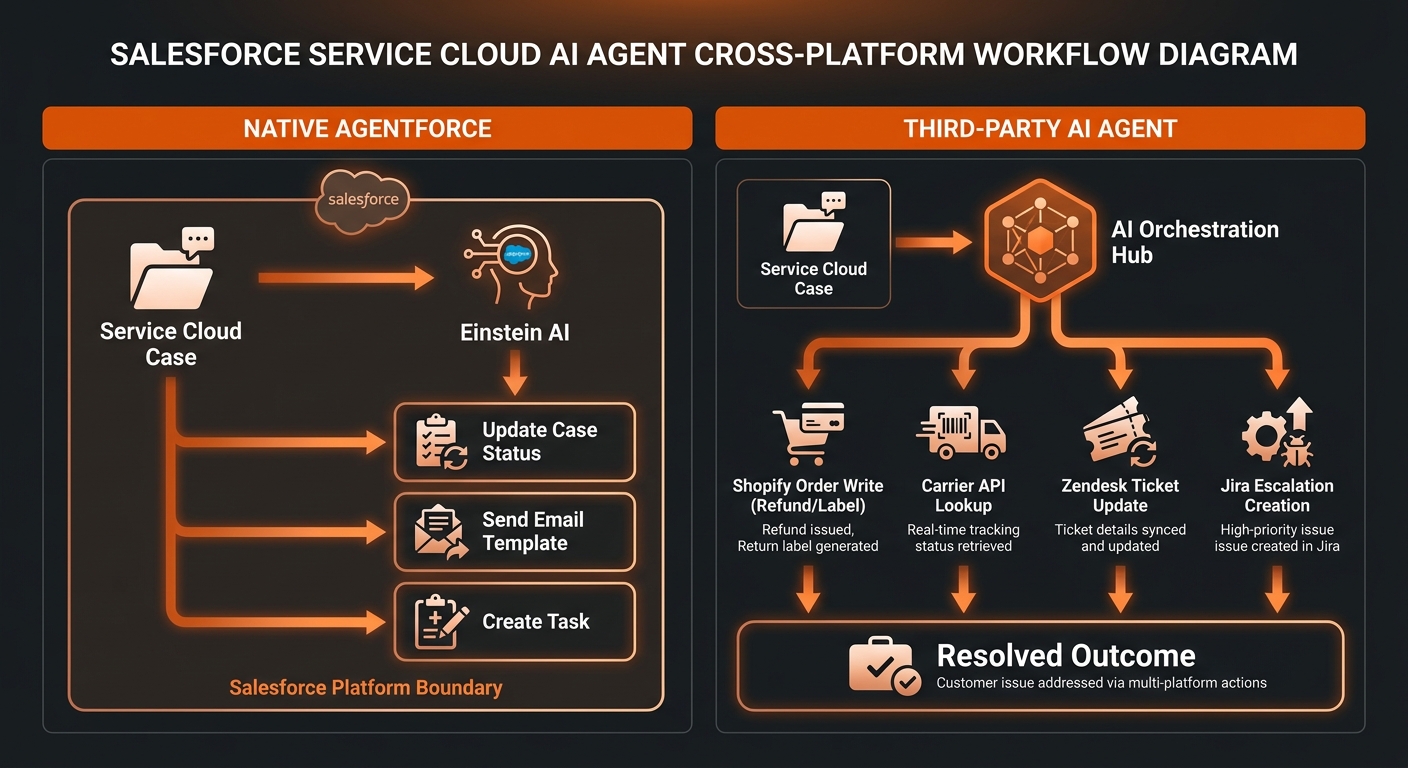
Salesforce Service Cloud AI Agent: Autonomous Case Resolution Beyond Agentforce (2026 Guide)
A Salesforce Service Cloud AI agent is a third-party autonomous resolution layer that connects to Service Cloud via API alongside Zendesk, Jira, carrier systems, and logistics APIs — resolving cases end-to-end without human intervention. Unlike Salesforce's native Agentforce, which automates within the Salesforce ecosystem, a true cross-platform AI agent reads case data from Salesforce and executes resolution actions across every system the case touches.
TL;DR: Salesforce AI Options Compared
| Approach | What it does | System access | Autonomous resolution? | Best for |
|---|---|---|---|---|
| Agentforce (native) | Automates in-Salesforce tasks — case updates, reply drafting, Einstein recommendations | Salesforce + Data Cloud (required for cross-record reasoning) | Limited to Salesforce-platform actions | Teams automating within the Salesforce ecosystem |
| Einstein AI Copilot | Surfaces recommendations, drafts case replies, summarizes records for agents | Salesforce-internal | No — human confirms every action | Agents who need faster in-Salesforce throughput |
| Third-party AI agent (e.g. CorePiper) | Resolves cases end-to-end across Salesforce, Zendesk, Jira, and external APIs | Salesforce + Zendesk + Jira + carrier APIs + ERP/TMS | Yes — closes cases without human intervention per case | Operations teams running multi-system case workflows |
What Is a Salesforce Service Cloud AI Agent?
The phrase "Salesforce Service Cloud AI agent" means two fundamentally different things depending on who is using it, and the operational distinction matters before you build anything.
The Salesforce definition: Salesforce's own AI agent platform is Agentforce — a configurable agent builder launched in late 2024 that runs within the Salesforce platform, powered by Einstein models and Salesforce Data Cloud. Agentforce can update case fields, draft customer replies, route cases by priority, recommend next actions, and run automation flows built inside Salesforce. Einstein AI Copilot sits alongside it as an agent-assist tool that surfaces recommendations and summaries to human case workers. Both are native, Salesforce-platform products.
The operations definition: An AI agent — in the agentic sense — is software that perceives a situation (the incoming case), reasons against a policy (your SOP), accesses external tools (Zendesk API, Jira API, carrier tracking, TMS), and takes action to completion without waiting for human approval at each step. The output is a resolved case with the customer's issue closed and all systems updated, not a drafted reply queued for review.
The gap between these definitions explains why most Salesforce teams that deploy Agentforce still handle a significant volume of multi-system cases manually. Agentforce is a powerful automation layer inside Salesforce. For cases where resolution requires writing a Zendesk ticket, creating a Jira escalation, querying a carrier API, or updating a TMS record, Agentforce cannot execute those steps natively without custom Apex code or middleware integration.
A third-party AI agent connects to Salesforce Service Cloud as an external system — reading case objects via the Salesforce REST API, querying connected platforms, executing resolution actions across all systems the SOP touches, and writing the outcome back to Salesforce — without a human in the loop for each case.
How Does Salesforce's Native Agentforce Compare to a Third-Party AI Agent?
Agentforce is a strong automation platform for teams operating primarily inside Salesforce. For service operations where the case record, customer history, entitlements, and resolution workflow all live in Salesforce, Agentforce delivers real automation value with relatively low configuration overhead — particularly if you are already using Data Cloud for customer data unification.
The comparison changes when your cases span systems. Most enterprise and mid-market service operations involve at least two of: Salesforce Service Cloud (case record, customer data), Zendesk (customer-facing ticketing), Jira (internal engineering or operations escalations), carrier portals (freight and shipping claims), TMS/WMS (logistics operations), or ERP (contract and order data). Resolving a case in this environment requires reading from all relevant systems, executing actions in each, and writing the consolidated outcome back — a workflow that neither Agentforce nor any Salesforce-native tool can run without significant custom development.
Specifically, Agentforce cannot natively:
- Create a Jira issue as a case escalation step and link it back to the Salesforce case
- Update a Zendesk ticket as part of a case resolution handoff
- Query a carrier tracking API mid-workflow to retrieve POD or delivery exception data
- Write a claim to a TMS or 3PL portal as a step in an OS&D case SOP
Each of these requires either a Salesforce middleware integration (MuleSoft, custom Apex, or a third-party iPaaS) or a purpose-built cross-platform AI agent. For teams resolving ten or more multi-system case types, building and maintaining that middleware in Salesforce is a significant ongoing engineering cost.
What Can a Third-Party Salesforce Service Cloud AI Agent Do?
A third-party AI agent for Salesforce Service Cloud extends resolution capability beyond the Salesforce platform boundary. Operating as an external orchestration layer, it:
Reads case data from Salesforce. The agent pulls the Salesforce case object — customer account, entitlement, case category, priority, related contacts, open activity history — via the Salesforce REST API. It does not require Data Cloud access or an Einstein license to reason against case records.
Queries connected systems in parallel. For a freight claim case, this means simultaneously reading the Salesforce case, querying the carrier API for delivery status and POD, checking the TMS for shipment origin data, and verifying the Zendesk ticket thread for customer communication context — in a single orchestrated workflow.
Executes multi-system SOPs. Resolution actions vary by case type. A shipment exception case might require: creating a Jira escalation in the carrier-ops project, updating the Zendesk customer ticket with current status, filing a carrier exception via API, and updating the Salesforce case status and close date. A third-party AI agent runs all four steps in sequence per the SOP, without a human routing between systems.
Writes resolution back to Salesforce. Case status updates, resolution notes, close reasons, and linked records are written back to the Salesforce case object — maintaining Salesforce as the system of record while the agent executes the cross-system workflow.
Escalates within the SOP boundaries. When a case falls outside the agent's configured resolution scope — a disputed claim above a threshold amount, a case requiring legal review, a customer with a specific escalation flag — the agent routes to the appropriate human queue in Salesforce with full context preloaded, per the human-in-the-loop patterns defined in the SOP.
For logistics and B2B operations teams, this means the most time-intensive case workflows — freight claims, OS&D disputes, carrier chargebacks, shipment exception escalations — can be automated from intake to resolution without a human manually copying data between Salesforce, Jira, and Zendesk on every case.
What Are the Limits of Native Agentforce for Multi-System Cases?
Agentforce is well-suited to Salesforce-native workflows. For case operations teams evaluating it against cross-platform alternatives, the key constraints to understand are:
Data Cloud dependency for cross-record reasoning. Agentforce's most capable reasoning — agent actions that span customers, cases, orders, and entitlements — requires Salesforce Data Cloud as the unification layer. Data Cloud is a separate product with its own licensing cost; teams without it access a narrower Agentforce feature set.
Platform boundary on action execution. Agentforce agents execute actions available in the Salesforce platform: update fields, create records, send emails via Salesforce, run Flows, call out to external APIs via Apex. External API callouts require Apex code and Salesforce Named Credentials — not zero-code. For each additional system (Jira, Zendesk, carrier API), a separate Apex integration must be built and maintained.
Configuration inside Salesforce. Agentforce is configured via Salesforce Agent Studio and Salesforce Flow. Teams without in-house Salesforce admins or developers face meaningful ramp time and dependency on the Salesforce consulting ecosystem. Changing an SOP means changing the Salesforce configuration.
No out-of-box logistics or freight context. Agentforce has no built-in understanding of freight claim workflows, OS&D procedures, Carmack Amendment filing windows, or carrier dispute SOPs. Everything must be configured from scratch as Salesforce topics and actions.
None of these are insurmountable, but they represent meaningful effort for teams whose primary goal is cross-platform case automation rather than deep Salesforce platform development.
What Case Types Should You Automate on Salesforce Service Cloud?
Not all Salesforce case types benefit equally from AI agent automation. The highest-ROI case types are those with structured resolution paths, deterministic data requirements, and multi-system execution steps:
Freight claims and OS&D disputes. These cases require reading the Salesforce case, pulling carrier POD and exception data, validating against the SOP-driven resolution rules, filing the carrier claim, creating the Jira tracking ticket, and updating the Zendesk customer thread — typically four to six system touches per case. At high volume, AI automation drives 60–80% case closure without human handling.
Shipment exception cases. Delivery delays, address failures, customs holds, and carrier damage notifications each have defined resolution paths. An AI agent reads the Salesforce case, checks carrier API status, triggers the appropriate SOP action (reroute, claim, customer notification), and updates Salesforce — without a human routing each exception manually.
B2B carrier dispute cases. Enterprise shippers disputing freight invoices or carrier damage assessments run multi-week resolution cycles involving Salesforce cases, carrier portal submissions, and internal Jira escalations to ops leadership. AI orchestration across Salesforce, Zendesk, and Jira compresses the cycle without increasing headcount.
Warranty and damage claims. Cases requiring customer proof collection (photos, delivery receipts, carrier acknowledgments), internal approval, and vendor notification are strong automation candidates. The agent collects the proof via the Zendesk customer thread, validates against the Salesforce entitlement, executes the resolution SOP, and closes the case.
Escalation routing from Zendesk to Salesforce. For organizations where Zendesk handles customer-facing tickets and Salesforce handles the operational case record, AI agent automation bridges the handoff — reading the Zendesk ticket, creating the Salesforce case with full context, and maintaining bidirectional sync throughout resolution.
How to Set Up a Salesforce Service Cloud AI Agent: 5 Steps
Setting up a third-party AI agent on Salesforce Service Cloud follows a consistent pattern regardless of the specific agent platform:
Step 1 — Connect Salesforce via API. Authenticate the AI agent using a Salesforce Connected App with OAuth 2.0. Define which case objects, fields, and related records the agent needs read and write access to. Scope the permission set to the minimum required for the case types you are automating.
Step 2 — Map your case types and SOP logic. Document the resolution workflow for each case type: what triggers the case (new case object created, case status change, priority flag), what data the agent reads (case fields, related account, entitlement), what actions it executes (Jira create, Zendesk update, carrier API call, Salesforce field update), and what conditions route to human review. The clearer the SOP documentation, the faster the configuration.
Step 3 — Connect secondary systems. For each system the case SOP touches — Zendesk, Jira, carrier APIs, TMS — establish API connections from the AI agent. Standard integrations (Zendesk REST API, Jira REST API) typically require only API key authentication. Carrier API integrations may require carrier-specific documentation and credentialing. RAG-based knowledge retrieval connects your SOP documentation so the agent reasons against your actual resolution policies.
Step 4 — Run a supervised pilot. Before full deployment, run the agent on a subset of incoming cases in a monitoring mode — human reviewers approve each agent action before execution. This surfaces SOP gaps, edge cases, and integration issues before they affect live case resolution. A two-week supervised pilot typically resolves 80–90% of configuration issues before the agent goes live.
Step 5 — Deploy with guardrails and monitor. Define agent guardrails — action blocklists (no unauthorized financial credits above threshold), escalation triggers (customer flags, claim amounts, case age), and confidence thresholds (below-threshold confidence routes to human review). Monitor AI resolution rate, human escalation rate, and average case handle time weekly for the first 60 days.
A well-configured third-party Salesforce Service Cloud AI agent typically reaches steady-state operation in two to three weeks. Resolution rate for structured case types (freight claims, OS&D, shipment exceptions) typically reaches 60–80% within 90 days of deployment.
Salesforce vs Zendesk vs Freshdesk: Which Platform Should Lead AI Case Automation?
For B2B enterprise operations, Salesforce Service Cloud is the natural system of record for case automation — it holds customer account relationships, entitlements, contracts, and operational history that Zendesk and Freshdesk typically do not. AI automation anchored in Salesforce retains that business-context fidelity.
For DTC e-commerce operations where customer interaction volume is high and operational depth is lower, Zendesk AI agents or Freshdesk AI agents often provide faster time-to-value because the ticket workflow is simpler and the data sources are fewer (Shopify + carrier API, rather than Salesforce + Jira + TMS + carrier API).
For organizations running both — Zendesk for customer-facing support and Salesforce for operational case records — the right architecture is a cross-platform agent that reads from Zendesk and writes to Salesforce simultaneously, without a human performing the handoff. This is the setup described in how to orchestrate Salesforce, Zendesk, and Jira with AI.
| Platform | Best AI automation use case | System-of-record strength | Cross-platform complexity |
|---|---|---|---|
| Salesforce Service Cloud | B2B operational cases, logistics claims, enterprise contracts | Customer accounts, entitlements, contracts | High (multi-system SOPs common) |
| Zendesk | Customer-facing ticket resolution, DTC e-commerce, high-volume support | Customer communication threads | Medium (Shopify + carrier APIs typical) |
| Freshdesk | SMB/mid-market support, Freshworks ecosystem shops | Ticket + Freddy AI in one platform | Low-medium (fewer integration touchpoints) |
What Metrics Should You Track After Deploying a Salesforce Service Cloud AI Agent?
The operational metrics that matter most for Salesforce Service Cloud AI automation are:
AI resolution rate by case type. What percentage of cases in each category are fully resolved by the AI agent without human intervention? Target: 60–80% for structured case types (freight claims, OS&D, shipment exceptions) within 90 days. See AI resolution rate benchmarks for category-by-category ranges.
Average case handle time. For AI-resolved cases: time from case creation to case closure. For human-escalated cases: time from creation to first human action. The AI should compress resolution time; if not, the SOP configuration needs revision.
Escalation rate. What percentage of cases route to human review? Early-stage agents (30–60 days) typically escalate 25–40% of cases. At steady state, expect 15–25%. Persistent escalation rates above 35% signal SOP gaps or integration issues.
Salesforce case accuracy. Are AI-resolved cases written back to Salesforce with correct field values, close reasons, and linked records? Resolution rate means little if the Salesforce data quality degrades. Audit a random sample of AI-closed cases weekly in the first month.
Cross-system consistency. For cases touching Jira, Zendesk, or carrier systems: do the records in each system match the Salesforce case outcome? Inconsistency signals a broken action step in the SOP workflow.
Frequently Asked Questions
See the FAQ schema embedded in the frontmatter above for the five most common questions about Salesforce Service Cloud AI agents. Additional context:
Does a third-party Salesforce AI agent require a Salesforce Data Cloud license? No. Third-party agents connect to Salesforce via standard REST API and OAuth — no Data Cloud or Einstein license required. Data Cloud is a dependency for native Agentforce cross-record reasoning, not for external AI agents reading case objects.
Can a Salesforce Service Cloud AI agent work alongside Agentforce? Yes. The most common deployment pattern is Agentforce handling in-Salesforce automation (case routing, field updates, reply drafting) while a third-party agent handles cross-system case workflows (Jira escalations, Zendesk updates, carrier API calls). The two layers complement each other and do not require configuration to coexist.
What SOP documentation does the agent need? The agent needs documented resolution workflows per case type: trigger conditions, data sources, action sequence, escalation criteria, and resolution definition. Plain-text SOP documents — even Word or Notion exports — are sufficient for most AI agent platforms to configure against.
The Bottom Line
Salesforce Service Cloud is the right system of record for enterprise and B2B case operations. Agentforce is a strong automation layer for Salesforce-native workflows. For cases that span Salesforce, Zendesk, Jira, and external logistics APIs — the case types that consume the most human time in operations teams — a third-party AI agent delivers the cross-platform orchestration that Agentforce cannot provide without significant custom development.
The practical question is not "Agentforce or third-party agent" but "which case types benefit from which layer." Agentforce handles the in-Salesforce automation; a cross-platform agent handles the multi-system case workflows. Used together, they cover the full resolution surface.
To see how a third-party AI agent integrates with your Salesforce Service Cloud setup, visit the Salesforce Service Cloud AI agent solution page or book a 30-minute technical walkthrough below.