
Zendesk AI Agent: Autonomous Ticket Resolution Beyond Native AI (2026 Guide)
A Zendesk AI agent resolves support tickets end-to-end across Shopify, carrier APIs, and Salesforce — going beyond what Zendesk's native AI can do. Here's how it works, what native Zendesk AI covers, and when you need a third-party agent.
 Mustafa BayramogluAugust 18, 202614 min read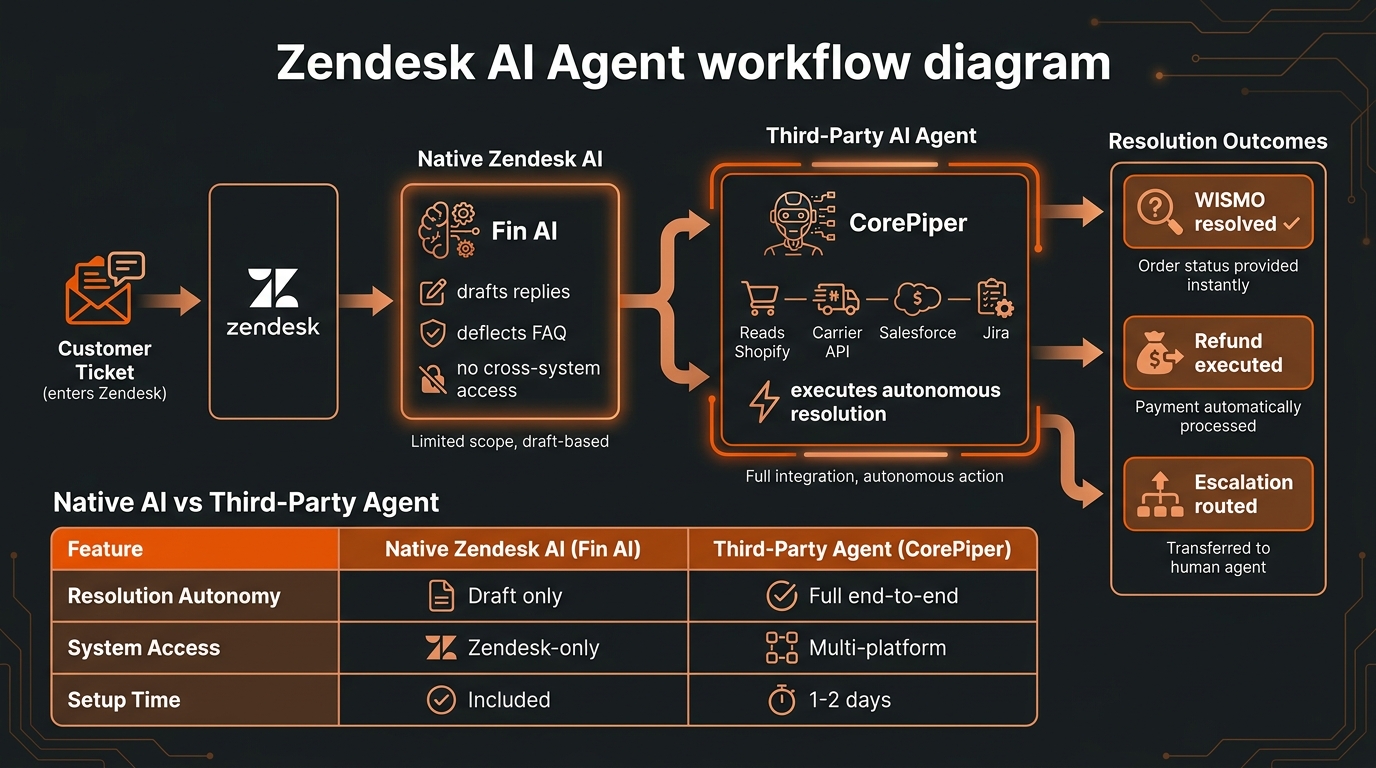
Zendesk AI Agent: Autonomous Ticket Resolution Beyond Native AI (2026 Guide)
A Zendesk AI agent is a third-party autonomous resolution layer that connects to Zendesk via API alongside Shopify, carrier tracking systems, and back-office platforms — resolving support tickets end-to-end without human input. Unlike Zendesk's native AI, which drafts replies and deflects FAQ queries, a true AI agent reads live data, executes actions in connected systems, and closes tickets autonomously.
TL;DR: Zendesk AI Options Compared
| Approach | What it does | System access | Autonomous resolution? | Best for |
|---|---|---|---|---|
| Zendesk AI bots (native) | Deflects FAQ tickets, routes conversations | Knowledge base + Zendesk-internal | Deflection only, no cross-system action | Reducing inbound on policy / FAQ queries |
| Zendesk AI Copilot (Advanced AI add-on) | Drafts replies, summarizes tickets, suggests responses | Zendesk-internal | No — human confirms every action | Teams that need faster agent throughput |
| Third-party AI agent (e.g. CorePiper) | Resolves tickets end-to-end across connected systems | Zendesk + Shopify + carrier API + Salesforce/Jira | Yes — closes tickets without human intervention | Brands targeting 65–85% automation rate |
What Is a Zendesk AI Agent?
The phrase "Zendesk AI agent" gets used to describe two architecturally different things, and the distinction determines whether your automation rate plateaus or compounds.
The Zendesk definition: Zendesk's own AI suite includes a conversational bot that handles FAQ deflection using your knowledge base, an AI Copilot that helps support agents draft replies faster and summarize ticket threads, and AI-powered triage that routes incoming tickets to the right team or queue. With the Advanced AI add-on ($50 per agent per month), you also get intent detection, sentiment analysis, and automated conversation tagging. Zendesk markets all of these as AI capabilities. None of them execute actions across external systems autonomously — a human reviews and confirms every action the AI suggests.
The operations definition: An AI agent — in the agentic AI sense — is software that perceives a situation (the ticket), reasons about it against a policy (your SOP), accesses external tools (Shopify API, carrier tracking API, Zendesk write access), and takes action to completion without waiting for human approval at each step. The outcome is a closed ticket with the customer's issue resolved, not a drafted reply queued for review.
The gap between these two definitions explains why most Zendesk teams that activate native AI still see a large volume of human-handled tickets. Native Zendesk AI makes agents faster inside Zendesk; it does not replace the need for a human to make the call, confirm the action, and close the case.
A third-party AI agent connects to Zendesk as an external system — reading incoming tickets via the Zendesk API, querying connected data sources, executing the resolution action (refund, reply, label generation, escalation), and writing the outcome back to Zendesk — all without a human in the loop for each ticket.
How Does Native Zendesk AI Compare to Third-Party AI Agents?
Zendesk's native AI is a strong agent-assist toolset. For teams where the bottleneck is agent throughput — handling more tickets per hour, drafting replies faster, tagging and routing tickets accurately — the native AI Copilot and bot features deliver measurable gains inside the Zendesk environment. That is a legitimate use case with real ROI for the right team.
The comparison changes when the question is resolution rate: the percentage of tickets fully resolved — customer's issue closed, action executed — without human involvement.
Native Zendesk AI bots handle FAQ deflection: your return policy, your shipping timeframe, your account login process. These are knowledge-retrieval conversations where the customer needs information, not an action. Deflection rate can be meaningful here — but it covers a narrower portion of your ticket distribution than most teams expect once they look at their actual ticket breakdown.
Native AI Copilot addresses the agent's time, not the ticket's resolution path. A human still reviews, decides, and executes every action the AI Copilot suggests. Response time goes down; resolution autonomy stays at zero.
Third-party AI agents address resolution itself: the AI is the decision-maker and action-taker for defined ticket categories. It reads the ticket, calls the carrier API to get the actual shipment status, applies your refund SOP, executes the Shopify refund, and sends the customer a confirmation — all without a human confirming each step. As we covered in detail in what end-to-end resolution really means, this distinction between drafting and resolving determines whether automation compounds into a structural cost reduction or simply makes your existing team marginally faster.
The practical implication: if your automation goal is handling 65–85% of ticket volume without human agents, Zendesk's native AI Copilot is not the path — it addresses agent productivity. A third-party AI agent that takes autonomous action across connected systems is what crosses that threshold.
What Tickets Can a Zendesk AI Agent Actually Resolve?
Resolution capability equals system access. Zendesk is the ticket interface — the resolution capability comes from what the AI agent can read and write in connected platforms outside Zendesk.
WISMO (Where Is My Order?) tickets: If the AI agent has a live carrier API connection — FedEx, UPS, USPS, DHL, Aftership, or similar — it reads the real tracking status, maps it to the correct customer message, sends the reply through Zendesk, and closes the ticket autonomously. WISMO makes up 30–50% of e-commerce support volume for most brands. Automating it moves the overall resolution rate more than almost any other single category. See the full playbook on automating WISMO tickets on Shopify.
Return and refund requests: If the AI agent has Shopify write access, it evaluates the return request against your refund SOP — order value thresholds, return window, item condition rules, exchange-first logic — executes the Shopify refund or generates a return label, and confirms with the customer through Zendesk. For brands handling hundreds of returns per week, this compounds quickly into measurable labor reduction.
Order modifications: Address changes, cancellation requests, and quantity changes within defined policy windows can be executed autonomously when the agent has Shopify API write access and the modification falls within the eligible window before fulfillment.
Cross-system escalations: Tickets involving both a Zendesk conversation and a Salesforce account record, a Jira service request, or a third-party claims system can be routed and updated in both places simultaneously — something native Zendesk AI has no path to do. This matters for brands running B2B account support in Salesforce alongside DTC support in Zendesk. The AI maintains state across both systems without requiring agents to switch tools and manually update records.
Logistics and freight claims: For logistics teams using Zendesk alongside a TMS or carrier portal, a third-party AI agent can retrieve POD documents, check carrier claim status, and log claim updates across both Zendesk and the claims system — the Zendesk freight claims automation workflow pattern. Native Zendesk AI has no connectors for TMS or carrier claims portals.
FAQ and policy questions: Handled comparably to native bot deflection, but typically within the same agent configuration rather than as a separate tool deployment.
Tickets that remain human-handled: Fraud investigations requiring judgment calls, VIP account management, complex damage claims under dispute, and policy exceptions requiring managerial approval. A well-configured human-in-the-loop escalation pattern means these tickets reach a human agent with full context pre-filled — order history, prior contacts, relevant policy sections — rather than a blank slate.
How Do You Set Up an AI Agent for Zendesk?
Third-party AI agent setup follows a consistent pattern that requires no structural changes to Zendesk itself.
Step 1 — Connect via the Zendesk API. Third-party agents connect to Zendesk through its REST API using an API key from your Zendesk admin settings. This gives the agent read access to incoming tickets and write access to post replies, update ticket status, add internal notes, and close or escalate cases. Zendesk's API supports this pattern natively and does not require custom connector development.
Step 2 — Connect your resolution data sources. This is where the agent gains the ability to actually resolve rather than draft. For e-commerce, the standard connections are:
- Shopify API — read order data, execute refunds and cancellations, generate return labels
- Carrier or tracking API — Aftership, EasyPost, or direct carrier APIs for live shipment status
- Salesforce — read account records, update case fields, log activity (for teams with a Salesforce CRM layer)
- Jira — create or update service tickets for escalations requiring engineering or operations involvement
Step 3 — Upload your SOPs as resolution rules. The agent needs to know how your business resolves each ticket category. SOP-driven configuration means you document your existing resolution logic — thresholds, exception handling, escalation conditions — and the AI applies that logic rather than improvising. This is how SOP-driven AI agents differ from generic LLM-based tools that rely on prompting alone.
Step 4 — Configure guardrails and escalation triggers. Define the conditions under which the AI escalates to a human rather than resolving autonomously: confidence thresholds, order value caps for autonomous refunds, policy edge cases, sentiment detection triggers. Guardrails for AI agents are what keep the automation rate high without increasing error risk on the cases that need human judgment.
Step 5 — Run a supervised pilot on a ticket subset. Before routing live volume through the autonomous agent, run a supervised period where the AI resolves tickets but a human reviews the outcomes before final execution. This surfaces edge cases, calibrates the SOP configuration, and builds team confidence in the automation. Most e-commerce teams complete this phase in one to two business days.
At the end of this sequence, the AI reads incoming Zendesk tickets, resolves the ones it has authority over, and writes outcomes back to Zendesk — all without changes to how your agents use Zendesk day-to-day.
What Are the Limitations of Native Zendesk AI for E-Commerce?
Understanding where native Zendesk AI stops is as important as understanding what it does. The limitations are architectural, not cosmetic.
No cross-platform action execution. Zendesk AI operates within Zendesk. It cannot issue a refund in Shopify, update a Salesforce case field, or create a Jira ticket based on the content of a Zendesk conversation — not without custom integration work that is outside the scope of native AI features. The data lives in Zendesk; the resolution often requires acting in a system Zendesk cannot natively reach.
No live external data retrieval. Native Zendesk AI answers questions using your knowledge base. It cannot look up the real-time shipment status from a carrier API or retrieve the current order state from Shopify mid-conversation. For WISMO tickets, this means the bot either gives a static answer from your policies or hands off to a human to check the actual tracking data.
Resolution pricing creates billing ambiguity. As detailed in the Zendesk AI pricing analysis, Zendesk's $1.50 per automated resolution billing model defines resolution as 72 hours of inactivity after a conversation closes — meaning customers who stopped responding without a genuine resolution can still count as billable automated resolutions. This ambiguity makes it difficult to accurately project cost against true resolution outcomes.
No RAG against operational data. Native Zendesk AI uses your knowledge base for retrieval. It does not retrieve against live operational data — order records, shipment statuses, account histories — in the way that retrieval-augmented generation for customer support enables. For support operations where the answer depends on real-time data state rather than policy text, this is a meaningful gap.
Single-platform architecture. Zendesk AI is optimized for teams living entirely inside Zendesk. For operations running Salesforce as the CRM, Jira as the escalation channel, and Shopify as the commerce platform — the cross-platform orchestration covered in Salesforce, Zendesk, and Jira together — native Zendesk AI has no path to unify those systems without significant custom development.
When Does a Third-Party Zendesk AI Agent Make Sense?
Not every Zendesk team needs a third-party AI agent. Native Zendesk AI is the right answer when:
- The bottleneck is agent throughput, not ticket resolution rate
- Your ticket distribution is heavily FAQ and policy-question weighted
- All your resolution actions happen inside Zendesk without system dependencies
A third-party AI agent becomes the right answer when:
- Resolution rate, not deflection rate, is the primary metric. If you are tracking what percentage of tickets close without human involvement — and want to move that number from 20% to 65% or higher — the architecture has to include autonomous action, not just faster drafting.
- Resolution requires cross-system action. If resolving a ticket means executing a Shopify refund, pulling carrier tracking data, updating a Salesforce record, or creating a Jira escalation, the agent needs API access to those systems — something native Zendesk AI does not provide.
- Ticket volume is growing faster than headcount. When ticket volume scales with revenue but hiring cannot keep pace, native AI gives you marginal throughput gains. A third-party agent that resolves 65–85% of volume autonomously is a structural change, not an incremental one.
- You run cross-channel or cross-platform support. If your team uses Zendesk for DTC support, Salesforce for B2B accounts, and Jira for engineering escalations, a single AI agent that maintains context across all three systems is worth far more than three separate AI add-ons that cannot share state.
The Freshdesk analog is instructive here: the same patterns that apply to a Freshdesk AI agent apply to Zendesk. The helpdesk platform is the interface; the AI agent's value comes from the resolution it executes across systems the helpdesk alone cannot reach.
How Does CorePiper Add Autonomous Resolution to Zendesk?
CorePiper connects to Zendesk as a third-party AI agent — reading tickets via the Zendesk API, applying SOP-driven resolution logic, executing actions across Shopify and connected systems, and writing outcomes back to Zendesk. Setup does not require replacing Zendesk or changing how your agents work.
The SOP-driven approach means CorePiper applies your documented resolution policies rather than improvising from training data. You define the resolution thresholds, exchange-first logic, escalation conditions, and refund caps; the AI executes against those rules consistently across every ticket. When a ticket falls outside the defined rules, it escalates to a human agent in Zendesk with full context pre-filled.
CorePiper's Zendesk connection is part of the Enterprise plan, priced custom to your case volume, and covers the entire cross-system resolution, Zendesk ticket read, Shopify action execution, carrier API lookup, and case closure, as a single billable resolved case. There is no per-agent seat fee for the AI layer.
For logistics and freight operations teams using Zendesk, CorePiper also connects to carrier claims portals, TMS systems, and logistics data sources that native Zendesk AI cannot reach — the use case covered in detail on the Zendesk freight claims automation page.
Getting Started
If your Zendesk team is measuring resolution rate and finding that native AI has plateaued it below where the business needs it to go, the next step is understanding which ticket categories are failing to resolve autonomously and whether those categories require cross-system access that native Zendesk AI cannot provide.
Most e-commerce and logistics teams find that WISMO tickets, return and refund requests, and order modification requests together make up 50–70% of total volume — and all three require system access beyond Zendesk. A third-party AI agent that covers those three categories autonomously moves the overall resolution rate more than any amount of native AI Copilot tuning.
CorePiper offers a 30-minute walkthrough of how the Zendesk connection works alongside Shopify and carrier APIs, with a live demonstration of a WISMO or return ticket resolving end-to-end without human intervention.