
HubSpot AI Agent: Autonomous Ticket Resolution Beyond Breeze (2026 Guide)
A HubSpot AI agent adds autonomous resolution across Shopify, carrier APIs, and Salesforce without replacing HubSpot. Here's how it works, what Breeze can and can't do, and when you need a third-party AI agent.
 Mustafa BayramogluAugust 20, 202617 min read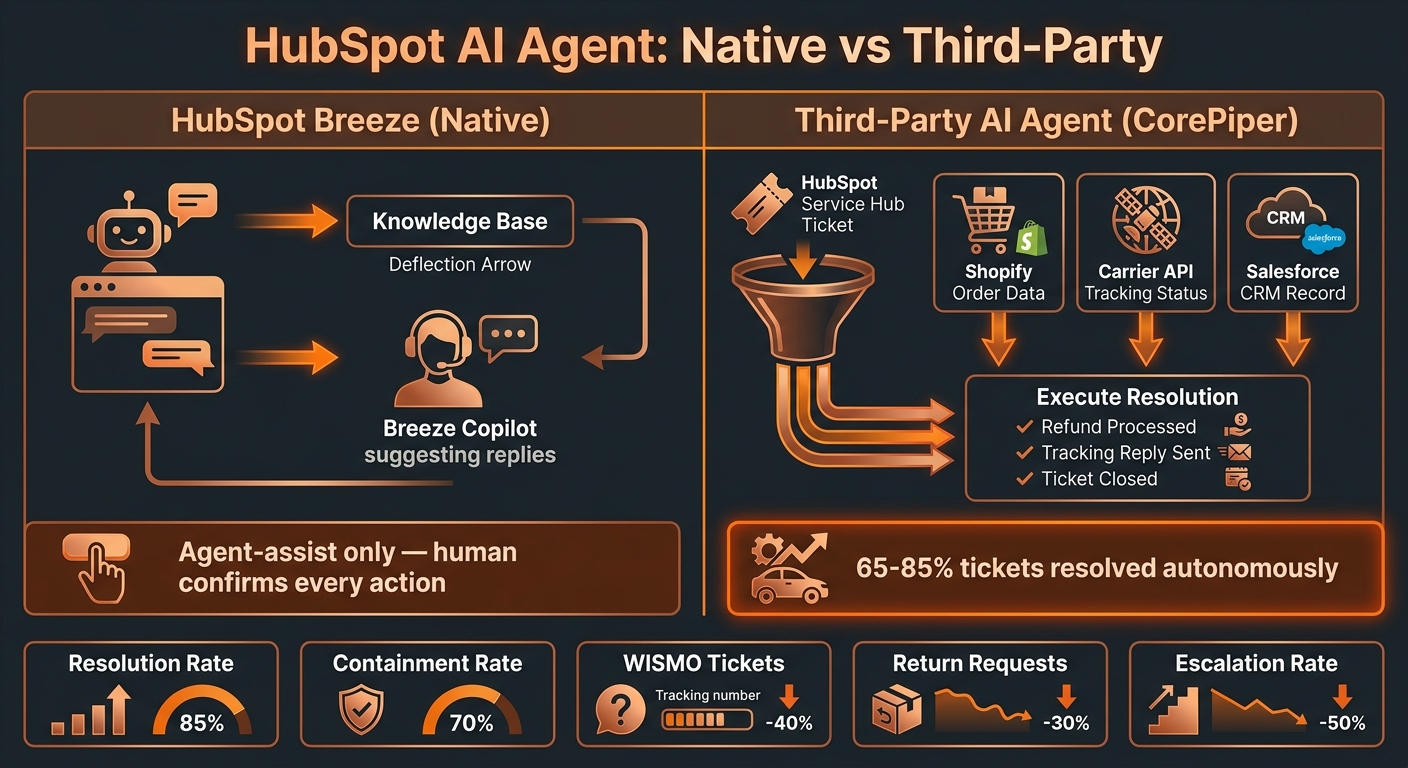
HubSpot AI Agent: Autonomous Ticket Resolution Beyond Breeze (2026 Guide)
A HubSpot AI agent is a third-party autonomous resolution layer that connects to HubSpot Service Hub via API alongside Shopify, carrier tracking systems, and back-office platforms — resolving support tickets end-to-end without human input. Unlike HubSpot's native Breeze AI, which drafts replies and deflects FAQ queries, a true AI agent reads live order data, executes actions in connected systems, and closes tickets autonomously.
TL;DR: HubSpot AI Options Compared
| Approach | What it does | System access | Autonomous resolution? | Best for |
|---|---|---|---|---|
| Breeze Customer Agent (native) | Deflects FAQ tickets via bot | Knowledge base + HubSpot-internal | Deflection only, no cross-system action | Reducing inbound on policy / FAQ queries |
| Breeze Copilot (native) | Drafts replies, summarizes conversations, generates tasks | HubSpot CRM data | No — human confirms every action | Teams that need faster rep throughput |
| Third-party AI agent (e.g. CorePiper) | Resolves tickets end-to-end across connected systems | HubSpot + Shopify + carrier API + Salesforce/Jira | Yes — closes tickets without human intervention | Brands targeting 65–85% automation rate |
What Is a HubSpot AI Agent?
The phrase "HubSpot AI agent" gets used for two architecturally different things, and confusing them leads to automation goals that never get met.
The HubSpot definition: HubSpot's Breeze AI platform, launched in 2024 and expanded through 2025, includes several tools for Service Hub users. Breeze Customer Agent is a conversational bot that deflects incoming questions using your knowledge base articles, routing queries it cannot handle to a live rep. Breeze Copilot is an AI assistant embedded in the HubSpot interface that helps reps draft replies, summarize long conversation threads, generate follow-up tasks, and surface relevant CRM context — contact history, deal stage, prior interactions. HubSpot markets both as AI capabilities for customer service. Neither takes autonomous action across external systems: a human reviews and confirms every action before it is executed.
The operations definition: An AI agent — in the agentic AI sense — is software that perceives a situation (the support ticket), reasons against a policy (your SOP), accesses external tools (Shopify API, carrier tracking API, HubSpot write access), and takes action to completion without waiting for human approval at each step. The outcome is a resolved ticket and a satisfied customer, not a drafted reply waiting in a queue.
The gap between these two definitions explains why most HubSpot teams that activate Breeze still see a large volume of manually handled tickets. Breeze makes reps faster inside HubSpot; it does not replace the need for a human to confirm the action and close the case.
A third-party AI agent connects to HubSpot as an external system — reading incoming tickets via the HubSpot Conversations API, querying connected data sources in real time, executing the resolution action (refund, tracking reply, return label, escalation), and writing the outcome back to HubSpot — all without a human in the loop for each ticket.
How Does HubSpot's Breeze AI Compare to Third-Party AI Agents?
HubSpot Breeze is a capable CRM-connected assist toolset. For teams where the bottleneck is rep throughput — drafting faster, summarizing contact history, routing conversations to the right queue — Breeze Copilot delivers measurable gains within the HubSpot environment. The CRM context HubSpot provides — full contact history, deal stage, previous interactions — makes Breeze Copilot more useful than a generic AI writing tool, and for sales-adjacent support workflows that context advantage is real.
The comparison shifts when the question is resolution rate: the percentage of tickets fully resolved — customer's issue closed, action executed — without human involvement.
Breeze Customer Agent handles FAQ deflection. Return policy, shipping windows, account FAQs, order-status questions it can answer from knowledge base articles. Deflection rate can be meaningful here, but it covers a narrower portion of your actual ticket distribution than most teams expect once they segment the queue. WISMO tickets where the customer wants a live tracking status, return requests requiring a Shopify refund execution, and shipping exceptions requiring carrier API verification are not FAQ deflection — they require system access and action.
Breeze Copilot addresses the rep's time, not the ticket's resolution path. Every action Copilot suggests still needs a human to review, confirm, and execute. Response time goes down; resolution autonomy stays at zero.
Third-party AI agents address resolution: the AI is the decision-maker and action-taker for defined ticket categories. It reads the ticket, pulls the live shipment status from the carrier API, applies your refund SOP, executes the Shopify refund, updates the HubSpot conversation, and sends the customer a confirmation — all without a rep confirming each step. As covered in detail in what end-to-end resolution means, this distinction between drafting and resolving is what separates automation that compounds into structural cost reduction from automation that makes an existing team marginally faster.
HubSpot's position in e-commerce support is also worth understanding. Unlike Zendesk or Freshdesk, which are purpose-built helpdesks, HubSpot is a CRM-first platform with service capabilities added. Service Hub is strong for teams that want support, CRM, and marketing under one platform — but the helpdesk-native depth of Zendesk or Freshdesk (native SLA management, advanced ticket routing, CSAT surveys, broad app marketplace) is not HubSpot's primary strength. For e-commerce brands using HubSpot primarily because they are already on HubSpot for CRM or marketing, the autonomous resolution gap is the same: Breeze does not cross the threshold into cross-system action.
What Tickets Can a HubSpot AI Agent Actually Resolve?
Resolution capability equals system access. HubSpot Service Hub is the ticket interface — the resolution capability comes from what the AI agent can read and write in connected platforms.
WISMO (Where Is My Order?) tickets: If the AI agent has a live carrier API connection — FedEx, UPS, USPS, DHL, Aftership, or a similar tracking aggregator — it reads the real tracking status for the specific order, maps it to the right customer message based on your communication SOP, sends the reply through HubSpot, and closes the conversation autonomously. WISMO makes up 30–50% of e-commerce support volume for most brands. See the full automation playbook in how to automate WISMO tickets for Shopify.
Return and refund requests: If the AI agent has Shopify write access, it evaluates the return against your refund SOP — order value thresholds, return window, item condition rules, exchange-first logic — executes the Shopify refund or generates a return label, and confirms with the customer through HubSpot. The specific refund logic is defined by your SOP, not by AI discretion: the agent applies a documented policy, not its own judgment.
Order modifications: Address changes, cancellation requests, and quantity adjustments within defined policy windows can be executed autonomously when the agent has Shopify API write access and the modification falls within the eligible window before fulfillment handoff.
Carrier disputes and shipping exceptions: Packages marked delivered but not received, transit delays beyond SLA, damaged shipment reports — these require carrier API queries, evidence documentation, and in some cases claim initiation. A third-party AI agent that connects to carrier portals can handle the investigation step and apply your resolution SOP automatically. See the full guide on handling delivered-but-not-received claims.
Cross-platform escalations: For tickets requiring Salesforce case creation, Jira issue escalation, or multi-system updates, a third-party AI agent that spans those platforms can route and populate the downstream record without manual data entry. HubSpot's native automation can route tickets internally, but cross-system execution requires external API access that Breeze does not provide natively.
HubSpot's CRM advantage shows up in a specific way here: for e-commerce brands where customer lifetime value is tracked in HubSpot deals, a third-party AI agent can query that CRM context — high-LTV customer, VIP status, prior resolution history — and apply differentiated resolution logic. This is where the combination of HubSpot's CRM depth and a third-party AI agent's resolution capability compounds.
How Does HubSpot AI Work in a Multi-System E-Commerce Stack?
Most e-commerce brands using HubSpot for support are also running Shopify (or a similar commerce platform), one or more carrier integrations, and often a separate logistics stack. The gap Breeze leaves is not within HubSpot — it is at the boundary between HubSpot and the other systems.
A third-party AI agent sits between HubSpot and those external systems, acting as the resolution orchestration layer:
- Ticket ingested in HubSpot — the customer sends a support message through any channel (email, chat, portal). HubSpot logs the conversation and creates a ticket.
- AI agent reads the ticket — the agent pulls the ticket via HubSpot Conversations API and classifies the intent (WISMO, refund request, order modification, shipping exception).
- AI queries connected systems — for a WISMO ticket, it calls the carrier API with the shipment tracking number; for a refund, it reads the Shopify order record against your refund SOP.
- AI executes the resolution — executes the Shopify action (refund, label generation), sends the customer response through HubSpot, and closes or tags the ticket per your workflow.
- HubSpot records the outcome — the HubSpot conversation and contact record reflect the completed resolution, visible to any rep who reviews the history.
This architecture does not replace HubSpot. The ticketing layer, contact records, CRM context, and human-agent workflows remain in HubSpot — the AI agent extends what can be resolved autonomously without requiring a rep to take each action.
The relevant benchmark: teams using this architecture typically reach 65–85% autonomous resolution on standard e-commerce ticket types, versus the deflection-only outcomes from native AI chatbots. The difference is whether the AI can execute an action or only surface information for a human to act on.
When Does HubSpot Breeze Work Well Enough on Its Own?
Not every team needs a third-party AI agent. Breeze is genuinely useful for:
High-volume FAQ deflection with a strong knowledge base. If a significant portion of your incoming tickets are questions your knowledge base already answers — product specifications, return policy, shipping timeframes — Breeze Customer Agent can deflect those before they reach a rep. The requirement is a well-structured, current knowledge base. Teams with poor knowledge base hygiene find that Breeze deflection rates disappoint.
CRM-connected rep assist. For support workflows where context is the bottleneck — "what has this customer purchased before, what issues have they had, what's their LTV" — Breeze Copilot's CRM integration genuinely accelerates reps by surfacing that context in the conversation view. Sales-adjacent support workflows where relationship context matters benefit from this.
Low cross-system resolution requirements. Teams whose tickets are primarily information requests (not action requests) — questions about status, policies, or account details — see more value from Breeze than teams where most tickets require executing a refund, filing a carrier claim, or updating an order in Shopify.
The signal that Breeze is no longer sufficient is when your containment rate plateaus and the tickets still reaching human reps are not complex judgment calls — they are routine WISMO queries, straightforward return requests, or order modifications that could be automated if the AI had system access.
How Do You Set Up a Third-Party AI Agent Alongside HubSpot?
Setup follows a consistent sequence regardless of which helpdesk is in use:
Step 1 — Connect HubSpot. The third-party agent authenticates to HubSpot via OAuth or API key, enabling it to read incoming conversations, write replies, update ticket status, and tag conversations. No changes to HubSpot's internal configuration are needed.
Step 2 — Connect commerce and logistics systems. The agent connects to Shopify (for order read and write access), carrier integrations (for live tracking status), and any back-office platforms — Salesforce, Jira, your 3PL's API — that are relevant to your resolution workflows.
Step 3 — Document your SOPs. The agent's resolution logic is your existing policies — refund thresholds, return windows, escalation criteria, exchange-first rules — structured as decision rules. This step requires documentation, not custom code. The quality of your SOPs directly determines the quality of automated resolution. See how SOP-driven AI agents work for the full framework.
Step 4 — Run a supervised pilot. Route a subset of tickets — typically WISMO first, since it is the highest-volume and most consistent category — through the AI agent in a supervised mode where a rep reviews before the action executes. This validates the resolution logic against real tickets before going fully autonomous.
Step 5 — Scale by ticket category. After WISMO, extend to returns and refunds, order modifications, and shipping exceptions. Each category goes through the same supervised-then-autonomous sequence. Full deployment typically spans two to four weeks depending on ticket mix complexity.
HubSpot vs Zendesk vs Freshdesk for AI-Driven Support
The choice of helpdesk affects the AI agent implementation context but does not change the fundamental architecture. All three platforms expose conversations via API; all three can serve as the ticketing layer while a third-party AI agent handles resolution.
The meaningful differences:
HubSpot Service Hub: CRM depth is genuine — full contact record, deal history, marketing interaction history visible in the support conversation. Strong for brands where customer lifetime value and purchase history should inform resolution decisions. Native helpdesk-specific features (SLA management, CSAT surveys, ticket automation rules) are less mature than Zendesk. Breeze Copilot's CRM-connected suggestions are uniquely useful for relationship-context workflows.
Zendesk: Purpose-built helpdesk with more mature SLA management, deeper ticket routing logic, a broader app marketplace, and more established enterprise deployment playbooks. Native Zendesk AI (via the Advanced AI add-on) includes more granular intent detection and ticket classification than Breeze. Zendesk AI agent limitations are similar to HubSpot's — agent-assist without cross-system resolution.
Freshdesk: More cost-efficient per seat at similar feature levels. Freddy AI (Freshdesk's native AI) follows the same pattern: copilot for agent assist, self-service bot for deflection, no autonomous cross-system resolution. Integrates well with the broader Freshworks suite if your team also uses Freshsales or Freshmarketer.
For teams already committed to HubSpot for CRM and marketing, the practical question is not "should I switch helpdesks" but "how do I add autonomous resolution to the HubSpot stack I already have." The third-party AI agent approach answers that without requiring a platform migration. For guidance on orchestrating Salesforce, Zendesk, and Jira together, the same cross-system resolution pattern applies regardless of which tool holds the ticket.
What to Measure After Adding a HubSpot AI Agent
Resolution metrics change when an AI agent is added. The most useful things to track:
Autonomous resolution rate by ticket category. What percentage of WISMO tickets are fully resolved without human action? Same for returns, order modifications, and shipping exceptions. Category-level resolution rates reveal where the SOP coverage is strong and where the AI is escalating because the policy is incomplete.
Human escalation rate. Of all tickets the AI agent touches, what percentage does it escalate to a rep? A high escalation rate typically means either the ticket mix contains more complex cases than the SOP covers, or the SOP documentation needs refinement.
First-contact resolution rate. Does the customer get a complete answer on the first AI response, or do they follow up? First-contact resolution is a lagging indicator of whether the AI resolution was actually correct — a resolved ticket that generates a follow-up was not well-resolved.
Ticket volume per rep. With autonomous resolution active, the tickets reaching human reps should concentrate in higher-complexity cases. If ticket volume per rep does not decline over time, the AI agent is likely escalating too aggressively or the SOP coverage is too narrow.
Time to resolution. AI-resolved tickets close in minutes; human-handled tickets close in hours or days. As the autonomous resolution rate rises, average time to resolution should fall. This is one of the clearest ROI signals in the support economics case for AI investment.
Common Questions About HubSpot AI Agents
Can a HubSpot AI agent handle multi-channel support — email, chat, and phone?
Yes, if the third-party agent connects to all three channels. HubSpot Service Hub aggregates email, live chat (via HubSpot Conversations), and WhatsApp into a shared inbox — all accessible via the Conversations API. Phone support is separate; HubSpot integrates with VoIP tools, but call transcripts are typically handled via Zoom, Aircall, or similar, which the AI agent can read through those integrations if configured.
Does a HubSpot AI agent work if I also use Salesforce as my CRM?
Yes. Teams running both HubSpot (for support ticketing) and Salesforce (for CRM/accounts) can configure a third-party AI agent to read from both — pulling HubSpot contact history and Salesforce account/opportunity data when both are relevant. This is a common stack for mid-market B2B e-commerce brands. The case routing guide for Salesforce and Jira covers the cross-system logic in detail.
Will the AI agent read HubSpot contact properties and CRM data?
Yes — via the HubSpot CRM API. Third-party agents that connect to HubSpot Service Hub can pull contact properties, lifecycle stage, deal history, and custom properties to inform resolution decisions. This is where HubSpot's CRM advantage is most useful: differentiated resolution logic for high-LTV customers, VIP escalation triggers, or purchase-history-aware refund decisions.
Is a HubSpot AI agent the same as HubSpot's Breeze Agent?
No. HubSpot Breeze Customer Agent is HubSpot's own AI bot — a native FAQ deflection and conversational flow tool. A third-party HubSpot AI agent is external software that connects to HubSpot via API to perform autonomous resolution across connected systems. The terms sound similar but describe architecturally different things: Breeze deflects, third-party agents resolve.
How does CorePiper connect to HubSpot?
CorePiper connects to HubSpot Service Hub via the HubSpot Conversations API and Tickets API — reading incoming tickets, executing replies through the HubSpot interface, and updating ticket status. No changes to HubSpot configuration are required. The connection takes less than a day to establish; the SOP documentation and pilot period are what determine the go-live timeline.
The Case for Adding Autonomous Resolution to HubSpot
HubSpot Service Hub is a capable ticketing and CRM platform. Breeze AI makes reps faster and deflects a portion of FAQ inbound. But the gap between "faster reps" and "fewer tickets reaching reps at all" is the difference between agent-assist and autonomous resolution — and Breeze does not bridge it.
For e-commerce brands on HubSpot that want to resolve 65–85% of ticket volume without human involvement, the practical path is a third-party AI agent that connects HubSpot to the resolution layer: Shopify for order actions, carrier APIs for live tracking, and your documented SOPs for the decision logic.
That architecture leaves HubSpot in place — your contact records, CRM history, and rep workflows remain exactly where they are — while extending what the support operation can resolve without human intervention. The investment is in SOP documentation and system connections, not in ripping out a platform you've already built on.
If you're running HubSpot Service Hub and want to move past Breeze's deflection ceiling, the CorePiper demo walkthrough shows the specific ticket types and resolution workflows relevant to your stack.
Mustafa Bayramoglu is the founder of CorePiper (YC W19) and has spent eight years building cross-platform operational automation for e-commerce and logistics companies.